Gong is the revenue intelligence platform that captures and analyzes customer interactions across calls, emails, meetings and web conferencing, then applies AI to surface deal risk, coaching signal and forecast correction for B2B go-to-market teams. Its public REST v2 API at api.gong.io exposes 57 operations covering calls, transcripts, recordings, users, permission profiles, workspaces, statistics, scorecards, trackers, library content, Engage flows and prospects, engagement events, meetings, audit logs, generic CRM ingestion and GDPR/CCPA data-privacy erasure. Gong also runs an official remote MCP server at mcp.gong.io for external AI agents, a rule-driven outbound webhook surface for calls, and a frontend SDK for partner apps embedded in the Gong UI.
Gong publishes 27 API contracts indexed on the APIs.io network, including Calls API, Users API, Library API, and 24 more. Tagged areas include Sales, Revenue Intelligence, Conversations, Analytics, and Artificial Intelligence.
The Gong catalog on APIs.io includes 1 event-driven AsyncAPI specification, 1 JSON-LD context, and 1 Spectral governance ruleset.
Gong’s developer surface includes authentication, documentation, API reference, getting-started guide, pricing, engineering blog, status page, and 57 more developer resources.
Regulatory Posture applies to this provider. Its tags matched the
Horizontal (data, software, accessibility, platform) regime, so
Regulatory Posture carries 15 points of the composite.
If this regime is wrong for your business, say so on your
provider repo — the
applicability map is public and we will correct it.
Create-or-Update Ergonomics applies to this provider. This API accepts writes, so it
carries 10 points of the composite. It is scored from the published contracts
themselves: whether a caller can create-or-update in one call, whether the write accepts a key the caller already
holds, and whether the response says which branch ran. Without that, every write needs a search-and-branch in
front of it, and the first time that check is skipped a duplicate record is created.
Scored against the observed mean rather than raw — a provider at the catalog average is unchanged by this facet,
not penalised by it.
The six quality facets above are damped to 75 points between them,
because the conditional facet above carries the other
25. That is why each facet's contribution is shown against a damped
maximum: raising a quality facet moves the composite by 75% of its nominal
weight, not 100%. The full arithmetic is at apis.io/rating/.
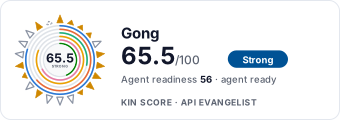
Show this score on your site.
It updates itself when the score changes. Paste this where you link to your API docs:
<a href="https://apis.io/providers/gong/"><img src="https://apis.io/badge/gong/card.svg" alt="Gong on APIs.io — Kin Score by API Evangelist"></a>
Other styles, a README pill and a shields.io endpoint are on the badge page.
Raise your score.
Agent readiness — checks not met, largest first (exact, from this profile):
Idempotency+9 pts — OpenAPI mutating operations declare an idempotency key — a header, a request-body property, or a named de-duplication token whose own description says so (verified); else common[].type matches /idempoten/i (documented)
A2A Agent Card+8 pts — a2a/-a2a.yml manifest, graded on conformance.grade against A2A 1.0.0
Documented Reversibility+6 pts — a reversal operation in the contract, graded up when a window is documented too
Pagination+5 pts — share of collection GETs (an array, or one wrapped in data/items/results ...) that declare a page/limit/offset/cursor parameter, a Link header or a next/cursor field; na with no collection GETs
Agentic Commerce Well-Known Document+5 pts — a parsing /.well-known/ucp.json or acp.json declaring a version and at least one service — `self` when its endpoints are on the provider's own domain, `platform` when they are on a vendor's
2 more unmet checks in the Agent Readiness table above.
Kin Score — facets with the most composite points still available (weight × headroom):
Access Clarityscores 43.4 — up to +11.3 composite points
The Kin Score Market layer reads a provider inside its market:
its position, and how deep its integrations go. Depth is only comparable within a position. Provisional and unweighted:
not part of the Kin Score or agent readiness.
Registered MCP server and declares compatibility are report only — not weighted.
Undeclared means we found nothing we can read, so there is no number: we never infer integrations.
Standards this provider implements or carries. De facto ones are profiled and measured by the API Commons; formal ones come from the standards directory and are linked by the provider's own tags. The evidence column says how each claim was established — not that it was made.
Gong’s “Accounts Enrich” API endpoints allow you to enrich your account records with Gong's data. Enrichment is asynchronous and works in two steps: Submit up to 10 accounts,
Gong’s “Auditing” API endpoints allow you to request the following log types from Gong: Access Log - This log is preserved for 14 days only User Activity Log - The data i
Gong’s “Contacts Enrich” API endpoints allow you to enrich your contact records with Gong's data. Enrichment is asynchronous and works in two steps: Submit up to 10 contacts,
Gong’s “Flows” API endpoints allow you to: View a list of relevant Gong Engage flows to choose from and the current flow assignment status Add prospects to Gong Engage fl
Gong's “Entity” endpoints allow you to: Ask questions in natural language about CRM entities (accounts, contacts, deals, leads) and get AI-generated insights based on data fro...
Configure your integration settings for displaying your company data in iFrames. For example, use this API to configure dynamic links as the iFrame source. This endpoint include...
Gong’s “Consent Meeting” API endpoints allow you to: Request creating a Gong Consent meeting link Update a Consent Meeting’s details Delete a Consent Meeting <
Gong’s “Stats” API endpoints allow you to: Request user activity Request scorecards activity Request interaction stats on calls that have Whisper turned on </l
Overlays applied on top of this provider's contracts. Each card says who wrote it: a document the provider publishes, or one API Evangelist derived or generated.
aid: gong
url: https://raw.githubusercontent.com/api-evangelist/gong/refs/heads/main/apis.yml
name: Gong
kind: company
description: Gong is the revenue intelligence platform that captures and analyzes customer interactions across calls, emails,
  meetings and web conferencing, then applies AI to surface deal risk, coaching signal and forecast correction for B2B go-to-market
  teams. Its public REST v2 API at api.gong.io exposes 57 operations covering calls, transcripts, recordings, users, permission
  profiles, workspaces, statistics, scorecards, trackers, library content, Engage flows and prospects, engagement events,
  meetings, audit logs, generic CRM ingestion and GDPR/CCPA data-privacy erasure. Gong also runs an official remote MCP server
  at mcp.gong.io for external AI agents, a rule-driven outbound webhook surface for calls, and a frontend SDK for partner
  apps embedded in the Gong UI.
deliveryModel:
  model: saas
  open_source: false
  commercial: true
  callable_host: true
  label: Hosted service · you call their endpoint
  confidence: high
  source:
  - openapi
  - pricing
  generated: '2026-08-28'
  method: derived
accessModel:
  pricing: contact-sales
  onboarding: sales-gated
  trial: false
  try_now: false
  public: false
  label: Self-serve signup
  confidence: high
  source:
  - plans
  - authentication
  generated: '2026-08-13'
  method: searched
  note: Corrected 2026-08-13 from the 2026-07-22 derive. www.gong.io/pricing publishes no prices or tiers — it is a lead form
    that routes to a custom proposal, and a Gong sandbox/developer instance is provisioned by a Revenue Architect or a partner
    application, not self-serve.
image: https://kinlane-images.s3.amazonaws.com/shared/apis-json/icons/gong.png
tags:
- Sales
- Revenue Intelligence
- Conversations
- Analytics
- Artificial Intelligence
- Conversation Intelligence
- Sales Engagement
- CRM
- Forecasting
- Transcription
- Agents
tags_raw:
- Sales
- Revenue Intelligence
- Conversation
- Analytics
- AI
- Conversation Intelligence
- Sales Engagement
- CRM
- Forecasting
- Transcription
- Agents
created: '2026-05-08'
modified: '2026-08-13'
specificationVersion: '0.23'
apis:
- name: Gong Calls API
  description: List calls, retrieve metadata, transcripts, recordings and trackers.
  humanURL: https://app.gong.io/settings/api/documentation
  baseURL: https://api.gong.io/v2
  tags:
  - Calls
  - Conversation Intelligence
  properties:
  - type: Documentation
    url: https://app.gong.io/settings/api/documentation
- name: Gong Users API
  description: Read user, manager and team data.
  humanURL: https://app.gong.io/settings/api/documentation
  baseURL: https://api.gong.io/v2
  tags:
  - User
  tags_raw:
  - Users
  properties:
  - type: Documentation
    url: https://app.gong.io/settings/api/documentation
- name: Gong CRM Integration API
  description: Push CRM-style account, contact, deal and engagement data into Gong.
  humanURL: https://app.gong.io/settings/api/documentation
  baseURL: https://api.gong.io/v2
  tags:
  - CRM
  - Integration
  properties:
  - type: Documentation
    url: https://app.gong.io/settings/api/documentation
- name: Gong Engagement Data API
  description: Read activity, scorecards, trackers, and library content.
  humanURL: https://app.gong.io/settings/api/documentation
  baseURL: https://api.gong.io/v2
  tags:
  - Engagement
  - Analytics
  properties:
  - type: Documentation
    url: https://app.gong.io/settings/api/documentation
- name: Gong Library API
  description: Access and organize library folders and shared call collections.
  humanURL: https://app.gong.io/settings/api/documentation
  baseURL: https://api.gong.io/v2
  tags:
  - Library
  properties:
  - type: Documentation
    url: https://app.gong.io/settings/api/documentation
- aid: gong:gong-calls-api
  name: Gong Calls API
  description: Operations for managing and retrieving call data
  humanURL: https://app.gong.io/settings/api/documentation
  baseURL: https://api.gong.io/v2
  tags:
  - Calls
  properties:
  - type: OpenAPI
    url: openapi/gong-calls-api-openapi.yml
  - type: Overlay
    url: overlays/gong-calls-api-overlay.yaml
- aid: gong:gong-data-privacy-api
  name: Gong Data Privacy API
  description: Operations for data privacy management and compliance
  humanURL: https://app.gong.io/settings/api/documentation
  baseURL: https://api.gong.io/v2
  tags:
  - Privacy
  tags_raw:
  - Data Privacy
  properties:
  - type: OpenAPI
    url: openapi/gong-data-privacy-api-openapi.yml
  - type: Overlay
    url: overlays/gong-data-privacy-api-overlay.yaml
- aid: gong:gong-digital-interactions-api
  name: Gong Digital Interactions API
  description: Operations for posting digital interaction data
  humanURL: https://app.gong.io/settings/api/documentation
  baseURL: https://api.gong.io/v2
  tags:
  - Digital Interactions
  properties:
  - type: OpenAPI
    url: openapi/gong-digital-interactions-api-openapi.yml
  - type: Overlay
    url: overlays/gong-digital-interactions-api-overlay.yaml
- aid: gong:gong-library-api
  name: Gong Library API
  description: Operations for browsing and retrieving library content
  humanURL: https://app.gong.io/settings/api/documentation
  baseURL: https://api.gong.io/v2
  tags:
  - Library
  properties:
  - type: OpenAPI
    url: openapi/gong-library-api-openapi.yml
  - type: Overlay
    url: overlays/gong-library-api-overlay.yaml
- aid: gong:gong-permission-profiles-api
  name: Gong Permission Profiles API
  description: Operations for managing permission profiles
  humanURL: https://app.gong.io/settings/api/documentation
  baseURL: https://api.gong.io/v2
  tags:
  - Permission Profiles
  properties:
  - type: OpenAPI
    url: openapi/gong-permission-profiles-api-openapi.yml
  - type: Overlay
    url: overlays/gong-permission-profiles-api-overlay.yaml
- aid: gong:gong-users-api
  name: Gong Users API
  description: Operations for managing and retrieving user data
  humanURL: https://app.gong.io/settings/api/documentation
  baseURL: https://api.gong.io/v2
  tags:
  - User
  tags_raw:
  - Users
  properties:
  - type: OpenAPI
    url: openapi/gong-users-api-openapi.yml
  - type: Overlay
    url: overlays/gong-users-api-overlay.yaml
- aid: gong:gong-accounts-enrich-api
  name: Gong Accounts Enrich API
  description: '<h3>Gong’s “Accounts Enrich” API endpoints allow you to enrich your account records with Gong''s data.</h3>

    <p>Enrichment is asynchronous and works in two steps:</p>

    <ol>

    <li>

    Submit up to 10 accounts, along with the data categories you want, and receive a <b>jobId</b>.

    </li>

    <li>

    Retrieve the results using the <b>jobId</b>. A data category whose status is “Running” is still being enriched, so poll
    until no category is “Running”.

    </li>

    </ol>

    <p>

    Each account is identified by search criteria - its name, domain or LinkedIn URL - and is returned with the id you supplied,
    so you can correlate results with your request.

    </p>'
  humanURL: https://app.gong.io/settings/api/documentation
  baseURL: https://api.gong.io/v2
  tags:
  - Accounts Enrich
  properties:
  - type: OpenAPI
    url: openapi/gong-accounts-enrich-api-openapi.yml
- aid: gong:gong-auditing-api
  name: Gong Auditing API
  description: '<h3>Gong’s “Auditing” API endpoints allow you to request the following log types from Gong:</h3>

    <ul>

    <li>

    Access Log - This log is preserved for 14 days only

    </li>

    <li>

    User Activity Log - The data is available since March 2021

    </li>

    <li>

    User Call Play Log - All data is available since inception

    </li>

    <li>

    Externally Shared Call Access Log - All data is available since inception

    </li>

    <li>

    Externally Shared Call Play Log - All data is available since inception

    </li>

    </ul>'
  humanURL: https://app.gong.io/settings/api/documentation
  baseURL: https://api.gong.io/v2
  tags:
  - Auditing
  properties:
  - type: OpenAPI
    url: openapi/gong-auditing-api-openapi.yml
- aid: gong:gong-coaching-api
  name: Gong Coaching API
  description: The Coaching API from Gong — 1 operation(s) for coaching.
  humanURL: https://app.gong.io/settings/api/documentation
  baseURL: https://api.gong.io/v2
  tags:
  - Coaching
  properties:
  - type: OpenAPI
    url: openapi/gong-coaching-api-openapi.yml
- aid: gong:gong-contacts-enrich-api
  name: Gong Contacts Enrich API
  description: '<h3>Gong’s “Contacts Enrich” API endpoints allow you to enrich your contact records with Gong''s data.</h3>

    <p>Enrichment is asynchronous and works in two steps:</p>

    <ol>

    <li>

    Submit up to 10 contacts, along with the data categories you want, and receive a <b>jobId</b>.

    </li>

    <li>

    Retrieve the results using the <b>jobId</b>. A data category whose status is “Running” is still being enriched, so poll
    until no category is “Running”.

    </li>

    </ol>

    <h3>Each contact must be identified by one of the following combinations:</h3>

    <ul>

    <li>

    <b>linkedinUrl</b> on its own

    </li>

    <li>

    <b>firstName</b> + <b>lastName</b> + <b>email</b>

    </li>

    <li>

    <b>firstName</b> + <b>lastName</b> + <b>accountSearchCriteria</b> (the account''s name, domain or LinkedIn URL)

    </li>

    </ul>

    <p>

    Each contact is returned with the id you supplied, so you can correlate results with your request.

    </p>'
  humanURL: https://app.gong.io/settings/api/documentation
  baseURL: https://api.gong.io/v2
  tags:
  - Contacts Enrich
  properties:
  - type: OpenAPI
    url: openapi/gong-contacts-enrich-api-openapi.yml
- aid: gong:gong-crm-api
  name: Gong CRM API
  description: '<style>.public-api-info {    background: rgb(222, 235, 255);}.public-api-tip {    background: rgb(227, 252,
    239);}.public-api-parameter {    background: rgba(9,30,66,0.08);}.public-api-note {    background: rgb(234, 230, 255);}.public-api-important
    {    background: rgb(255, 250, 230);}.public-api-critical {    background: rgb(255, 235, 230);}table, th, td {  border:
    1px solid gray;  border-collapse: collapse;}th, td {  padding: 5px;}th {  text-align: left;}img {  border: 2px solid #D3D5D9;}</style><p>If
    you are using the deprecated endpoints, download the <a href="/r/img/permanent/crm_api_deprecated_endpoints.pdf" target="_blank">PDF
    file</a>.</p><h1>What does the CRM API do?</h1><p>This API enables integration with CRMs that are not natively integrated
    with Gong, so that Gong can provide you with its full capabilities based on your CRM data. This includes:</p><ul>  <li>Pipeline
    review and forecast</li>  <li>Narrow down conversations (calls and emails) by customer data for coaching and analytics</li>  <li>Track
    initiatives and adoption based on accounts and opportunities</li></ul><p>By uploading your CRM data to Gong, your Gong
    users will be able to see their CRM deals in the Gong Deals page, view deal boards to follow up on deal progress, get
    warnings for deals that are at risk, and see whether their team will reach its quota. The CRM data is also displayed in
    conversations and calls, so that your Gong users can see account and contact data such as the name and job title of the
    contact in the call. Account data is displayed in the Accounts page, together with the history of all communication and
    contact with the company.</p><p><b>Note</b>: Gong provides native integrations with Salesforce, HubSpot and Microsoft
    Dynamics 365.</p><h2>API Protocol</h2>The API protocol is based on REST guidelines. Check <a href="https://app.gong.io/company/api-authentication?currentTab=MY_API_TAB">here</a>
    what''s your base URL for all API calls.

    <p>The payload is either a JSON object or, for API calls that upload lists of objects, line delimited JSON (see: <a href="https://en.wikipedia.org/wiki/JSON_streaming#Newline-Delimited_JSON">JSON
    streaming</a>). JSON objects should be UTF-8 encoded.</p><p>Dates and timestamps in JSON objects should be in ISO-8601
    format without milliseconds (e.g. ''2018-02-18T02:30:00-07:00'' or ''2018-02-18T08:00:00Z'', where Z stands for UTC).</p><h2>What
    data can I upload?</h2><p>To see your CRM data in Gong, upload the following entities:</p><ul>  <li>Business User: The
    CRM user, such as a seller or manager. </li>  <li>Account: The customer details in the CRM</li>  <li>Contact: A specific
    contact in the CRM that is associated with a customer</li>  <li>Deal: A deal or opportunity, or a contract of a specific
    account in the CRM</li>  <li>Lead: A potential customers who are not associated with an account</li>  <li>Stage: The list
    of stages the deal can be in, in your CRM</li></ul><h2>Uploading CRM data to Gong</h2><p>This diagram shows how to set
    up your system in order to upload CRM data to Gong. This is relevant for each scenario of uploading data, initial, incremental
    and uploading historical data.</p><img alt="" src="/r/img/permanent/crm_api_flow.png" height="95%" ><h3>Registering your
    Integration</h3><p>Register your integration to get an integrationId used to identify your company''s integration with
    Gong. This is a one time action that does not need to be repeated unless you delete your integration.</p><p>Use <code>PUT
    v2/crm/integrations</code> to register your integration. The integration Id is returned in the response. Include the integration
    Id each time you upload your CRM data.</p><h3>Uploading additional data for CRM entities</h3><p>Each CRM entity has a
    set of standard fields. In addition, you may want to upload additional fields.</p><p>Use the <code>POST /v2/crm/entity-schema</code>
    to adjust the schema according to your needs. Once you have uploaded your schema to Gong, you can upload your entities
    with the additional fields.</p><h3>Uploading your CRM data to Gong</h3><p>This section explains how you can use the CRM
    API to upload your data to Gong:</p><h4>First-time upload</h4><p>Create a database dump of the data you want to upload
    to Gong based on your CRM schema and data. When uploading your data for the first time you should include all of the CRM
    records that should appear in Gong.</p><h4>Incremental upload </h4><p>Send regular incremental data updates to Gong. You
    can update your data as often as you like, we recommend updating between every 1-5 minutes.<br>You should only send new
    records or records that have changed since the previous upload of data. New records are added to Gong and existing records
    are updated or deleted, whichever is relevant. Entities are identified by the objectId. Ensure that this ID remains the
    same each time it is updated.</p><p>When updating data, the modificationDate parameter is mandatory. This enables us to
    maintain accurate historical data. If your CRM does not store the modification date, send the date the API call is made.</p><h4>Uploading
    data change history</h4><p>Gong incorporates historical change data in different areas of Gong in order to provide a more
    accurate picture of the status of different entities at that time. For example, showing the correct stage of a deal at
    the time a call was made.</p><p>If your CRM stores record history, you are encouraged to load historical change data as
    part of the integration. You can do this at any time, but we recommend doing this after the initial upload as follows:</p><ol>  <li>Generate
    the JSON files with the relevant data. Ensure that the modifiedDate is set to the date the entity was updated.</li>  <li>Upload
    the entities with their historical data using the <code>POST /v2/crm/entities?objectType=ACCOUNT|CONTACT|DEAL|LEAD</code>
    endpoint.</li></ol><h2>Gong Data Model</h2><p>This diagram shows the connection between the different objects in the CRM
    API:</p><img alt="" src="/r/img/permanent/crm_api_model.png" height="80%"><p>The following relationship between entities
    must exist:</p><ul>  <li>A contact must be linked to a single account.</li>  <li>A deal is linked to a single account.</li>  <li>A
    deal has an owner who is a user in Gong.</li>  <li>A converted lead is expected to be converted into an account and/or
    a deal and/or a contact.</li></ul><h2>What if my CRM doesn''t match the Gong data model?</h2><p>It is possible that your
    CRM entity model won''t match the Gong CRM entity model. Your CRM may store your data in different entities, or you may
    not have an entity that represents one of the Gong CRM entities.</p><p>In order to upload your CRM data and associate
    it with calls and conversations, you need to identify the objects in your CRM which match the Gong CRM entities.</p><p>The
    account is a mandatory entity which must be uploaded in order to integrate Gong with your CRM. To upload account data,
    identify your CRM entities that contain data about your customers or companies that you do business with. These customers
    are not actual people within the org, rather they represent the org itself.</p><p>To upload contact details, identify
    your CRM entities that hold data about employees in the company that your reps are in touch with. A contact represents
    a person where communication has advanced beyond the prospect stage. Your reps will have multiple conversations and interactions
    with the contact.</p><p>The deal represents the selling process to the customer (account).</p><p>The lead is a prospect
    or potential contact, who is not yet associated with an account. If your CRM has an entity which represents people who
    you contact in the very early stages, and who is later converted to another entity which represents the people you are
    doing business with (the contact), upload this data as a lead entity.</p><h2>When will my CRM data be displayed in Gong?</h2><p>In
    addition to the time it takes for data to upload to Gong, the data is first uploaded as raw data and is not automatically
    available in Gong.</p><br><br><br><br>'
  humanURL: https://app.gong.io/settings/api/documentation
  baseURL: https://api.gong.io/v2
  tags:
  - CRM
  properties:
  - type: OpenAPI
    url: openapi/gong-crm-api-openapi.yml
- aid: gong:gong-engage-flows-api
  name: Gong Engage Flows API
  description: '<h3>Gong’s “Flows” API endpoints allow you to:</h3>

    <ul>

    <li>

    View a list of relevant Gong Engage flows to choose from and the current flow assignment status

    </li>

    <li>

    Add prospects to Gong Engage flows

    </li>

    </ul>'
  humanURL: https://app.gong.io/settings/api/documentation
  baseURL: https://api.gong.io/v2
  tags:
  - Engage Flows
  properties:
  - type: OpenAPI
    url: openapi/gong-engage-flows-api-openapi.yml
- aid: gong:gong-engagement-legacy-see-digital-interactions-api
  name: Gong Engagement (Legacy – See “Digital Interactions”) API
  description: '<h3>Limited release - contact <a href="mailto:integration.requests@gong.io">integration.requests@gong.io</a>
    for more information.

    </h3>


    <h3>Gong’s "Engagement" API endpoints allow you to push engagement events into Gong and display them as events in Gong’s
    activity timeline.</h3>

    <h3>There are currently 3 types of events:</h3>

    <ul>

    <li>

    "Content Shared" Event Type - Use this event type to push engagement events into Gong when a Gong user shares content
    with external participants (for example, a contract was “shared” by the account executive with his prospects)</li>

    <li>

    "Content Viewed" Event Type - Use this event type to push engagement events into Gong when a content is viewed by an external
    participant (for example, a contract was “viewed” by the prospect)

    </li>

    <li>

    "Custom Action" Event Type -  Use this event type to push engagement events into Gong when a content is engaged by an
    external participant (for example, a contract was “signed” by the prospect)</li>

    </ul>'
  humanURL: https://app.gong.io/settings/api/documentation
  baseURL: https://api.gong.io/v2
  tags:
  - Engagement (Legacy – See “Digital Interactions”)
  properties:
  - type: OpenAPI
    url: openapi/gong-engagement-legacy-see-digital-interactions-api-openapi.yml
- aid: gong:gong-entities-api
  name: Gong Entities API
  description: '<h3>Gong''s “Entity” endpoints allow you to:</h3>

    <ul>

    <li>

    Ask questions in natural language about CRM entities (accounts, contacts, deals, leads) and get AI-generated insights
    based on data from calls and emails.

    </li>

    <li>

    Generate pre-configured briefs on CRM entities. Briefs are set up in the Agent Studio in Gong.

    </li>

    </ul>

    The response includes the generated answer or brief and the calls and emails used to generate it. It also includes information
    about the specific parts of those calls or emails that provided the evidence for the AI-generated content.'
  humanURL: https://app.gong.io/settings/api/documentation
  baseURL: https://api.gong.io/v2
  tags:
  - Entities
  properties:
  - type: OpenAPI
    url: openapi/gong-entities-api-openapi.yml
- aid: gong:gong-integration-settings-api
  name: Gong Integration Settings API
  description: <p>Configure your integration settings for displaying your company data in iFrames. For example, use this API
    to configure dynamic links as the iFrame source. This endpoint includes validation mechanisms to ensure the integration
    is secure.</p><p>Mandatory fields are marked with a *.</p>
  humanURL: https://app.gong.io/settings/api/documentation
  baseURL: https://api.gong.io/v2
  tags:
  - Integration settings
  tags_raw:
  - Integration Settings
  properties:
  - type: OpenAPI
    url: openapi/gong-integration-settings-api-openapi.yml
- aid: gong:gong-meetings-in-beta-phase-api
  name: Gong Meetings (in Beta Phase) API
  description: '<h3>Gong’s “Consent Meeting” API endpoints allow you to:</h3>

    <ul>

    <li>

    Request creating a Gong Consent meeting link

    </li>

    <li>

    Update a Consent Meeting’s details

    </li>

    <li>

    Delete a Consent Meeting

    </li>

    <li>

    List all Licensed Users in the Gong instance and their Consent Page status

    </li>

    </ul>

    <h3>The requested calls may contain the following meeting details:</h3>

    <ul>

    <li>

    Meeting Scheduled Start Time

    </li>

    <li>

    Meeting Scheduled End Time

    </li>

    <li>

    Organizer

    </li>

    <li>

    Meeting Title

    </li>

    <li>

    Invitees

    </li>

    <li>

    External Meeting Id - The ID as it is formed on an external system

    </li>

    </ul>'
  humanURL: https://app.gong.io/settings/api/documentation
  baseURL: https://api.gong.io/v2
  tags:
  - Meetings (in Beta Phase)
  properties:
  - type: OpenAPI
    url: openapi/gong-meetings-in-beta-phase-api-openapi.yml
- aid: gong:gong-outcomes-api
  name: Gong Outcomes API
  description: The Outcomes API from Gong — 1 operation(s) for outcomes.
  humanURL: https://app.gong.io/settings/api/documentation
  baseURL: https://api.gong.io/v2
  tags:
  - Outcomes
  properties:
  - type: OpenAPI
    url: openapi/gong-outcomes-api-openapi.yml
- aid: gong:gong-permissions-api
  name: Gong Permissions API
  description: '<h3>Gong’s "Permission" API endpoints allow you to:</h3>

    <ul>

    <li>

    List all permission profiles in a given workspace

    </li>

    <li>

    Create permission profile

    </li>

    <li>

    Get a permission profile

    </li>

    <li>

    Update permission profile

    </li>

    <li>

    List all users controlled by a permission profile

    </li>

    <li>

    Allow users individual access to calls

    </li>

    <li>

    Remove user''s individual access to calls

    </li>

    <li>

    Retrieve users that have individual access to calls

    </li>

    </ul>'
  humanURL: https://app.gong.io/settings/api/documentation
  baseURL: https://api.gong.io/v2
  tags:
  - Permissions
  properties:
  - type: OpenAPI
    url: openapi/gong-permissions-api-openapi.yml
- aid: gong:gong-settings-api
  name: Gong Settings API
  description: '<h3>Gong’s “Settings” API endpoints allow you to:</h3>

    <ul>

    <li>

    Request all the scorecards within the Gong system.

    </li>

    <li>

    Request all the workspaces including their details.

    </li>

    </ul>'
  humanURL: https://app.gong.io/settings/api/documentation
  baseURL: https://api.gong.io/v2
  tags:
  - Settings
  properties:
  - type: OpenAPI
    url: openapi/gong-settings-api-openapi.yml
- aid: gong:gong-stats-api
  name: Gong Stats API
  description: "<h3>Gong’s “Stats” API endpoints allow you to:</h3>\n<ul>\n<li>\nRequest user activity\n</li>\n<li>\nRequest\
    \ scorecards activity\n</li>\n<li>\nRequest interaction stats on calls that have Whisper turned on\n</li>\n</ul>\n<h3>The\
    \ requested user activity may contain the following details:</h3>\n<ul>\n<li>\n<b>Calls Hosted:</b> The number of recorded\
    \ calls this user hosted.\n</li>\n<li>\n<b>Call Participated:</b> The number of calls in which this user is a participant\
    \ (not host).\n</li>\n<li>\n<b>Calls Reviewed:</b> The number of calls in which someone pressed the \"Mark as reviewed\"\
    .\n</li>\n<li>\n<b>Calls Listened:</b> The number of other users' calls the user listened to.\n</li>\n<li>\n<b>Call Shared\
    \ Outside:</b> The number of calls the user shared with others outside the company.\n</li>\n<li>\n<b>Call Shared Inside:</b>\
    \ The number of calls the user shared with others inside the company.\n</li>\n<li>\n<b>Own Calls Listened:</b> The number\
    \ of the user's own calls the user listened to.\n</li>\n<li>\n<b>Comment Given:</b> The number of calls in which a user\
    \ gave at least one comment.\n</li>\n<li>\n<b>Comment Received:</b> The number of calls in which a user received at least\
    \ one comment on the users calls.\n</li>\n<li>\n<b>Feedback Given:</b> The number of recorded calls the user gave feedback\
    \ on.\n</li>\n<li>\n<b>Feedback Received:</b> The number of recorded calls the user received feedback on.\n</li>\n<li>\n\
    <b>Feedback Requested:</b> The number of recorded calls the user requested feedback on.\n</li>\n<li>\n<b>Scorecard Filled:</b>\
    \ The number of calls in which someone filled a scorecard on the user's calls.\n</li>\n<li>\n<b>Scorecards Completed:</b>\
    \ The number of scorecards the user completed.\n</li>\n<li>\n<b>Scorecards Answers:</b> The answers in the answered scorecard.\n\
    </li>\n<li>\n<b>Whisper:</b> Person Interaction Stats (List of user interaction stats. Applicable values: 'Talk Ratio',\n\
    \ 'Longest Monologue', 'Longest Customer Story', 'Interactivity', 'Question Rate', 'Patience').\n</li>\n</ul>"
  humanURL: https://app.gong.io/settings/api/documentation
  baseURL: https://api.gong.io/v2
  tags:
  - Stats
  properties:
  - type: OpenAPI
    url: openapi/gong-stats-api-openapi.yml
- aid: gong:gong-targets-api
  name: Gong Targets API
  description: The Targets API from Gong — 2 operation(s) for targets.
  humanURL: https://app.gong.io/settings/api/documentation
  baseURL: https://api.gong.io/v2
  tags:
  - Targets
  properties:
  - type: OpenAPI
    url: openapi/gong-targets-api-openapi.yml
- aid: gong:gong-tasks-api
  name: Gong Tasks API
  description: The Tasks API from Gong — 2 operation(s) for tasks.
  humanURL: https://app.gong.io/settings/api/documentation
  baseURL: https://api.gong.io/v2
  tags:
  - Task
  tags_raw:
  - Tasks
  properties:
  - type: OpenAPI
    url: openapi/gong-tasks-api-openapi.yml
common:
- type: Overlay
  url: overlays/gong-audit-logs-api-overlay.yaml
- type: Overlay
  url: overlays/gong-crm-data-api-overlay.yaml
- type: Overlay
  url: overlays/gong-crm-integration-api-overlay.yaml
- type: Overlay
  url: overlays/gong-crm-schema-api-overlay.yaml
- type: Overlay
  url: overlays/gong-engagement-events-api-overlay.yaml
- type: Overlay
  url: overlays/gong-flows-api-overlay.yaml
- type: Overlay
  url: overlays/gong-folders-api-overlay.yaml
- type: Overlay
  url: overlays/gong-meetings-api-overlay.yaml
- type: Overlay
  url: overlays/gong-prospects-api-overlay.yaml
- type: Overlay
  url: overlays/gong-recordings-api-overlay.yaml
- type: Overlay
  url: overlays/gong-scorecards-api-overlay.yaml
- type: Overlay
  url: overlays/gong-statistics-api-overlay.yaml
- type: Overlay
  url: overlays/gong-trackers-api-overlay.yaml
- type: Overlay
  url: overlays/gong-transcripts-api-overlay.yaml
- type: Overlay
  url: overlays/gong-workspaces-api-overlay.yaml
- type: CapabilityMap
  url: capabilities/gong-capability-edges.yml
  name: Gong Business Capability Map
- type: AgenticAccess
  url: agentic-access/gong-agentic-access.yml
- type: TrustCenter
  url: security/gong-trust-center.yml
- type: DomainSecurity
  url: security/gong-domain-security.yml
- type: Authentication
  url: authentication/gong-authentication.yml
- type: GitHubOrganization
  url: https://github.com/gong-io
- type: LinkedIn
  url: https://www.linkedin.com/company/gong-io
- type: Website
  url: https://www.gong.io/
- type: Plans
  url: plans/gong-plans-pricing.yml
- type: RateLimits
  url: rate-limits/gong-rate-limits.yml
- type: FinOps
  url: finops/gong-finops.yml
- type: Documentation
  url: https://app.gong.io/settings/api/documentation
- type: APIReference
  url: https://app.gong.io/settings/api/documentation
- type: Help
  url: https://app.gong.io/help
- type: GettingStarted
  url: https://app.gong.io/help/docs/api
- type: Login
  url: https://app.gong.io
- type: Pricing
  url: https://www.gong.io/pricing
- type: Blog
  url: https://www.gong.io/blog
- type: Status
  url: https://status.gong.io
- type: PrivacyPolicy
  url: https://www.gong.io/privacy-policy
- type: TermsOfService
  url: https://www.gong.io/terms-of-service
- type: Trust
  url: https://www.gong.io/trust-center
- type: Security
  url: https://www.gong.io/trust-center/security
- type: GitHub
  url: https://github.com/gong-io
- type: Twitter
  url: https://x.com/gong_io
- type: Packages
  url: packages/gong-packages.yml
- type: SDKs
  url: packages/gong-packages.yml
- type: WellKnown
  url: well-known/gong-well-known.yml
- type: MCPServer
  url: mcp/gong-mcp.yml
- type: ToolCrosswalk
  url: mcp/gong-tool-crosswalk.yml
- type: LLMsTxt
  url: llms/gong-llms.txt
- type: Conformance
  url: conformance/gong-conformance.yml
- type: Compliance
  url: https://www.gong.io/security
- type: ErrorCatalog
  url: errors/gong-problem-types.yml
- type: Lifecycle
  url: lifecycle/gong-lifecycle.yml
- type: StatusPage
  url: https://status.gong.io
- type: Deprecation
  url: https://help.gong.io/docs/public-api-change-deprecating-call-action-items-in-the-extensive-endpoint
- type: OAuthScopes
  url: scopes/gong-scopes.yml
- type: VulnerabilityDisclosure
  url: security/gong-vulnerability-disclosure.yml
- type: Sandbox
  url: sandbox/gong-sandbox.yml
- type: Conventions
  url: conventions/gong-conventions.yml
- type: ChangeLog
  url: changelog/gong-changelog.yml
- type: Components
  url: components/gong-components.yml
- type: DataModel
  url: data-model/gong-data-model.yml
- type: Webhooks
  url: asyncapi/gong-webhooks.yml
- type: AgentSkill
  url: skills/_index.yml
- type: DeveloperPortal
  url: https://help.gong.io/docs/how-to-use-the-gong-developers-hub
- type: Support
  url: https://contact.gong.io/hc/en-us/requests/new
- type: HelpCenter
  url: https://help.gong.io/
maintainers:
- FN: Kin Lane
  email: kin@apievangelist.com
x-merged-from:
- gong-io
x-enrichment:
  date: '2026-08-13'
  status: enriched
  artifacts_added: 46
  pass: local-v1
Gong API — frequently asked questions
Does Gong have an API?
Yes. APIs.io lists 27 APIs from Gong, including Gong Calls API, Gong Users API and Gong CRM Integration API, and 24 more.
Is there an OpenAPI specification for the Gong API?
Yes. APIs.io indexes 25 OpenAPI specifications for Gong, each linked for download from this page.
How do I authenticate with the Gong API?
Gong documents its authentication (http/oauth2 · 4 schemes). The details are profiled on APIs.io as Gong Authentication.
Does Gong have an MCP server?
Yes. APIs.io lists 1 MCP server for Gong: Remote MCP server at mcp.gong.io over HTTP requiring OAuth; 3 tools listed.
Is the Gong API ready for AI agents?
Gong has a Kin Score of 65.5 out of 100 (strong) and an Agent Readiness score of 55.5 (agent-ready), scored by API Evangelist on 2026-11-02.
Discovery needs no key. Ratings and market analysis are Pro.
Get an API key
Free tier, no form to fill in. Signing in shares your email address with us — we
store it to create your key and to recognise you if you sign in with another
provider. See our Privacy Policy and
Terms.
 Kin Score
How this is scored →
 It updates itself when the score changes. Paste this where you link to your API docs: