UpCloud is a Finnish cloud infrastructure provider offering cloud servers, block and object storage, managed databases, managed Kubernetes (UKS), load balancers and private networking from data centres in Europe, North America, Asia and Australia. Its public REST API (version 1.3, api.upcloud.com) is documented at developers.upcloud.com with a published OpenAPI 3.1 contract, and is backed by official Go, Python and PHP clients, the upctl CLI and a Terraform provider.
UpCloud publishes 29 API contracts indexed on the APIs.io network, including Account API, Account Tokens API, Audit Logs API, and 26 more. Tagged areas include Company, Cloud, Infrastructure, Object Storage, and Kubernetes.
The UpCloud catalog on APIs.io includes 1 JSON-LD context and 1 Spectral governance ruleset.
UpCloud’s developer surface includes CLI, authentication, engineering blog, changelog, documentation, getting-started guide, pricing, and 26 more developer resources.
Regulatory Posture applies to this provider. Its tags matched the
Horizontal (data, software, accessibility, platform) regime, so
Regulatory Posture carries 15 points of the composite.
If this regime is wrong for your business, say so on your
provider repo — the
applicability map is public and we will correct it.
Create-or-Update Ergonomics applies to this provider. This API accepts writes, so it
carries 10 points of the composite. It is scored from the published contracts
themselves: whether a caller can create-or-update in one call, whether the write accepts a key the caller already
holds, and whether the response says which branch ran. Without that, every write needs a search-and-branch in
front of it, and the first time that check is skipped a duplicate record is created.
Scored against the observed mean rather than raw — a provider at the catalog average is unchanged by this facet,
not penalised by it.
The six quality facets above are damped to 75 points between them,
because the conditional facet above carries the other
25. That is why each facet's contribution is shown against a damped
maximum: raising a quality facet moves the composite by 75% of its nominal
weight, not 100%. The full arithmetic is at apis.io/rating/.
Show this score on your site.
It updates itself when the score changes. Paste this where you link to your API docs:
<a href="https://apis.io/providers/upcloud/"><img src="https://apis.io/badge/upcloud/card.svg" alt="UpCloud on APIs.io — Kin Score by API Evangelist"></a>
Other styles, a README pill and a shields.io endpoint are on the badge page.
Raise your score.
Agent readiness — checks not met, largest first (exact, from this profile):
MCP Server+12 pts — deployment.mode + probe verdict on the mcp/ manifest, not the pointer; an unprobed slug falls back to authorship
Idempotency+9 pts — OpenAPI mutating operations declare an idempotency key — a header, a request-body property, or a named de-duplication token whose own description says so (verified); else common[].type matches /idempoten/i (documented)
A2A Agent Card+8 pts — a2a/-a2a.yml manifest, graded on conformance.grade against A2A 1.0.0
Rate-Limit Signaling+7 pts — OpenAPI responses document X-RateLimit-* / RateLimit headers (verified), else a rate_limits artifact or RateLimits link (documented)
Request/Response Examples+7 pts — share of operations carrying request/response examples; else an Examples / Code Samples link
The Kin Score Market layer reads a provider inside its market:
its position, and how deep its integrations go. Depth is only comparable within a position. Provisional and unweighted:
not part of the Kin Score or agent readiness.
Registered MCP server and declares compatibility are report only — not weighted.
Undeclared means we found nothing we can read, so there is no number: we never infer integrations.
Standards this provider implements or carries. De facto ones are profiled and measured by the API Commons; formal ones come from the standards directory and are linked by the provider's own tags. The evidence column says how each claim was established — not that it was made.
UpCloud API calls can be authenticated with HTTP Bearer (token) authentication. The token API requests below allow creation, management and deletion of bearer tokens. The bearer...
The Audit Log Service API allows customers to query and export their audit logs. Audit logs track all actions performed on customer accounts, including resource creation, modifi...
A Managed Database is a database-as-a-service that lets customers use a database without setting up servers or database software. The service configuration defines high availabi...
File Storage is a scalable file storage service that provides shared access to files over a network using the NFS protocol. The File Storage API allows the creation, configurati...
The UpCloud network has public and private IP addresses. Public IP addresses are used to connect to the server from the Internet. Private Utility network addresses are available...
Kubernetes is a container orchestration system for automating, managing and scaling software deployment. Managed Kubernetes allows you to easily create Kubernetes clusters witho...
A Managed load balancer works as the network level frontend of customer application by directing connections to the backend servers. The Managed load balancer API allows custome...
The network API calls present the different networks attached to cloud servers and allow the configuration of SDN private networks. Networks define a secure connections between ...
Object Storage is a computer data storage architecture that manages data as objects as opposed to block storage which manages data as blocks within sectors and tracks. Managed O...
Partner API gives UpCloud partners the ability manage accounts for their customers. Note that use of this API is available only to accounts provisioned as partner accounts. Plea...
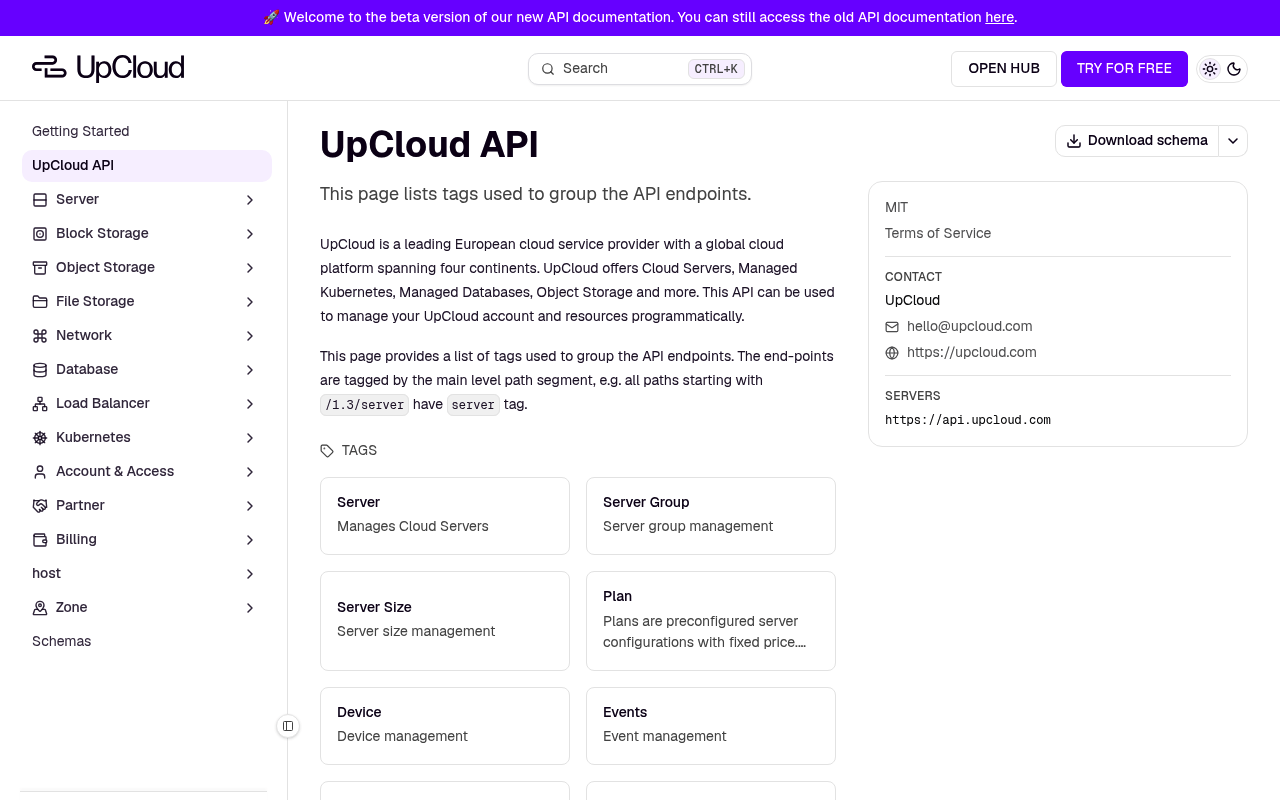
Plans are preconfigured server configurations with fixed price. Each plan includes certain number of CPU cores, memory amount, storage and transfer quota. Most plans also includ...
Block Storage is similar to a physical hard disk. It can be used to install an operating system or hold another filesystem for a Cloud Server. Writable Block Storage and CD-ROM ...
User can define a set of free-form tags to group and identify a subset of their servers. Tags can be for example _webserver_, _database_, _PROD_, _QA_, _DEV_ etc. A server can h...
aid: upcloud
name: UpCloud
description: UpCloud is a Finnish cloud infrastructure provider offering cloud servers, block and object storage, managed
  databases, managed Kubernetes (UKS), load balancers and private networking from data centres in Europe, North America, Asia
  and Australia. Its public REST API (version 1.3, api.upcloud.com) is documented at developers.upcloud.com with a published
  OpenAPI 3.1 contract, and is backed by official Go, Python and PHP clients, the upctl CLI and a Terraform provider.
url: https://raw.githubusercontent.com/api-evangelist/upcloud/refs/heads/main/apis.yml
x-type: company
x-source: harvest:market-gap:object-storage
x-tier: profiled
x-tier-reason: enrichment pass 2026-10-13 (local-v5; was harvest)
accessModel:
  pricing: freemium
  onboarding: self-serve
  trial: false
  try_now: true
  public: false
  gated: none
  gated_source:
  - onboarding
  label: Freemium · Self-serve signup
  confidence: medium
  source:
  - plans
  - authentication
  - security
  generated: '2026-11-06'
  method: derived
specificationVersion: '0.20'
created: '2026-10-13'
modified: '2026-10-13'
tags:
- Company
- Cloud
- Infrastructure
- Object Storage
- Kubernetes
- Database
- Servers
- Networking
tags_raw:
- Company
- Cloud
- Infrastructure
- Object Storage
- Kubernetes
- Databases
- Servers
- Networking
maintainers:
- FN: Kin Lane
  email: kin@apievangelist.com
- FN: APIs.json
  email: info@apis.io
common:
- type: Plans
  url: plans/upcloud-plans-pricing.yml
- type: CapabilityMap
  url: capabilities/upcloud-capability-edges.yml
  name: UpCloud Business Capability Map
- type: AgenticAccess
  url: agentic-access/upcloud-agentic-access.yml
- type: Spectral
  url: rules/upcloud-rules.yml
- type: JSONLD
  url: json-ld/upcloud-context.jsonld
- type: Vocabulary
  url: vocabulary/upcloud-vocabulary.yml
- type: DataModel
  url: data-model/upcloud-data-model.yml
- type: CLI
  url: cli/upcloud-cli.yml
- type: ErrorCatalog
  url: errors/upcloud-problem-types.yml
- type: Conformance
  url: conformance/upcloud-conformance.yml
- type: LLMsTxt
  url: llms/upcloud-llms.txt
- type: SecurityTxt
  url: well-known/upcloud-status-security.txt
- type: WellKnown
  url: well-known/upcloud-well-known.yml
- type: Hosts
  url: hosts/upcloud-hosts.yml
- type: Vendors
  url: vendors/upcloud-vendors.yml
- type: SDKs
  url: packages/upcloud-packages.yml
- type: Packages
  url: packages/upcloud-packages.yml
- type: Authentication
  url: authentication/upcloud-authentication.yml
- type: DomainSecurity
  url: security/upcloud-domain-security.yml
- type: Website
  url: https://upcloud.com
- type: Blog
  url: https://upcloud.com/blog/
- type: ChangeLog
  url: https://upcloud.com/docs/changelog/
- type: DeveloperPortal
  url: https://developers.upcloud.com/api/1.3
- type: Documentation
  url: https://upcloud.com/docs/
- type: GettingStarted
  url: https://developers.upcloud.com/api/1.3/getting-started
- type: GitHubOrganization
  url: https://github.com/UpCloudLtd
- type: Login
  url: https://hub.upcloud.com/login
- type: Pricing
  url: https://upcloud.com/pricing/
- type: PrivacyPolicy
  url: https://upcloud.com/privacy-notice/
- type: SignUp
  url: https://signup.upcloud.com/?promo=goupcloud
- type: StatusPage
  url: https://status.upcloud.com/
- type: Support
  url: https://upcloud.com/support/
- type: TermsOfService
  url: https://upcloud.com/terms-of-service/
apis:
- aid: upcloud:upcloud-account-api
  name: UpCloud Account API
  description: Account management and authentication
  humanURL: https://developers.upcloud.com/api/1.3
  baseURL: https://api.upcloud.com
  tags:
  - Account
  tags_raw:
  - account
  properties:
  - type: OpenAPI
    url: openapi/upcloud-account-api-openapi.yml
  - type: Documentation
    url: https://developers.upcloud.com/api/1.3
- aid: upcloud:upcloud-account-tokens-api
  name: UpCloud Account Tokens API
  description: 'UpCloud API calls can be authenticated with HTTP Bearer (token) authentication. The token API requests below
    allow creation, management and deletion of bearer tokens.


    The bearer token can be used for authentication by setting the Authorization header of the API request:


    `Authorization: Bearer ucat_01DQE3AJDEBFEKECFM558TGH2F`.'
  humanURL: https://developers.upcloud.com/api/1.3
  baseURL: https://api.upcloud.com
  tags:
  - account-tokens
  properties:
  - type: OpenAPI
    url: openapi/upcloud-account-tokens-api-openapi.yml
  - type: Documentation
    url: https://developers.upcloud.com/api/1.3
- aid: upcloud:upcloud-audit-logs-api
  name: UpCloud Audit Logs API
  description: "The Audit Log Service API allows customers to query and export their audit logs.\n\t\t\nAudit logs track all\
    \ actions performed on customer accounts, including resource creation, modification, and deletion. \nThe API provides\
    \ filtering, pagination, and export capabilities.\n\nAll endpoints require HTTP Basic authentication using UpCloud account\
    \ credentials."
  humanURL: https://developers.upcloud.com/api/1.3
  baseURL: https://api.upcloud.com
  tags:
  - Audit Logs
  tags_raw:
  - audit-logs
  properties:
  - type: OpenAPI
    url: openapi/upcloud-audit-logs-api-openapi.yml
  - type: Documentation
    url: https://developers.upcloud.com/api/1.3
- aid: upcloud:upcloud-currency-api
  name: UpCloud Currency API
  description: Currency management
  humanURL: https://developers.upcloud.com/api/1.3
  baseURL: https://api.upcloud.com
  tags:
  - Currency
  tags_raw:
  - currency
  properties:
  - type: OpenAPI
    url: openapi/upcloud-currency-api-openapi.yml
  - type: Documentation
    url: https://developers.upcloud.com/api/1.3
- aid: upcloud:upcloud-database-api
  name: UpCloud Database API
  description: 'A Managed Database is a database-as-a-service that lets customers use a database without setting up servers
    or database software. The service configuration defines high availability, resources, the database software version, and
    security parameters.


    The Managed Database API lets you manage instances of supported open-source engines, including MySQL, PostgreSQL, Valkey,
    and OpenSearch. Managed Databases are available in every UpCloud zone. All request and response payloads are JSON.'
  humanURL: https://developers.upcloud.com/api/1.3
  baseURL: https://api.upcloud.com
  tags:
  - Database
  tags_raw:
  - database
  properties:
  - type: OpenAPI
    url: openapi/upcloud-database-api-openapi.yml
  - type: Documentation
    url: https://developers.upcloud.com/api/1.3
- aid: upcloud:upcloud-device-api
  name: UpCloud Device API
  description: Device management
  humanURL: https://developers.upcloud.com/api/1.3
  baseURL: https://api.upcloud.com
  tags:
  - Device
  tags_raw:
  - device
  properties:
  - type: OpenAPI
    url: openapi/upcloud-device-api-openapi.yml
  - type: Documentation
    url: https://developers.upcloud.com/api/1.3
- aid: upcloud:upcloud-events-api
  name: UpCloud Events API
  description: Event management
  humanURL: https://developers.upcloud.com/api/1.3
  baseURL: https://api.upcloud.com
  tags:
  - Event
  tags_raw:
  - events
  properties:
  - type: OpenAPI
    url: openapi/upcloud-events-api-openapi.yml
  - type: Documentation
    url: https://developers.upcloud.com/api/1.3
- aid: upcloud:upcloud-file-storage-api
  name: UpCloud File Storage API
  description: 'File Storage is a scalable file storage service that provides shared access to files over a network using
    the NFS protocol.


    The File Storage API allows the creation, configuration, and deletion of file storage service, as well as monitoring of
    network and storage usage.


    API follows JSON Merge Patch semantics. Note when modifying nested structures payload should contain entire array, which
    in a sense is PUT within PATCH for them. JSON Merge Patch uses null to explicitly indicate property deletion while absent
    properties are ignored, i.e. not modified.'
  humanURL: https://developers.upcloud.com/api/1.3
  baseURL: https://api.upcloud.com
  tags:
  - File Storage
  tags_raw:
  - file-storage
  properties:
  - type: OpenAPI
    url: openapi/upcloud-file-storage-api-openapi.yml
  - type: Documentation
    url: https://developers.upcloud.com/api/1.3
- aid: upcloud:upcloud-firewall-ruleset-api
  name: UpCloud Firewall Ruleset API
  description: UpCloud SDN Firewall API. Allows creation, management and deletion of Firewall rulesets and Firewall rules.
  humanURL: https://developers.upcloud.com/api/1.3
  baseURL: https://api.upcloud.com
  tags:
  - firewall-ruleset
  properties:
  - type: OpenAPI
    url: openapi/upcloud-firewall-ruleset-api-openapi.yml
  - type: Documentation
    url: https://developers.upcloud.com/api/1.3
- aid: upcloud:upcloud-gateway-api
  name: UpCloud Gateway API
  description: UpCloud Gateway API. Allows creation, management and deletion of gateways.
  humanURL: https://developers.upcloud.com/api/1.3
  baseURL: https://api.upcloud.com
  tags:
  - Gateways
  tags_raw:
  - gateway
  properties:
  - type: OpenAPI
    url: openapi/upcloud-gateway-api-openapi.yml
  - type: Documentation
    url: https://developers.upcloud.com/api/1.3
- aid: upcloud:upcloud-ip-address-api
  name: UpCloud Ip Address API
  description: "The UpCloud network has public and private IP addresses.\n\nPublic IP addresses are used to connect to the\
    \ server from the Internet.\n\nPrivate Utility network addresses are available for all servers within a\nsingle account,\
    \ and can communicate with each other globally as long\nas the servers have the utility network interfaces configured.\
    \ This is\nadded to servers by default.\n\nA server has a minimum of zero and a maximum of five public IPv4 and IPv6\n\
    addresses. Every server can have one utility network IPv4 address only,\nand must have at least one IP address. The UpCloud\
    \ API assigns the IP addresses\nautomatically in networks configured to use DHCP. IP addresses cannot be\nreserved for\
    \ later use, except for floating IPs that can be reserved and\nswitched from server to another freely within their specific\
    \ zone.\n\nThe operating system running on the server will see a separate network interface\nper IP address. On a typical\
    \ server, there are three network interfaces. The\nfirst network interface is assigned to the public network and the second\
    \ to the\nUtility network. If the server has an IPv6 address configured it will use the\nthird network interface. DHCP\
    \ service is provided on all public IPv4 network\ninterfaces and all private DHCP-enabled networks for automatic configuration\n\
    of the correct IP address. IPv6 network interfaces should use stateless\naddress autoconfiguration (SLAAC) with IPv6 privacy\
    \ extensions disabled.\nOn IPv6-only server DNS parameters can be obtained with stateless DHCPv6.\n\nAdditionally, there\
    \ are floating IPs: IPv4 addresses that can be\nattached to any IPv4 interface in their specific zone (eg. de-fra1 or\
    \ fi-hel2).\nFloating IP addresses can be instantly switched from one server to another when\ndoing maintenance or dealing\
    \ with technical issues. More information on floating\nIPs and their configuration can be found from [our tutorials](https://upcloud.com/community/tutorials/floating-ip-addresses/).\n\
    \n## Release policy\n\nThe release policy defines what happens to an IP address when its dependent resource is deleted,\
    \ such as a server or service it's attached to. The following values are supported:\n\n`release`: The address is also\
    \ deleted. This applies to both normal and floating IP addresses.\n\n`keep`: For normal (non-floating) IP addresses, they\
    \ are converted to detached floating IPs when their dependent resource is deleted. For floating IP addresses, they remain\
    \ as detached floating IPs that can be reattached elsewhere.\n\nFloating IP addresses are created with `keep` as default\
    \ policy, ensuring they remain available even after dependency deletion.\n\nThe release policy can be set when creating\
    \ a new IP address or modified for an existing one through the API.\n\nNote that release policy functionality is currently\
    \ only supported for public IPv4 addresses.\n\n## Service delegation\n\nAssign existing Floating IPv4 addresses to a service\
    \ instead of a server. This enables the service to manage the IP address and use your dedicated floating IP address in\
    \ the service's DNS records.\n\nDelegated IP addresses can be tracked with the `is_delegated` attribute in the API response.\n\
    \nWhen an IP address is delegated to a service, it becomes subject to specific access restrictions. The IP address becomes\
    \ managed by the service until you explicitly remove it. During the delegation:  \n\n* You cannot delete the IP address.\n\
    * You cannot modify its MAC address.\n* You can only update the release policy and PTR record.\n\nThese restrictions ensure\
    \ service stability and are automatically lifted once the IP address is removed from the service and as long as the release\
    \ policy is set to `keep` so the IP address remains available in your account.\n\nCurrently only Load Balancer supports\
    \ IP address delegation."
  humanURL: https://developers.upcloud.com/api/1.3
  baseURL: https://api.upcloud.com
  tags: []
  tags_raw:
  - ip_address
  properties:
  - type: OpenAPI
    url: openapi/upcloud-ip-address-api-openapi.yml
  - type: Documentation
    url: https://developers.upcloud.com/api/1.3
- aid: upcloud:upcloud-kubernetes-api
  name: UpCloud Kubernetes API
  description: 'Kubernetes is a container orchestration system for automating, managing and scaling software deployment.

    Managed Kubernetes allows you to easily create Kubernetes clusters without having to take care about low level details.'
  humanURL: https://developers.upcloud.com/api/1.3
  baseURL: https://api.upcloud.com
  tags:
  - Kubernetes
  tags_raw:
  - kubernetes
  properties:
  - type: OpenAPI
    url: openapi/upcloud-kubernetes-api-openapi.yml
  - type: Documentation
    url: https://developers.upcloud.com/api/1.3
- aid: upcloud:upcloud-load-balancer-api
  name: UpCloud Load Balancer API
  description: 'A Managed load balancer works as the network level frontend of customer application by directing connections
    to the backend servers.


    The Managed load balancer API allows customer to manage their services. Managed load balancers are available in every
    UpCloud zone. The API requests and responses payload are in JSON format only.


    API follows JSON Merge Patch semantics. Note when modifying nested structures payload should contain entire array, which
    in a sense is PUT within PATCH for them. JSON Merge Patch uses null to explicitly indicate property deletion while absent
    properties are ignored, i.e. not modified.


    It is recommended to use the hostnames of your load balancer when directing your domain to it. This ensures utilization
    of all addresses that the load balancer might possess.


    For the subdomains of your domain, use CNAME. For the primary domain, you might need to use ALIAS, or whatever is supported
    by your DNS provider.'
  humanURL: https://developers.upcloud.com/api/1.3
  baseURL: https://api.upcloud.com
  tags:
  - Load Balancer
  tags_raw:
  - load-balancer
  properties:
  - type: OpenAPI
    url: openapi/upcloud-load-balancer-api-openapi.yml
  - type: Documentation
    url: https://developers.upcloud.com/api/1.3
- aid: upcloud:upcloud-network-api
  name: UpCloud Network API
  description: "The network API calls present the different networks attached to cloud servers and allow the configuration\
    \ of SDN private networks.\n\nNetworks define a secure connections between attached cloud servers using a specialised\
    \ network interface. A cloud server may belong to any number of virtual networks at the same time.\nServer interfaces\
    \ are identified and ordered by their index.\n\n## Network types\n\n### Public networks\n\nPublic networks provide internet\
    \ connectivity to the cloud servers. Public networks are automatically added as public [IP addresses](https://upcloudltd.github.io/upcloud-openapi-spec/api/ip-address)\
    \ are attached to cloud servers.\n\n### Utility network\n\nThe Utility network is a simple to use, yet functionally limited\
    \ network connecting all cloud servers under the same UpCloud account. All cloud servers are connected to the Utility\
    \ network by default. This way the Utility network forms a secure connection between all servers within one account, no\
    \ matter where they are located. IP addressing on the Utility network is specified automatically and cannot be changed.\
    \ The Utility network is limited to one connection per cloud server. SDN private networks are to be used for production\
    \ workloads and any advanced network setups. The Utility network is added by [adding a utility IP address](https://upcloudltd.github.io/upcloud-openapi-spec/api/ip-address#assign-ip-address).\n\
    \n### Private virtual LAN\n\nSDN private networks provide flexible and customisable network configuration options beyond\
    \ that of the Utility network and are recommended for production workloads.\n\nThese networks provide secure connections\
    \ between attached cloud servers using dedicated network interfaces. Servers can be attached and detached from SDN private\
    \ networks at will using the API commands. SDN private networks allow a practically unlimited number of cloud servers\
    \ to be attached simultaneously and a cloud server may belong to any number of SDN private networks at the same time.\
    \ IP addressing may be defined automatically or custom IP addressing may be used. SDN private networks are configured\
    \ per zone allowing cloud server on the same zone to be attached.\n\n#### Available IP subnets in Private virtual LANs\n\
    \nGenerally, you can use any _global unicast_ address for your subnet address, even public ones. However, we recommend\
    \ staying with well-known private address ranges.\n\nPrivate address ranges include: **10.0.0.0/8**, **172.16.0.0/12**,\
    \ **192.168.0.0/16**.\n\nAllowed subnet prefix lengths (sizes): minimum length 8 bits, maximum length 29 bits.\n\nExcluded\
    \ ranges:\n\n* 100.64.0.0/10 (CGNAT)\n* 127.0.0.0/8 (localhost)\n* 224.0.0.0/4 (IP multicast)\n* 169.254.0.0/16 (link\
    \ local)\n\nThe above ranges are not available for use in Private virtual LANs.\n\nFor more information on:\n * adding\
    \ network interfaces to cloud servers  [see](https://upcloudltd.github.io/upcloud-openapi-spec/api/server#add-a-network-interface).\n\
    \ * modifying network interfaces from cloud servers  [see](https://upcloudltd.github.io/upcloud-openapi-spec/api/server#modify-a-network-interface).\n\
    \ * deleting network interfaces from cloud servers  [see](https://upcloudltd.github.io/upcloud-openapi-spec/api/server#delete-a-network-interface-2).\n\
    \ * assigning IP addresses to cloud servers [see](https://upcloudltd.github.io/upcloud-openapi-spec/api/server#add-an-ip-address-to-a-network-interface).\n\
    \ * deleting addresses from cloud servers [see](https://upcloudltd.github.io/upcloud-openapi-spec/api/server#delete-an-ip-address-from-a-network-interface)."
  humanURL: https://developers.upcloud.com/api/1.3
  baseURL: https://api.upcloud.com
  tags:
  - Networks
  tags_raw:
  - network
  properties:
  - type: OpenAPI
    url: openapi/upcloud-network-api-openapi.yml
  - type: Documentation
    url: https://developers.upcloud.com/api/1.3
- aid: upcloud:upcloud-network-peering-api
  name: UpCloud Network Peering API
  description: Network peering management
  humanURL: https://developers.upcloud.com/api/1.3
  baseURL: https://api.upcloud.com
  tags:
  - Network Peering
  tags_raw:
  - network-peering
  properties:
  - type: OpenAPI
    url: openapi/upcloud-network-peering-api-openapi.yml
  - type: Documentation
    url: https://developers.upcloud.com/api/1.3
- aid: upcloud:upcloud-object-storage-2-api
  name: UpCloud Object Storage 2 API
  description: 'Object Storage is a computer data storage architecture that manages data as objects as opposed to block storage
    which manages data as blocks within sectors and tracks. Managed Object storage is commonly used to manage large amounts
    of unstructured data for example storing large datasets like photos, music, or files in online collaboration services.
    All customers data is encrypted by default using encryption at rest.


    Managed Object Storage API commands allow creation, management and deletion of Object Storage devices as well as viewing
    Object Storage network data usage. Managed Object Storage is fully S3-compliant allowing file and bucket management using
    existing S3 clients.


    API follows JSON Merge Patch semantics. Note when modifying nested structures payload should contain entire array, which
    in a sense is PUT within PATCH for them. JSON Merge Patch uses null to explicitly indicate property deletion while absent
    properties are ignored, i.e. not modified.'
  humanURL: https://developers.upcloud.com/api/1.3
  baseURL: https://api.upcloud.com
  tags:
  - object-storage-2
  properties:
  - type: OpenAPI
    url: openapi/upcloud-object-storage-2-api-openapi.yml
  - type: Documentation
    url: https://developers.upcloud.com/api/1.3
- aid: upcloud:upcloud-partner-api
  name: UpCloud Partner API
  description: 'Partner API gives UpCloud partners the ability manage accounts for their customers.


    Note that use of this API is available only to accounts provisioned as partner accounts. Please contact your account representative
    for further details.'
  humanURL: https://developers.upcloud.com/api/1.3
  baseURL: https://api.upcloud.com
  tags:
  - Partners
  tags_raw:
  - partner
  properties:
  - type: OpenAPI
    url: openapi/upcloud-partner-api-openapi.yml
  - type: Documentation
    url: https://developers.upcloud.com/api/1.3
- aid: upcloud:upcloud-permission-api
  name: UpCloud Permission API
  description: Manage permissions for sub-accounts to access resources owned by the main account.
  humanURL: https://developers.upcloud.com/api/1.3
  baseURL: https://api.upcloud.com
  tags:
  - Permission
  tags_raw:
  - permission
  properties:
  - type: OpenAPI
    url: openapi/upcloud-permission-api-openapi.yml
  - type: Documentation
    url: https://developers.upcloud.com/api/1.3
- aid: upcloud:upcloud-plan-api
  name: UpCloud Plan API
  description: 'Plans are preconfigured server configurations with fixed price. Each plan includes certain number of CPU cores,
    memory amount, storage and transfer quota. Most plans also include one public IPv4 address. Utility IPv4 addresses and
    public IPv6 addresses are currently free of charge, so they are not included in plan.


    In addition to plans available in a zone, there is always possibility for free scaling of CPU, memory and disk resources.
    In such cases the plan used by server will be reported as "custom" by API. It is possible to change existing "custom"
    server to a fixed plan provided that CPU cores and memory amount matches the selected plan.


    GPU plans also have additional `gpu_amount` and `gpu_model` attributes, which indicate the number of GPUs and their model
    included in the plan.


    If server''s storage or network resources do not fit to plan''s specification, they are billed on an hourly basis. The
    storage device(s) and IP addresses included in fixed plan price have `part_of_plan` attribute with value "yes" in server
    details response.'
  humanURL: https://developers.upcloud.com/api/1.3
  baseURL: https://api.upcloud.com
  tags:
  - Plan
  tags_raw:
  - plan
  properties:
  - type: OpenAPI
    url: openapi/upcloud-plan-api-openapi.yml
  - type: Documentation
    url: https://developers.upcloud.com/api/1.3
- aid: upcloud:upcloud-price-api
  name: UpCloud Price API
  description: Retrieve pricing information for UpCloud resources and services.
  humanURL: https://developers.upcloud.com/api/1.3
  baseURL: https://api.upcloud.com
  tags:
  - Price
  tags_raw:
  - price
  properties:
  - type: OpenAPI
    url: openapi/upcloud-price-api-openapi.yml
  - type: Documentation
    url: https://developers.upcloud.com/api/1.3
- aid: upcloud:upcloud-router-api
  name: UpCloud Router API
  description: Router management
  humanURL: https://developers.upcloud.com/api/1.3
  baseURL: https://api.upcloud.com
  tags:
  - Router
  tags_raw:
  - router
  properties:
  - type: OpenAPI
    url: openapi/upcloud-router-api-openapi.yml
  - type: Documentation
    url: https://developers.upcloud.com/api/1.3
- aid: upcloud:upcloud-server-api
  name: UpCloud Server API
  description: Manages Cloud Servers
  humanURL: https://developers.upcloud.com/api/1.3
  baseURL: https://api.upcloud.com
  tags:
  - Servers
  tags_raw:
  - server
  properties:
  - type: OpenAPI
    url: openapi/upcloud-server-api-openapi.yml
  - type: Documentation
    url: https://developers.upcloud.com/api/1.3
- aid: upcloud:upcloud-server-group-api
  name: UpCloud Server Group API
  description: Server group management
  humanURL: https://developers.upcloud.com/api/1.3
  baseURL: https://api.upcloud.com
  tags:
  - server-group
  properties:
  - type: OpenAPI
    url: openapi/upcloud-server-group-api-openapi.yml
  - type: Documentation
    url: https://developers.upcloud.com/api/1.3
- aid: upcloud:upcloud-server-size-api
  name: UpCloud Server Size API
  description: Server size management
  humanURL: https://developers.upcloud.com/api/1.3
  baseURL: https://api.upcloud.com
  tags: []
  tags_raw:
  - server_size
  properties:
  - type: OpenAPI
    url: openapi/upcloud-server-size-api-openapi.yml
  - type: Documentation
    url: https://developers.upcloud.com/api/1.3
- aid: upcloud:upcloud-storage-api
  name: UpCloud Storage API
  description: 'Block Storage is similar to a physical hard disk. It can be used to install an operating system or hold another
    filesystem for a Cloud Server.


    Writable Block Storage and CD-ROM resources can be freely attached to any Cloud Server within the same zone and under
    the same account. A maximum of 16 storage devices can be attached to a Cloud Server at the same time; however, the combined
    limit for network interfaces and storage devices is 24.


    <h3>Storage resource types</h3>


    There are four different storage resource types: normal, CD-ROM, template, and backup. The normal type represents writable
    Block Storage.'
  humanURL: https://developers.upcloud.com/api/1.3
  baseURL: https://api.upcloud.com
  tags:
  - Storage
  tags_raw:
  - storage
  properties:
  - type: OpenAPI
    url: openapi/upcloud-storage-api-openapi.yml
  - type: Documentation
    url: https://developers.upcloud.com/api/1.3
- aid: upcloud:upcloud-tag-api
  name: UpCloud Tag API
  description: 'User can define a set of free-form tags to group and identify a subset

    of their servers. Tags can be for example _webserver_, _database_, _PROD_, _QA_, _DEV_ etc.


    A server can have several tags. API can be used to return only servers

    matching specified tags. Note that all operations changing server''s

    state or attributes must still be done individually for each server

    UUID, tags can be used only to return a list of servers.


    __Warning! Consider using labels instead of tags:__ Tags are an access control feature and only available for a limited
    set of resources. Use labels to describe and filter your resources. Documentation for labels can be found on the resource
    specific documentation pages.


    Creating and modifying tags is allowed **only by main account**. Subaccounts

    have access only to listing tags and tagged servers they are granted

    access to.'
  humanURL: https://developers.upcloud.com/api/1.3
  baseURL: https://api.upcloud.com
  tags:
  - Tag
  tags_raw:
  - tag
  properties:
  - type: OpenAPI
    url: openapi/upcloud-tag-api-openapi.yml
  - type: Documentation
    url: https://developers.upcloud.com/api/1.3
- aid: upcloud:upcloud-timezone-api
  name: UpCloud Timezone API
  description: Timezone management
  humanURL: https://developers.upcloud.com/api/1.3
  baseURL: https://api.upcloud.com
  tags:
  - Timezone
  tags_raw:
  - timezone
  properties:
  - type: OpenAPI
    url: openapi/upcloud-timezone-api-openapi.yml
  - type: Documentation
    url: https://developers.upcloud.com/api/1.3
- aid: upcloud:upcloud-vnc-keymap-api
  name: UpCloud Vnc Keymap API
  description: VNC keymap management
  humanURL: https://developers.upcloud.com/api/1.3
  baseURL: https://api.upcloud.com
  tags: []
  tags_raw:
  - vnc_keymap
  properties:
  - type: OpenAPI
    url: openapi/upcloud-vnc-keymap-api-openapi.yml
  - type: Documentation
    url: https://developers.upcloud.com/api/1.3
- aid: upcloud:upcloud-zone-api
  name: UpCloud Zone API
  description: Operations for managing zones.
  humanURL: https://developers.upcloud.com/api/1.3
  baseURL: https://api.upcloud.com
  tags:
  - Zone
  tags_raw:
  - zone
  properties:
  - type: OpenAPI
    url: openapi/upcloud-zone-api-openapi.yml
  - type: Documentation
    url: https://developers.upcloud.com/api/1.3
x-enrichment:
  date: '2026-10-13'
  status: enriched
  artifacts_added: 20
  pass: local-v5
UpCloud API — frequently asked questions
Does UpCloud have an API?
Yes. APIs.io lists 29 APIs from UpCloud, including UpCloud Account API, UpCloud Account Tokens API and UpCloud Audit Logs API, and 26 more.
Is there an OpenAPI specification for the UpCloud API?
Yes. APIs.io indexes 29 OpenAPI specifications for UpCloud, each linked for download from this page.
How do I authenticate with the UpCloud API?
UpCloud documents its authentication (http · 1 scheme). The details are profiled on APIs.io as Upcloud Authentication.
How much does the UpCloud API cost?
UpCloud publishes its prices; its Cloud Servers – Starter plan is Starting from €3/mo as of 2026-10-28. APIs.io lists 22 pricing plans for UpCloud, with each plan's price, limits and inclusions under Pricing on this page.
Is the UpCloud API ready for AI agents?
UpCloud has a Kin Score of 51.8 out of 100 (developing) and an Agent Readiness score of 31.9 (agent-ready), scored by API Evangelist on 2026-11-06.
Calls without X-API-Key need no key. Calls with it need a paid plan — get a key.
Get an API key
Free tier, no form to fill in. Signing in shares your email address with us — we
store it to create your key and to recognise you if you sign in with another
provider. See our Privacy Policy and
Terms.
 Kin Score
How this is scored →
 It updates itself when the score changes. Paste this where you link to your API docs: