Fever
Fever is a global live-entertainment discovery and ticketing platform that helps millions of people find events, activities and experiences in their city, and gives venues and partners the tools to sell and analyze tickets. For developers Fever exposes two public surfaces: an official Model Context Protocol (MCP) server over its real-time global event catalog (tools search_cities and search_events, OAuth 2.0 with PKCE), and a partner-facing Reporting API delivering in-depth event sales data (orders, tickets, financials, plan and session details) for CRM, BI, data-warehouse and ERP integration. Fever is backed by Accel and General Catalyst.
Fever publishes 5 APIs on the APIs.io network, including Authentication API, FeverZone API, Order Items API, and 2 more. Tagged areas include Company, Consumer, Live Entertainment, Events, and Ticketing.
Fever’s developer surface includes documentation, API reference, authentication, support, and 17 more developer resources.
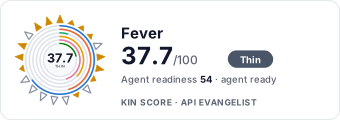
Kin Score
Kin Score
How this is scored →scored 2026-08-10 · rubric v0.9.1
APIs 5
Individual APIs this provider publishes, each with its own machine-readable definition.
Fever Authentication API
This endpoint is used to authenticate a user. It requires a username and password to be passed in the request body. If the user is authenticated successfully, a token is returne...
Fever FeverZone API
These endpoints provide an interface to extract the data available in FeverZone reports. The delay of the data is less than 15 minutes from reality. The route `/feverzone/sales-...
Fever Order Items API
These endpoints enable to access order-item data. ## Filtering Options The endpoint supports filtering by: | Parameter | Type | Description | |-----------|------|-------------| ...
Fever Plans API
The goal of the Plan endpoint is to provide all information about the plans/events/experiences/listings organised by a partner. The delay of the data is less than 10 minutes fro...
Fever Sessions API
The goal of the Session Endpoint is to provide all information about the session (or ticket types) of a plan. The delay of the data is less than 10 minutes from reality. ## Requ...
MCP Servers 1
Model Context Protocol servers that expose these APIs to AI agents.
fever-mcp.yml
MCP SERVERRate Limits 1
Documented rate limits and quota policies.
Security Posture 2
Authentication, domain security, vulnerability disclosure, and trust-center signals.
Agentic Access 1
Recommended x-agentic-access execution contracts for AI agents.
Resources
Get Started 1
Portal, sign-up, and the first successful call
Documentation 2
Reference material describing how the API behaves
Agent Surfaces 5
MCP servers, agent skills, and machine-readable catalogs
Design & Contract 5
Pagination, idempotency, versioning, errors, and events
Access & Security 2
Authentication, authorization, and security posture
Operate 3
Status, limits, changes, and where to get help
Commercial 2
Pricing, plans, and the legal terms of use
Company 1
The organization behind the API
Source (apis.yml)
aid: fever
name: Fever
description: 'Fever is a global live-entertainment discovery and ticketing platform that helps millions of people find events,
activities and experiences in their city, and gives venues and partners the tools to sell and analyze tickets. For developers
Fever exposes two public surfaces: an official Model Context Protocol (MCP) server over its real-time global event catalog
(tools search_cities and search_events, OAuth 2.0 with PKCE), and a partner-facing Reporting API delivering in-depth event
sales data (orders, tickets, financials, plan and session details) for CRM, BI, data-warehouse and ERP integration. Fever
is backed by Accel and General Catalyst.'
url: https://raw.githubusercontent.com/api-evangelist/fever/refs/heads/main/apis.yml
x-type: company
x-source: vc-portfolio
x-backed-by:
- accel
- general-catalyst
x-tier: stub
x-tier-reason: portfolio-lead
accessModel:
pricing: unknown
onboarding: self-serve
trial: false
try_now: false
public: false
label: Self-serve signup
confidence: medium
source:
- authentication
generated: '2026-07-22'
method: derived
specificationVersion: '0.20'
created: '2026-07-17'
modified: '2026-07-19'
image: https://feverup.com/_astro/og-image-fever.PfP_3GVw.jpg
tags:
- Company
- Consumer
- Live Entertainment
- Events
- Ticketing
- Experiences
- Reporting
- MCP
maintainers:
- FN: Kin Lane
email: kin@apievangelist.com
- FN: APIs.json
email: info@apis.io
apis:
- aid: fever:fever-authentication-api
name: Fever Authentication API
description: 'This endpoint is used to authenticate a user. It requires a username and password to be passed in the request
body. If
the user is authenticated successfully, a token is returned in the response body. This token is used to authenticate the
user in subsequent requests.
⚠️ The token expiration time is **30 minutes**. After that time, the user will need to authenticate again to get a new
token.'
humanURL: https://developer.feverup.com/en/
baseURL: https://data-reporting-api.prod.feverup.com/v1
tags:
- Authentication
properties:
- type: OpenAPI
url: openapi/fever-authentication-api-openapi.yml
- type: Documentation
url: https://developer.feverup.com/en/
- type: APIReference
url: https://data-reporting-api.prod.feverup.com/v1/redoc
- type: Authentication
url: authentication/fever-authentication.yml
- aid: fever:fever-feverzone-api
name: Fever FeverZone API
description: 'These endpoints provide an interface to extract the data available in FeverZone reports. The delay of the
data
is less than 15 minutes from reality. The route `/feverzone/sales-by-reseller` allows the user to get a sales summary
by reseller and can be aggregated by venues/ticket types.
## Model documentation
#### Sales
This endpoint returns a summary of the sales, aligned with FeverZone Sales Summary report. It allows to filter by
`plan_ids`, `purchase_date` and `event_date`, and also specify the `currency` of the report.
<details>
<summary><b>📄 <code>/feverzone/sales-summary</code> response entity model</b></summary>
| Column Name | Description |
Example value |
|------------------------|-------------------------------------------------------------------------------------------------------------------------------------------------------------------------------------------------------------------------------------------------------------------------------------------------------------------------------------------------------------------------------------|---------------|
| `currency` | ISO3 currency of the order monetary field. |
EUR |
| `orders` | Metric representing the number of unique transactions (count) made, where each order may include
multiple tickets and add-ons. |
100 |
| `tickets_sold` | Metric representing the number (sum) of entry tickets sold, excluding any complimentary tickets
issued (invitations) and add-ons. This value shows the total number of entry tickets, representing the primary sales volume. |
200 |
| `addons_sold` | Metric representing the number (sum) of add-ons sold, excluding complimentary invitations.
Indicates the total number of add-ons purchased. |
50 |
| `ticket_invitations` | Metric representing the number (sum) of complimentary tickets issued at no charge for the user.
Issuing invitations may have fees. |
10 |
| `addons_invitations` | Metric representing the number (sum) of complimentary add-ons issued at no charge. Issuing
add-ons may have fees. |
5 |
| `ticket_gross_revenue` | Metric representing the revenue generated exclusively from the sale of entry tickets. It''s
the sum of `tickets_sold` multiplied by their ticket price. It shows the financial contribution of ticket sales to the
total revenue. |
1200.00 |
| `addon_gross_revenue` | Metric representing the revenue generated from the sale of additional items or services, such
as merchandise or premium experiences (a.k.a. add-ons). It''s the sum of `addons_sold` multiplied by their add-on price.
It indicates the contribution of supplementary products or services to total revenue. |
356.34 |
| `total_gross_revenue` | Metric representing the total amount of revenue generated from ticket sales and add-ons, including
surcharge, and before any discounts are applied. It equals to `ticket_gross_revenue` + `addon_gross_revenue` + `surcharge`.
Indicates the overall financial performance, showing the total revenue collected from sales and additional charges before
considering any discounts. | 1556.34 |
| `ticket_surcharge` | Metric representing the surcharges applied specifically to entry ticket sales. It''s the sum
of `tickets_sold` multiplied by their surcharge per ticket. It provides details on the extra fees associated with entry
ticket purchases. |
56.34 |
| `addon_surcharge` | Metric representing the surcharges applied specifically to add-ons. It''s the sum of `addons_sold`
multiplied by their surcharge per add-on. It shows the extra fees collected from add-on purchases. |
0.00 |
| `surcharge` | Metric representing the sum of additional booking fees applied to the order at checkout. It''s
the sum of `ticket_surcharge` and `addon_surcharge`. It represents extra charges collected. |
56.34 |
| `discount` | Metric representing the total value of all discounts applied through promo codes or special
offers. It''s the sum of all discounts applied, and it''s represented with a negative value. It indicates the amount of
revenue that has been reduced due to promotional efforts. |
-100.00 |
| `user_payment` | Metric representing the total revenue collected after discounts. It is computed as the `total_gross_revenue`
+ `discounts`. It reflects actual revenue paid by customers. |
1456.34 |
</details>
<details>
<summary><b>📄 <code>/feverzone/sales-by-ticket-type</code> response entity model</b></summary>
| Column Name | Description |
Example value |
|------------------------|-------------------------------------------------------------------------------------------------------------------------------------------------------------------------------------------------------------------------------------------------------------------------------------------------------------------------------------------------------------------------------------|---------------|
| `currency` | ISO3 currency of the order monetary field. |
EUR |
| `ticket_type` | Type of ticket sold. |
Adult |
| `tickets_sold` | Metric representing the number (sum) of entry tickets sold, excluding any complimentary tickets
issued (invitations) and add-ons. This value shows the total number of entry tickets, representing the primary sales volume. |
200 |
| `addons_sold` | Metric representing the number (sum) of add-ons sold, excluding complimentary invitations.
Indicates the total number of add-ons purchased. |
50 |
| `ticket_invitations` | Metric representing the number (sum) of complimentary tickets issued at no charge for the user.
Issuing invitations may have fees. |
10 |
| `addons_invitations` | Metric representing the number (sum) of complimentary add-ons issued at no charge. Issuing
add-ons may have fees. |
5 |
| `ticket_gross_revenue` | Metric representing the revenue generated exclusively from the sale of entry tickets. It''s
the sum of `tickets_sold` multiplied by their ticket price. It shows the financial contribution of ticket sales to the
total revenue. |
1200.00 |
| `addon_gross_revenue` | Metric representing the revenue generated from the sale of additional items or services, such
as merchandise or premium experiences (a.k.a. add-ons). It''s the sum of `addons_sold` multiplied by their add-on price.
It indicates the contribution of supplementary products or services to total revenue. |
356.34 |
| `total_gross_revenue` | Metric representing the total amount of revenue generated from ticket sales and add-ons, including
surcharge, and before any discounts are applied. It equals to `ticket_gross_revenue` + `addon_gross_revenue` + `surcharge`.
Indicates the overall financial performance, showing the total revenue collected from sales and additional charges before
considering any discounts. | 1556.34 |
| `ticket_surcharge` | Metric representing the surcharges applied specifically to entry ticket sales. It''s the sum
of `tickets_sold` multiplied by their surcharge per ticket. It provides details on the extra fees associated with entry
ticket purchases. |
56.34 |
| `addon_surcharge` | Metric representing the surcharges applied specifically to add-ons. It''s the sum of `addons_sold`
multiplied by their surcharge per add-on. It shows the extra fees collected from add-on purchases. |
0.00 |
| `surcharge` | Metric representing the sum of additional booking fees applied to the order at checkout. It''s
the sum of `ticket_surcharge` and `addon_surcharge`. It represents extra charges collected. |
56.34 |
| `discount` | Metric representing the total value of all discounts applied through promo codes or special
offers. It''s the sum of all discounts applied, and it''s represented with a negative value. It indicates the amount of
revenue that has been reduced due to promotional efforts. |
-100.00 |
| `user_payment` | Metric representing the total revenue collected after discounts. It is computed as the `total_gross_revenue`
+ `discounts`. It reflects actual revenue paid by customers. |
1456.34 |
</details>
<details>
<summary><b>📄 <code>/feverzone/sales-by-reseller</code> response entity model</b></summary>
| Column Name | Description | Example value |
|--------------------------------|----------------------------------------------------------------|--------------------------------------|
| `reseller.id` | ID of the reseller | 607f50e3-666f-4b2e-9620-38aabf6d9m10
|
| `reseller.name` | Name of the reseller | Reseller name |
| `reseller.email` | Email of the reseller | test@reseller.com |
| `reseller.type` | Type of reseller | AGENCY |
| `reseller.contact_language` | Language that the reseller uses for communications | es_ES |
| `reseller.accepts_comms` | If reseller accepts communications or not | YES |
| `ticket_type` | Ticket type by reseller | Agencia \| Tarifa
Básica |
| `venue_name` | Venue name by reseller | Palacio Real de Madrid |
| `tickets_sold` | Tickets sold by reseller and aggregated dimensions applicable | 1000 |
| `gross_revenue` | Gross revenue by reseller and aggregated dimensions applicable | 10000 |
</details>'
humanURL: https://developer.feverup.com/en/
baseURL: https://data-reporting-api.prod.feverup.com/v1
tags:
- FeverZone
properties:
- type: OpenAPI
url: openapi/fever-feverzone-api-openapi.yml
- type: Documentation
url: https://developer.feverup.com/en/
- type: APIReference
url: https://data-reporting-api.prod.feverup.com/v1/redoc
- type: Authentication
url: authentication/fever-authentication.yml
- aid: fever:fever-order-items-api
name: Fever Order Items API
description: 'These endpoints enable to access order-item data.
## Filtering Options
The endpoint supports filtering by:
| Parameter | Type | Description |
|-----------|------|-------------|
| `order_ids` | array[integer] | List of specific order IDs |
| `plan_ids` | array[integer] | List of specific plan (event) IDs |
| `date_field` | string | Date field to filter on (`CREATED_DATE_UTC`, `UPDATED_DATE_UTC`, or `EVENT_START_DATE_UTC`).
`UPDATED_DATE_UTC` filters on when the order **data** last changed (any field of the flattened record, including nested/enrichment
fields such as plan name), matching the `updated_date_utc` field in the response — not the order''s own update time (`order_updated_date_utc`).
|
| `date_from` | string | Start date for the selected date field. Format: `YYYY-MM-DD HH:mm` or `YYYY-MM-DD` |
| `date_to` | string | End date for the selected date field. Format: `YYYY-MM-DD HH:mm` or `YYYY-MM-DD` |
## Model documentation
#### Orders with Order Items
The goal of this endpoint is to provide a comprehensive picture about orders with detailed information about their
associated order items, including buyers, owners, partners, plans, sessions, and more.
<details>
<summary><b>📄 <code>/reports/order-items</code> response entity model</b></summary>
| Column Name | Description | Example
value |
|----------------------------|-------------------------------------------------------------------------------|-------------------------------------------------------------|
| `id` | Unique order ID. This code groups all tickets bought in the same transaction. | 12345 |
| `parent_order_id` | If the order comes from a reschedule, the original order ID | 11234 |
| `buyer` | Order buyer information. | _See `order.buyer`
documentation below_ |
| `created_date_utc` | UTC date when the order was created. | 2021-01-01T00:00:00Z |
| `updated_date_utc` | UTC date when the order **data** was last updated — moves whenever any field of the flattened
order record changes (including nested/enrichment fields such as plan name, UTM or ratings). This is the field the `UPDATED_DATE_UTC`
filter matches, so filtering by `UPDATED_DATE_UTC` and this value are always consistent. | 2021-01-01T00:00:00Z |
| `order_updated_date_utc` | UTC date when the order **itself** was last updated (order-level fields only). Unlike `updated_date_utc`,
it does not move when only nested/enrichment data changes. | 2021-01-01T00:00:00Z |
| `surcharge` | Surcharge applied to the order. | 0.0 |
| `currency` | ISO3 currency of the order monetary fields. | USD |
| `purchase_channel` | Purchase channel where the transaction comes from. | web |
| `channel` | Channel slug through which this order was placed. Use this field to join with `POST /v1/reports/channels/search`
— the `channel` field in both endpoints is the same slug. `null` when no channel is recorded on the order (e.g. box-office
or pre-channel data). | partner-channel |
| `payment_method` | Payment method used. | credit_card |
| `purchase_location_source` | Purchase location information. | _See `order.purchase_location_source`
documentation below_ |
| `billing_zip_code` | Billing ZIP Code manually fulfilled by the customer. | 28001 |
| `utm` | UTM information attributed to the order. | _See `order.utm`
documentation below_ |
| `partner` | Partner information. | _See `order.partner`
documentation below_ |
| `business` | Business associated with the order. | _See `order.business`
documentation below_ |
| `plan` | Plan information. | _See `order.plan`
documentation below_ |
| `coupon` | Coupon information. | _See `order.coupon`
documentation below_ |
| `assigned_seats` | List of assigned seats for the order. | _See `order.assigned_seats`
documentation below_ |
| `order_items` | List of order items associated with this order. | _See `order.order_items`
documentation below_ |
| `booking_questions` | List of booking questions and answers for the order. | _See `order.booking_questions`
documentation below_ |
| `order_group_id` | 🚧 **Under Development.** Groups orders from cluster tickets. All orders with the same `order_group_id`
belong to the same purchase group (e.g., bundled tickets across multiple venues). | 12345 |
| `is_main_group_order` | 🚧 **Under Development.** Flag indicating whether this is the main order in a group. `true`
for the primary order, `false` for secondary orders in the same group. | true |
| `staff_notes` | List of staff notes attached to the order. Opt-in: only returned when the search request
includes `included_fields=staff_notes`; otherwise the field is omitted from the response. | `["Payment Details: Groupon",
"change ticket to new day"]` |
| `booked_slots` | List of booked slots (assets/rooms reserved by the cart). | _See `order.booked_slots`
documentation below_ |
| `payment_details` | Card payment details for the order (transaction id, brand and descriptive payment method).
Empty/null when the order was not paid by card or no card details are recorded. | _See `order.payment_details` documentation
below_ |
<details>
<summary><span style="font-size:18pt;"><code>order.buyer</code></span></summary>
| Column Name | Description |
Example value |
|------------------------|-----------------------------------------------------------------------------------------------------------------|--------------------------------------------------------|
| `id` | Unique ID of the buyer. |
123456 |
| `first_name` | First name of the order buyer. |
John |
| `last_name` | Last name of the order buyer. |
Doe |
| `email` | Email of the order buyer. |
test@example.com |
| `date_of_birthday` | Date of birth of the order buyer. |
1990-01-01 |
| `marketing_preference` | Indicates whether the user accepted receiving marketing communications from the partner in
the checkout screen. | true |
| `language` | Language of the order buyer, extracted from the device locale. The format is ISO 639-1 (two
letters). | en |
| `b2b_end_user` | B2B end-user information. `null` when the buyer is not B2B or no B2B end user is linked to
the order. | _See `order.buyer.b2b_end_user` documentation below_ |
<details>
<summary><span style="font-size:16pt;"><code>order.buyer.b2b_end_user</code></span></summary>
| Column Name | Description | Example value |
|--------------|-----------------------------------|-------------------|
| `id` | Unique ID of the B2B end user. | 789012 |
| `email` | Email of the B2B end user. | test@feverup.com |
| `first_name` | First name of the B2B end user. | John |
| `last_name` | Last name of the B2B end user. | Doe |
</details>
</details>
<details>
<summary><span style="font-size:18pt;"><code>order.purchase_location_source</code></span></summary>
| Column Name | Description |
Example value |
|----------------|-----------------------------------------------------------------------------------------------------------------------------------------------------------|---------------|
| `id_geo_name` | Geo name ID from where the purchase was made. This field is inferred so it might not be accurate. More
information at https://www.geonames.org/about.html | 123456 |
| `city_name` | City from where the purchase was made. This field is inferred so it might not be accurate. |
Madrid |
| `country_code` | Country code from where the purchase was made. This field is inferred so it might not be accurate. |
ES |
| `region_code` | Region code from where the purchase was made. This field is inferred so it might not be accurate. |
MD |
| `postal_code` | Best estimate of user location at time of purchase, combining multiple sources of information. |
28001 |
| `quality` | Quality order. |
1.0 |
</details>
<details>
<summary><span style="font-size:18pt;"><code>order.utm</code></span></summary>
| Column Name | Description | Example value
|
|------------------------|---------------------------------------------------------------------------------|---------------|
| `utm.source` | Value of the UTM source field where the order comes from based on last click. | google |
| `utm.medium` | Value of the UTM medium field where the order comes from based on last click. | cpc |
| `utm.campaign` | Value of the UTM campaign field where the order comes from based on last click. | campaign_1234
|
| `utm.content` | Value of the UTM content field where the order comes from based on last click. | 692693771262 |
| `utm.term` | Value of the UTM term field where the order comes from based on last click. | candlelight |
| `utm.referring_domain` | Value of the referring domain where the order comes from. | google.com |
</details>
<details>
<summary><span style="font-size:18pt;"><code>order.partner</code></span></summary>
| Column Name | Description | Example value |
|-------------|---------------------------|---------------|
| `id` | Unique ID of the partner. | 1 |
| `name` | Name of the partner. | Partner Name |
</
# --- truncated at 32 KB (77 KB total) ---
# Full source: https://raw.githubusercontent.com/api-evangelist/fever/refs/heads/main/apis.yml