ALVIERE
Alviere provides a full‑stack embedded finance platform that enables businesses to integrate banking, payments, and credit services directly into their products. The company offers APIs for account creation, transaction processing, compliance, and reporting, targeting fintechs and enterprises seeking seamless financial infrastructure.
ALVIERE publishes 10 API contracts indexed on the APIs.io network, including Account Wallet API, Accounts API, Authentication API, and 7 more. Tagged areas include Company, Fintech, Embedded Finance, and Banking.
The ALVIERE catalog on APIs.io includes 1 Spectral governance ruleset.
ALVIERE’s developer surface includes documentation, changelog, authentication, support, API reference, engineering blog, and 16 more developer resources.
1 published contract
Individual APIs this provider publishes, each with its own machine-readable definition.
Spectral governance rulesets for linting and validating these APIs.
Authentication, domain security, vulnerability disclosure, and trust-center signals.
Recommended x-agentic-access execution contracts for AI agents.
aid: alviere
name: ALVIERE
image: https://alviere.com/imgs/og-default.jpg
description: Alviere provides a full‑stack embedded finance platform that enables businesses to integrate banking, payments,
  and credit services directly into their products. The company offers APIs for account creation, transaction processing,
  compliance, and reporting, targeting fintechs and enterprises seeking seamless financial infrastructure.
url: https://raw.githubusercontent.com/api-evangelist/alviere/refs/heads/main/apis.yml
x-type: company
x-source: harvest:g2-catalog
x-tier: profiled
x-tier-reason: enrichment pass 2026-10-19 (modular-v1; was harvest)
specificationVersion: '0.20'
created: '2026-10-19'
modified: '2026-10-19'
tags:
- Company
- Fintech
- Embedded Finance
- Banking
tags_raw:
- Company
- Fintech
- EmbeddedFinance
- APIs
- Banking
maintainers:
- FN: Kin Lane
  email: kin@apievangelist.com
- FN: APIs.json
  email: info@apis.io
common:
- type: Documentation
  url: https://apidocs.alviere.com/
- type: AgenticAccess
  url: agentic-access/alviere-agentic-access.yml
- type: Spectral
  url: rules/alviere-rules.yml
- type: Vocabulary
  url: vocabulary/alviere-vocabulary.yml
- type: ChangeLog
  url: changelog/alviere-changelog.yml
- type: Authentication
  url: authentication/alviere-authentication.yml
- type: ErrorCatalog
  url: errors/alviere-problem-types.yml
- type: Conformance
  url: conformance/alviere-conformance.yml
- type: LLMsTxt
  url: llms/alviere-llms.txt
- type: WellKnown
  url: well-known/alviere-well-known.yml
- type: Hosts
  url: hosts/alviere-hosts.yml
- type: Vendors
  url: vendors/alviere-vendors.yml
- type: Support
  url: https://support.alviere.com/hc/en-us
- type: PrivacyPolicy
  url: https://alviere.com/privacy-policies
- type: ChangeLog
  url: https://apidocs.alviere.com/release-notes
- type: APIReference
  url: https://developer.alviere.com/
- type: GitHubOrganization
  url: https://github.com/Alviere
- type: DomainSecurity
  url: security/alviere-domain-security.yml
- type: Website
  url: https://alviere.com/
- type: Blog
  url: https://blog.alviere.com
- type: Newsroom
  url: https://alviere.com/press
- type: Contact
  url: https://alviere.com/get-started
apis:
- aid: alviere:alviere-account-wallet-api
  name: ALVIERE Account Wallet API
  description: "This section details the ledger which contains the funding information for the account.\n\n### Ledger and\
    \ Balances\nThere are three types of funding buckets managed by the Alviere ledger:\n\n| Bucket | Description |\n|--------|-------------|\n\
    | **BALANCE** | These are the settled funds in the user account. |\n| **IN_TRANSIT** | The unsettled funds in the user\
    \ account. This amount generally includes funds that have been authorized by a user transaction, but have not yet settled\
    \ from the corresponding processor. |\n| **CAPTIVE** | The funds that have been held captive for a transaction that was\
    \ performed on the account. For example, if an ACH Debit was performed, the funds will be held captive until the transaction\
    \ executes. |\n\nThe account wallet APIs allow you to perform operations on the account ledger or move funds within the\
    \ system to other account wallets.\n\n### Account Wallet Transactions\nTransactions on the account wallet follow a specific\
    \ flow depending on the transaction type being executed.\n\nThe available account statuses are as follows:\n\n| Status\
    \ | Description |\n|--------|-------------|\n| **ACTIVE** | The transaction has been created in the system. | \n| **PROCESSING**\
    \ | The transaction is currently processing; this usually happens when a ledger transaction requires a payment to be pulled\
    \ or pushed from a payment method. | \n| **PENDING** | The transaction is pending acceptance from the receiver of the\
    \ transaction. |\n| **CANCELLED_USER** | The transaction has been cancelled at the user's request. | \n| **CANCELLED_SYSTEM**\
    \ | The transaction has been cancelled by an automated system process; the reason for the cancellation will be present\
    \ on the response of the API call. | \n| **ERROR** | The transaction has failed due to a system error. | \n| **FAILED**\
    \ | The transaction failed due to an unsuccessful underlying payment transaction, such as an NSF response from the processor.\
    \ The reason for the failure will be present on the response of the API call. | \n| **EXPIRED** | The transaction has\
    \ expired in the system because the processing of the transaction did not complete within the predefined time for execution.\
    \ | \n| **COMPLETED** | The transaction has been completed and the funds were successfully transferred. | \n| **REJECTED**\
    \ | The transaction was rejected by a manual review process. | \n| **PENDING_KYC** | The transaction is currently pending\
    \ and awaiting the receiver/recipient to complete their KYC information. | \n| **PROCESSING_PAYMENT** | The transaction\
    \ is currently processing a payment operation with the underlying processor. | \n| **WAITING** | The transaction is currently\
    \ waiting for funds to be available in order to be executed; this status occurs only on Withdraw transactions when the\
    \ corresponding reserve account has insufficient funds. The transaction will automatically post when the funds on the\
    \ reserve account are replenished. | \n| **MANUAL_REVIEW** | The transaction has been placed in manual review and awaits\
    \ an operator decision to be posted. | \n| **VOIDED** | The transaction has been voided due to voiding of the underlying\
    \ payment transaction directly with the processor. |\n\n**Note**: Different workflows and statuses may apply to different\
    \ transaction types.\n\n### Holding Funds\nIn order for any user account to hold funds in Alviere, they need to perform\
    \ the full KYC and Identity Management processes.\nFor further details, see the [Accounts](#tag/Accounts) section of the\
    \ documentation.\n\n### Service Fees\nAlviere supports the application of Service Fees on any user account wallet transaction.\n\
    To apply your own service fees to a transaction, you should set the desired amount or percentage of the total value of\
    \ the transaction in the corresponding structure.\n\nService Fees will be automatically be moved to your service fees\
    \ account; this is a native feature of Alviere's Treasury Management module. A transaction of type `SERVICE_FEE` will\
    \ be automatically created as a child transaction of the original user account wallet transaction.\nService Fees are only\
    \ collected once the transaction moves to `COMPLETED` status. If the transaction is not completed (eg. `REFUND`), the\
    \ service fee transaction will also be void and the funds will not move to your service fees account.\n\nService Fees\
    \ in Alviere always apply to transactions and can be charged in the following types:\n\n| Service Fee Type | Description\
    \ |\n|------------------|-------------|\n| **PERCENT** | Use this service fee type if you want a service fee percentage\
    \ to be applied on the total amount of the transaction. For example, if the total amount is $100 and you want to apply\
    \ a 10% fee, you should set the property to `value: 10` |\n| **AMOUNT** | Use this service fee type if you want a fixed\
    \ amount service fee to be applied to the transaction, in cents (eg. `value: 1000`). |\n| **PERCENT_CAPPED** | Use this\
    \ service fee type if you want a service fee percentage to be applied on the total amount of the transaction, up to a\
    \ certain amount. For example, if the total amount is $1000 and you want to apply a 10% fee capped to $50, you should\
    \ set the `value: 10` and `cap: 5000` |\n\nIn terms of how the transaction amount applies to the transaction:\n\n| Charge\
    \ Type | Description |\n|-------------|-------------|\n| **UPCHARGE** | The service fee will be applied as an upcharge\
    \ to the transaction. For example, if a customer is performing a cross-border transaction of $100 and there's a `PERCENT`\
    \ service fee of 10%, the user account would be charged $110. |\n| **DEDUCT** | The service fee will be applied as a deduction\
    \ to the transaction amount. For example, if a customer is performing a withdraw transaction of $100 and there's a `PERCENT`\
    \ service fee of 10%, the user would only receive $90 on their account. |\n\n### Captivating/Uncaptivating Funds\nAlviere\
    \ supports the custom captivation of funds in the user account's wallet. Captivation needs to have a corresponding ledger\
    \ entry associated with it, generally a `LOAD` funds transaction type.\n\nThe following business rules apply to funds\
    \ captivation:\n  - Funds can only be captivated in the user account wallet if the sum `balance` + `in_transit` funds\
    \ is equal to or greater than the funds being captivated.\n  - When captivating funds, Alviere's ledger will always use\
    \ `balance` funds first, and if the full amount is not available, the remainder will be taken from the `in_transit` funds.\n\
    \nThe following business rules apply to the uncaptivation of funds:\n  - Funds can only be uncaptivated when the amount\
    \ is less than or equal to the `captive` amount and the original transaction that captivated the funds has not completed.\n\
    \  - Funds that are uncaptivated return to the corresponding buckets:\n    - To the `balance` bucket for settled funds;\n\
    \    - To the `in_transit` bucket for unsettled funds.\n\nNote that the captivated funds also abide by the settlement\
    \ rules of the underlying payment processor. For example, if funds are captivated from the `in_transit` bucket and settle\
    \ in the meantime, they return to the user account wallet as `balance` when the funds are uncaptivated."
  humanURL: https://developer.alviere.com/
  baseURL: https://api.snd.alviere.com
  tags:
  - Account Wallet
  properties:
  - type: OpenAPI
    url: openapi/alviere-account-wallet-api-openapi.yml
- aid: alviere:alviere-accounts-api
  name: ALVIERE Accounts API
  description: "This section outlines the integration with Alviere to create and manage your customers and users, and to perform\
    \ KYC and Identity Verification on them.<br/>\n\nA user account is a representation of a customer of your program, which\
    \ is required for the following Alviere products:\n  * **FBO Accounts** - Alviere provides FDIC-insured bank accounts\
    \ through its banking partners so you can provide full banking services to your customers. The funds are held *for benefit\
    \ of* your customers and Alviere manages all day-to-day activities of the banking program, so you can focus on further\
    \ extending your business offering.\n  * **Stored Value Accounts** - Alviere provides e-wallet / stored value accounts\
    \ through its banking partners. This means any user account can store money in an e-wallet and easily transfer it from\
    \ e-wallet to e-wallet, or to/from payment methods.\n  * **Direct Deposit Accounts** - With Alviere's FDIC-insured FBOs\
    \ and/or stored value account services, you can provide your customers with a DDA routing number where they can deposit\
    \ their salaries or receive ACH payments from external sources, giving you another touchpoint for promotional and revenue\
    \ opportunities.\n\nUser accounts are created and validated in the Alviere platform in stages. Each stage provides different\
    \ permissions to what actions the user can perform within the Alviere platform.\n\n### KYC and Identity Verification\n\
    \nKYC and Identity Verification within the Alviere platform is a multi-stage process and is, by nature, the validations\
    \ that need to be performed as an asynchronous process.\nDuring this process the user account will transition between\
    \ several statuses. Please check the **[User Status](#section/User-Status)** section for more details.\n\nWhen submitting\
    \ a request for a new user account, you must provide all of the relevant information that is defined for your program,\
    \ including name, date of birth, address, email address, phone number, and Social Security Number, depending on the products\
    \ you are enabling through the Alviere platform.\nThis information must be present on the payload of your user creation\
    \ API request.\n\n### User Status\nThe user `status` field indicates the current status of your users in the Alviere platform.\n\
    \nSome statuses are internal and represent the current stage in the identity verification process, while other statuses\
    \ represent the need to obtain additional information from the customer or that a manual review of the identity is required.\n\
    \nThe following statuses are possible for users in the Alviere platform:\n\n| Status | Description |\n|--------|-------------|\n\
    | **CREATED** | Prior to KYC and Identity Verification checks, this is the status of a user account once you submit a\
    \ successful user creation request. |\n| **ACTIVE** | If the user is fully active in the system, their status will be\
    \ `ACTIVE`. In some cases, the active status does not mean that the user will have full access to all the products provided\
    \ by Alviere. |\n| **INACTIVE** | This status indicates that all permissions to access the system are currently revoked\
    \ and the user will not be able to perform any actions in the Alviere platform until you choose to reactivate the user\
    \ account. |\n| **PROCESSING** | This status indicates that identity verification is in progress; no action is required\
    \ while the user account is in this status. |\n| **PENDING_USER** | This status indicates that further action is required\
    \ from the user. This status could occur due to missing or incorrect data on the user's profile such as an address or\
    \ Social Security Number. For more information, see the Pending User Status Reasons section below. | \n| **MANUAL_REVIEW**\
    \ | This status indicates that the user account is currently under manual review by an operator. The `stage` property\
    \ will indicate why the user account is under manual review (e.g. if `stage: \"FRAUD\"` this means that the account_abuse\
    \ score was too high and needs to be validated by the operator) | \n| **REJECTED** | This status indicates the user account\
    \ has been rejected by the platform, either manually or automatically. The reason for the rejection will be returned on\
    \ the `reason` property of the user. | \n| **DELETED** | This status indicates the user account has been deleted and removed\
    \ from the platform. The user account data will still be present in the system, but the accout cannot be reinstated. If\
    \ you wish to temporarily remove access to a user account, you should change the status to `INACTIVE` instead |\n\n####\
    \ Processing Stages\nThe status of pending verification applies to users that have not yet been completely identified.\n\
    \nThe possible status reason for the pending verification `stage` property are:\n\n| Stage | Description |\n|-------|-------------|\n\
    | **FRAUD** | This stage indicates that the fraud check internal process is in progress. |\n| **ADDRESS** | This stage\
    \ indicates that the address provided by the user is being validated. |\n| **IDENTITY** | This stage indicates that the\
    \ identity verification process is being performed. Information such as the date of birth, address, and/or Social Security\
    \ Number are being matched against public and platform-private records for accuracy. |\n| **DOCUMENT** | This stage indicates\
    \ that the photo identification, provided by the user to validate their identity, is being processed. |\n| **SANCTIONS**\
    \ | This stage indicates that the internal process of Sanctions and Negative News screening is not complete. |\n| (empty)\
    \ | This stage indicates that the user has not started the KYC validation or is on-boarded and there's no more stages\
    \ to execute. |\n\n#### User Status Reasons\nThe `status_reason` field provides a descriptive reason for the current `status`\
    \ of the user.\n\nIf the status is `PENDING_USER`, it means more information is required from the user in order to proceed\
    \ with the Identity Verification process.\nThe following status reasons can occur for this status:\n\n| Status Reason\
    \ | Description |\n|---------------|-------------|\n| **INVALID_NAME** | The first and/or last name provided are not valid\
    \ and one or both need to be re-submitted. |\n| **INVALID_DOB** | The provided date of birth is not valid; this could\
    \ happen for programs where there is a minimum age requirement or the date of birth does not match the public record information\
    \ on the user. |\n| **INVALID_ADDRESS** | The user has provided an address that is invalid and needs to be re-submitted.\
    \ |\n| **INVALID_PHONE** | The user has provided a phone that is invalid and needs to be re-submitted. |\n| **INVALID_LAST_4_SSN**\
    \ | The user has provided the last 4 digits of their Social Security Number that could not be matched against public and\
    \ platform-private records. This will generally result in the user account being placed in `status_reason: 'REQUIRES_FULL_SSN'`.\
    \ *Note: This status is only valid for US consumers.* |\n| **INVALID_SSN** | The user has provided their Social Security\
    \ Number that could not be matched against public and platform-private records. This will generally result in the user\
    \ account being placed in `status_reason: 'REQUIRES_FULL_SSN'`. *Note: This status is only valid for US consumers.* |\n\
    | **REQUIRES_LAST_4_SSN** | The user is required to provide the last 4 digits of their Social Security Number in order\
    \ to proceed with the identity verification process. This status usually happens when it was not possible to lookup the\
    \ last 4 digits of their SSN from public records. *Note: This status is only valid for US consumers.* |\n| **REQUIRES_FULL_SSN**\
    \ | The user is required to provide their full 9-digit Social Security Number in order to proceed with the identity verification\
    \ process. This status usually happens when it was not possible to lookup the full SSN from public records. *Note: This\
    \ status is only valid for US consumers.* |\n| **INVALID_DOSSIER** | The user has provided a dossier that is invalid and\
    \ needs to be re-submitted. |\n| **EXPIRED_DOCUMENT** | The user has provided a document that is expired. A valid document\
    \ needs to be submitted to proceed with the identity verification process. |\n\nIf the status is `REJECTED`, the user\
    \ account either failed some automated checks or was manually rejected by an Operator from the Alviere platform.\nThe\
    \ following status reasons can occur for this status:\n\n| Status Reason | Description |\n|---------------|-------------|\n\
    | **NO_IDENTITY_MATCH** | The user has failed to provide information to validate their identity.|\n| **SANCTIONED_USER**\
    \ | The user has been positively identified with OFAC Sanctions or Negative News.|\n| **FRAUD** | The user has been marked\
    \ fraudulent; for example, a Chargeback was filed for this account and the operator has marked it as fraud. |\n| **CUSTOM**\
    \ | The user was rejected and the operator has provided a custom description for the rejection. |\n\n#### Dossiers\nThe\
    \ dossier structure of the User Account is an essential part of Identity Management. In most programs enabled by Alviere,\
    \ documental identification might be required to enable the full set of services for end users.\nWhen a document is required\
    \ in order to proceed, the Pending User Status will be `REQUIRES_PHOTO_ID`.\n\nDossiers need to be validated through external\
    \ partners of Alviere; this process is also asynchronous. The following dossier statuses are applied:\n\n| Dossier Status\
    \ | Description |\n|----------------|-------------|\n| **CREATED** | This is the status of a dossier once it has been\
    \ submitted through the API indicating that the dossier is created. |\n| **PENDING** | This status indicates that the\
    \ dossier is under verification. |\n| **MANUAL_REVIEW** | This status indicates that the dossier is under manual verification.\
    \ |\n| **VERIFIED** | This status indicates that the dossier has been approved by the system and the user has been positively\
    \ identified. |\n| **REJECTED** | This status indicates that the dossier has been rejected. Possible causes range from\
    \ false documents to bad quality of photos. |\n| **FAILED** | This status indicates that the dossier has been failed.\
    \ This happens when the documents format is invalid. |\n| **EXPIRED** | This status indicates that the dossier submitted\
    \ has expired and the user account has been placed back in `PENDING_USER` status in order for the user to submit documentation\
    \ with a valid expiration date. |\n| **DELETED** | This status indicates that the dossier is deleted. |"
  humanURL: https://developer.alviere.com/
  baseURL: https://api.snd.alviere.com
  tags:
  - Account
  tags_raw:
  - Accounts
  properties:
  - type: OpenAPI
    url: openapi/alviere-accounts-api-openapi.yml
- aid: alviere:alviere-authentication-api
  name: ALVIERE Authentication API
  description: "Alviere uses the openid authentication standard.\n\nThis section details what is required for authentication\
    \ and access to the Alviere endpoints.\n\n### Get API Credentials\nIn order to connect to the API, you’ll need to have\
    \ authentication credentials that should be provided by your Relationship Manager.\n\nIf you don’t have authentication\
    \ credentials yet, please request them by sending an email from your company email to support@alviere.com.\n\n### Api\
    \ Authentication\nIn order to authenticate to the platform you'll need the following information:\n  * **client_id**:\
    \ Your unique client ID in the Alviere platform\n  * **client_secret**: Your API key used to connect to the APIs; you\
    \ may have more than one secret\nfor your account\n  * **username**: The username that will be used for authentication\n\
    \  * **password**: The password that will be used for authentication\n\n### Authentication Flow\nThe following details\
    \ the flow for authentication:\n1. To call any of the APIs in the platform you'll need an access token, so this is always\
    \ the service you need to call first\n2. The response object from the authentication endpoint will return multiple fields\
    \ as per the JWT specification. Below are the most relevant:\n    * **access_token**: The token that is used for all subsequent\
    \ calls to the API\n    * **expires_in**: The time limit after which the access token will expire; in seconds\n3. On all\
    \ subsequent calls to the API, you'll need to include a header in the HTTP request with that information.<br/><br/>The\
    \ format of the header is `Authorization: Bearer [you_access_token]`"
  humanURL: https://developer.alviere.com/
  baseURL: https://api.snd.alviere.com
  tags:
  - Authentication
  properties:
  - type: OpenAPI
    url: openapi/alviere-authentication-api-openapi.yml
- aid: alviere:alviere-bank-processing-api
  name: ALVIERE Bank Processing API
  description: "This section describes how to execute payment ACH transactions, such as ACH Debits and ACH Credits.\n\nACH\
    \ is processed in Alviere based on the NACHA processing windows. \nAlviere posts transactions Monday to Friday at 12:15pm,\
    \ except for official US bank holidays.\n\nThere are two types of transactions supported for ACH:\n  * **Same-Day ACH**:\
    \ Transactions processed before 12pm Eastern will be received/debited on the same day as the transaction.\n  * **Next-Day\
    \ ACH**: Transactions processed after 12pm Eastern will be received/debited the day after the date of the transaction."
  humanURL: https://developer.alviere.com/
  baseURL: https://api.snd.alviere.com
  tags:
  - Bank Processing
  properties:
  - type: OpenAPI
    url: openapi/alviere-bank-processing-api-openapi.yml
- aid: alviere:alviere-card-issuance-api
  name: ALVIERE Card Issuance API
  description: "This section describes how to issue and manage cards with the Alviere platform.\n\nTo issue cards, you'll\
    \ need to have a Cardholder Program with Alviere. \n\n### Card Types\n\nThe Alviere platform supports the following types\
    \ of cards:\n\n| Type | Description |\n|------|-------------|\n| **DEBIT** | This is a type of card that uses the balance\
    \ of the user account wallet in order to authorize transactions. |\n| **PREPAID** | This is a type of card that needs\
    \ to be preloaded with a balance in order to authorize transactions. |\n| **GIFT CARD** | This is a type of card that\
    \ has a fixed balance preset at the moment of the issuance of the card. |\n\nThe main difference between a Debit or Prepaid\
    \ card and a Gift Card is the latter does not require KYC to be performed.\n\n### Card Products\n\nIn the Alviere platform,\
    \ each card on a program is identified by a unique `product_id` that will be provided to your company at the moment of\
    \ the program setup. \n\nA `product_id` is always associated to only one of the card types mentioned above. Your program\
    \ can support any number of card configurations and Alviere will assign individual `product_id` for each one of the cards.\n\
    \nProduct IDs also define if the card is issued virtually or physically, the design/card art of the card, carrier design\
    \ (physical cards only), and all the settings, limitations, and fees of the card. These settings will be defined at the\
    \ moment of the setup of your Cardholder Program, and cannot be set using the API.\n\n### Shipping Address Rules\n\nThe\
    \ shipping address defines where a card is shipped to via postal service. This setting does not apply to virtual card\
    \ products.\n\n  - Virtual card product types will not have this field present.\n  - This field is mandatory for Gift\
    \ Card product types.\n  - For non-Gift Card programs, if this property is present, the card will be shipped to this address\
    \ instead of the address found on the user account\n\n### Card Statuses\nThe following table details the issued card statuses\
    \ in the Alviere platform:\n\n| Type | Description |\n|------|-------------|\n| **CREATED** | The card was created in\
    \ the Alviere platform; this is the initial status for all card issuance requests. |\n| **PENDING** | The card is currently\
    \ pending; this could happen due to a secondary ID verification. |\n| **PROCESSING** | The card is currently processing.\
    \ |\n| **ACTIVE** | The card is active and ready to be used. |\n| **FROZEN** | The card is currently frozen and all transaction\
    \ authorizations will be declined. |\n| **SET_TO_EMBOSS** | The card is set to be embossed by the manufacturing partner;\
    \ this status is only applicable to physical card products. |\n| **SHIPPED** | The card has been shipped via mail; this\
    \ status is only applicable to physical card products. |\n| **READY_TO_ACTIVATE** | The card is ready to be activated\
    \ and for the PIN to be set; this status is only applicable to physical card products. |\n| **RETURNED_MAIL** | The card\
    \ was returned via the postal service; this status is only applicable to physical card products. |\n| **LOST_STOLEN**\
    \ | The card has been reported by the cardholder as stolen or lost; this is a final status. |\n| **CANCELED** | The card\
    \ has been canceled and can no longer be used; this is a final status. |\n| **EXPIRED** | The card has expired; this is\
    \ a final status. |\n\n### Incentives\nAlviere supports incentivization/bonuses for all of its cards.\n\nTwo types of\
    \ incentives are supported:\n\n| Type | Description |\n|------|-------------|\n| **CASHBACK** | The cardholder will receive\
    \ into the balance of their account, a cashback of the defined amount/percentage after a successful authorization of a\
    \ card transaction. |\n| **BOOST** | The card authorization will succeed if the balance + boost amount/percentage are\
    \ equal or lower to the amount being authorized. For example, if the card balance is $100 and there's a BOOST incentive\
    \ of 10%, the system will authorize a transaction up to $110. |\n\nIncentives can be configured individually for each\
    \ card issued through the API. You can configure an amount of the incentive and/or the valid merchants where the incentive\
    \ is to be applied.\n\nThe following rules are applied to the incentives:\n\n - **Percentage**: This property defines\
    \ the percentage of the authorization amount to apply the incentive (BOOST or CASHBACK)\n - **Cap**: This property defines\
    \ a cap for the incentive (BOOST or CASHBACK); for example, if you have a 10% cashback with a $5 cap, and the authorized\
    \ transaction is $100, the value of the cashback into the cardholder's balance will be $5\n\nYou can also limit the merchants\
    \ where the incentives are to be applied; i.e. \"only apply this incentive on purchases for merchant X\". Merchant incentives\
    \ can be applied to specific merchant IDs or to merchant names. \n\nIn the case of merchant names, the system will do\
    \ a match of the name; i.e. it will be applied as long as the merchant name exists in the merchant description field.\
    \ For example, if this property is set to \"Alviere\", then a transaction for \"Alviere, Inc.\" and a transaction for\
    \ \"Alviere Financial Services\" will both apply.\n\n### Allowed Merchants\n\nYou can also specify that the card balance\
    \ can only be spent on specific merchants; i.e. the card was issued with a balance that can only be spent on specific\
    \ merchant(s).\n\nIn the case of merchant names, the system will do a match of the name; for example, if this property\
    \ is set to \"Alviere\", then a transaction for \"Alviere, Inc.\" and a transaction for \"Alviere Financial Services\"\
    \ will both apply."
  humanURL: https://developer.alviere.com/
  baseURL: https://api.snd.alviere.com
  tags:
  - Card Issuance
  properties:
  - type: OpenAPI
    url: openapi/alviere-card-issuance-api-openapi.yml
- aid: alviere:alviere-card-processing-api
  name: ALVIERE Card Processing API
  description: This section describes how to execute payment processing transactions, such as authorizations and cancellations
    of existing transactions.
  humanURL: https://developer.alviere.com/
  baseURL: https://api.snd.alviere.com
  tags:
  - Card Processing
  properties:
  - type: OpenAPI
    url: openapi/alviere-card-processing-api-openapi.yml
- aid: alviere:alviere-remittances-api
  name: ALVIERE Remittances API
  description: Use Alviere cross-border payments API to transfer funds with integrated risk management, configurable fees
    and high availability.
  humanURL: https://developer.alviere.com/
  baseURL: https://api.snd.alviere.com
  tags:
  - Remittances
  properties:
  - type: OpenAPI
    url: openapi/alviere-remittances-api-openapi.yml
- aid: alviere:alviere-reporting-api
  name: ALVIERE Reporting API
  description: 'Use the Reporting API to get all transactions processed by Alviere and to check the statuses of transactions,
    such as their settlement status.


    Below are the statuses that will be returned from the API on the `status` property:


    | Status | Description |

    |--------|-------------|

    | **CREATED** | We have received the transaction and accepted it for processing. |

    | **IN_TRANSIT** | The transaction has been authorized by the network and has not yet settled.|

    | **FAILED** | The transaction authorization has failed; the details of the reason for the failure will be in the details
    of the response. |

    | **VOIDED** | This transaction was voided by the merchant before it settled. |

    | **SETTLED** | The transaction has been settled and the funds are on their way to the merchant''s banks. |

    | **COMPLETED** | This is a status that happens after the settlement (ie. transactions in this status are already settled);
    in future versions of the API this will mean that the webhook was called. |'
  humanURL: https://developer.alviere.com/
  baseURL: https://api.snd.alviere.com
  tags:
  - Reporting
  properties:
  - type: OpenAPI
    url: openapi/alviere-reporting-api-openapi.yml


# --- truncated at 32 KB (39 KB total) ---
# Full source: https://raw.githubusercontent.com/api-evangelist/alviere/refs/heads/main/apis.yml
Every provider here is available over the APIs.io API and to AI agents over MCP.
 Kin Score
How this is scored →
Kin Score
How this is scored →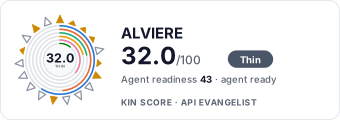 It updates itself when the score changes. Paste this where you link to your API docs: