PowerShell website screenshot

PowerShell

PowerShell is a cross-platform task automation solution made up of a command-line shell, a scripting language, and a configuration management framework. The PowerShell ecosystem exposes APIs through the PowerShell Gallery (an OData-based package repository), the Runspace .NET hosting APIs, and PowerShell Remoting protocols (WS-Management and SSH).

PowerShell publishes 4 APIs on the APIs.io network, including Metadata API, Packages API, Search API, and 1 more. Tagged areas include Automation, Command-Line, Cross-Platform, Scripting, and Shell.

PowerShell’s developer surface includes authentication, GitHub presence, documentation, engineering blog, getting-started guide, release notes, and 10 more developer resources.

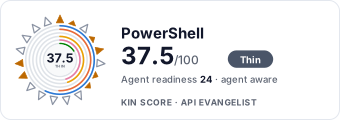
47.2/100 developing ▬ flat Agent 31/100 agent aware Full breakdown ↓
scored 2026-08-05 · rubric v0.9.1
AccessFreemiumSelf serve⚡ Free to try
7 APIs
AutomationCommand-LineCross-PlatformScriptingShellWindowsDevOps

Kin Score

Kin Score Kin Score How this is scored →
scored 2026-08-05 · rubric v0.9.1
Composite quality — 47.2/100 · developing
Contract Quality 14.9 / 25
Developer Ergonomics 7.4 / 20
Commercial Clarity 9.5 / 20
Operational Transparency 8.9 / 13
Governance 0.0 / 12
Discoverability 6.5 / 10
Agent readiness — 31/100 · agent aware
Machine-Readable Contract 18 / 18
Agentic Access Contract 10 / 10
MCP Server 0 / 12
Machine-Readable Auth 10 / 10
Idempotency 0 / 9
Stable Error Semantics 0 / 8
Request/Response Examples 0 / 7
Rate-Limit Signaling 7 / 7
Typed Event Surface 0 / 6
Agent Skills 0 / 5
Well-Known Catalog 0 / 4
Consent & Bot Identity 0 / 3
A2A Agent Card 0 / 8
Dry-Run / Simulate Mode 0 / 4
Improve this rating by publishing the missing artifacts — every area above can be raised, and the full rubric is at apis.io/rating/. This rating is computed from github.com/api-evangelist/powershell: open an issue to ask a question, or submit a pull request to add artifacts. Want it done for you? Prioritized profiling — $2,500 →

APIs 7

Individual APIs this provider publishes, each with its own machine-readable definition.

PowerShell Gallery API

The PowerShell Gallery is the central repository for PowerShell modules, scripts, and DSC resources. It exposes a public OData v2 API for searching, retrieving, and downloading ...

PowerShell Runspace API

.NET APIs for creating, configuring, and managing PowerShell runspaces from host applications. Enables embedding PowerShell execution inside .NET programs.

PowerShell Remoting API

APIs and protocols for remote PowerShell execution over WS-Management (WinRM) and SSH. Enables one-to-one and one-to-many remote command and session management.

PowerShell Metadata API

OData service metadata.

PowerShell Packages API

Browse and retrieve package entries from the Gallery feed.

PowerShell Search API

Search and discovery operations.

PowerShell Updates API

Find updates for installed packages.

Scroll for all 7

Open Collections 1

Open, tool-agnostic API collections (OpenAPI-derived and Bruno).

PowerShell Gallery API

OPEN COLLECTION

Pricing Plans 1

Published pricing tiers and plan structures.

Rate Limits 1

Documented rate limits and quota policies.

Powershell Rate Limits

5 limits

RATE LIMITS

FinOps 1

Cost, billing, and metering signals for API financial operations.

Security Posture 4

Authentication, domain security, vulnerability disclosure, and trust-center signals.

Powershell Authentication

apiKey · 1 scheme

SECURITY

Powershell Domain Security

TLSv1.3 · HSTS · DMARC

SECURITY

Powershell Vulnerability Disclosure

security.txt · contact published

SECURITY

Agentic Access 1

Recommended x-agentic-access execution contracts for AI agents.

Powershell Agentic Access

6 operations

6 operations · 0 acting

AGENTIC

Resources

Get Started 1

Portal, sign-up, and the first successful call

Documentation 1

Reference material describing how the API behaves

Agent Surfaces 1

MCP servers, agent skills, and machine-readable catalogs

Build 1

SDKs, sample code, and the tooling you integrate with

Access & Security 5

Authentication, authorization, and security posture

Operate 3

Status, limits, changes, and where to get help

Commercial 1

Pricing, plans, and the legal terms of use

Company 2

The organization behind the API

Other 1

Properties that don't map to a standard resource type

Source (apis.yml)

apis.yml Raw ↑
aid: powershell
name: PowerShell
description: PowerShell is a cross-platform task automation solution made up of a command-line shell, a scripting language,
  and a configuration management framework. The PowerShell ecosystem exposes APIs through the PowerShell Gallery (an OData-based
  package repository), the Runspace .NET hosting APIs, and PowerShell Remoting protocols (WS-Management and SSH).
type: Index
accessModel:
  pricing: freemium
  onboarding: self-serve
  trial: false
  try_now: true
  public: false
  label: Freemium · Self-serve signup
  confidence: high
  source:
  - plans
  - authentication
  generated: '2026-07-22'
  method: derived
image: https://raw.githubusercontent.com/PowerShell/PowerShell/master/assets/ps_black_64.svg
tags:
- Automation
- Command-Line
- Cross-Platform
- Scripting
- Shell
- Windows
- DevOps
url: https://raw.githubusercontent.com/api-evangelist/powershell/refs/heads/main/apis.yml
created: '2024-01-15'
modified: '2026-04-28'
specificationVersion: '0.19'
apis:
- aid: powershell:powershell-gallery-api
  name: PowerShell Gallery API
  description: The PowerShell Gallery is the central repository for PowerShell modules, scripts, and DSC resources. It exposes
    a public OData v2 API for searching, retrieving, and downloading packages programmatically.
  image: https://www.powershellgallery.com/Content/Images/Branding/psgallerylogo.svg
  humanURL: https://www.powershellgallery.com/
  baseURL: https://www.powershellgallery.com/api/v2
  tags:
  - Modules
  - NuGet
  - Packages
  - Repository
  - OData
  properties:
  - type: Documentation
    url: https://docs.microsoft.com/en-us/powershell/gallery/overview
  - type: Metadata
    url: https://www.powershellgallery.com/api/v2/$metadata
  contact:
  - FN: PowerShell Gallery Support
    url: https://github.com/PowerShell/PowerShellGallery/issues
- aid: powershell:powershell-runspace-api
  name: PowerShell Runspace API
  description: .NET APIs for creating, configuring, and managing PowerShell runspaces from host applications. Enables embedding
    PowerShell execution inside .NET programs.
  humanURL: https://docs.microsoft.com/en-us/dotnet/api/system.management.automation.runspaces
  tags:
  - Automation
  - .NET
  - Runspace
  - SDK
  properties:
  - type: Documentation
    url: https://docs.microsoft.com/en-us/powershell/scripting/developer/hosting/creating-runspaces
  - type: SDKs
    url: https://www.nuget.org/packages/System.Management.Automation/
  - type: Examples
    url: https://github.com/PowerShell/PowerShell/tree/master/test/hosting
- aid: powershell:powershell-remoting-api
  name: PowerShell Remoting API
  description: APIs and protocols for remote PowerShell execution over WS-Management (WinRM) and SSH. Enables one-to-one and
    one-to-many remote command and session management.
  humanURL: https://docs.microsoft.com/en-us/powershell/scripting/learn/remoting/running-remote-commands
  tags:
  - Remoting
  - SSH
  - WinRM
  - WS-Management
  properties:
  - type: Documentation
    url: https://docs.microsoft.com/en-us/powershell/scripting/learn/remoting/powershell-remoting-faq
  - type: ProtocolSpecification
    url: https://docs.microsoft.com/en-us/openspecs/windows_protocols/ms-psrp/
- aid: powershell:powershell-metadata-api
  name: PowerShell Metadata API
  description: OData service metadata.
  humanURL: https://www.powershellgallery.com/
  baseURL: https://www.powershellgallery.com/api/v2
  tags:
  - Metadata
  properties:
  - type: OpenAPI
    url: openapi/powershell-metadata-api-openapi.yml
- aid: powershell:powershell-packages-api
  name: PowerShell Packages API
  description: Browse and retrieve package entries from the Gallery feed.
  humanURL: https://www.powershellgallery.com/
  baseURL: https://www.powershellgallery.com/api/v2
  tags:
  - Packages
  properties:
  - type: OpenAPI
    url: openapi/powershell-packages-api-openapi.yml
- aid: powershell:powershell-search-api
  name: PowerShell Search API
  description: Search and discovery operations.
  humanURL: https://www.powershellgallery.com/
  baseURL: https://www.powershellgallery.com/api/v2
  tags:
  - Search
  properties:
  - type: OpenAPI
    url: openapi/powershell-search-api-openapi.yml
- aid: powershell:powershell-updates-api
  name: PowerShell Updates API
  description: Find updates for installed packages.
  humanURL: https://www.powershellgallery.com/
  baseURL: https://www.powershellgallery.com/api/v2
  tags:
  - Updates
  properties:
  - type: OpenAPI
    url: openapi/powershell-updates-api-openapi.yml
common:
- type: AgenticAccess
  url: agentic-access/powershell-agentic-access.yml
- type: TrustCenter
  url: security/powershell-trust-center.yml
- type: VulnerabilityDisclosure
  url: security/powershell-vulnerability-disclosure.yml
- type: DomainSecurity
  url: security/powershell-domain-security.yml
- type: Authentication
  url: authentication/powershell-authentication.yml
- type: Website
  url: https://microsoft.com/powershell
- type: GitHub
  url: https://github.com/PowerShell/PowerShell
- type: Documentation
  url: https://docs.microsoft.com/en-us/powershell/
- type: Blog
  url: https://devblogs.microsoft.com/powershell/
- type: Community
  url: https://github.com/PowerShell/PowerShell/blob/master/docs/community/README.md
- type: GettingStarted
  url: https://docs.microsoft.com/en-us/powershell/scripting/learn/ps101/01-getting-started
- type: License
  url: https://github.com/PowerShell/PowerShell/blob/master/LICENSE.txt
- type: ReleaseNotes
  url: https://github.com/PowerShell/PowerShell/releases
- type: RoadMap
  url: https://github.com/PowerShell/PowerShell/projects
- type: Security
  url: https://github.com/PowerShell/PowerShell/security/policy
- type: Contributing
  url: https://github.com/PowerShell/PowerShell/blob/master/.github/CONTRIBUTING.md
- type: Integrations
  url: https://www.microsoft.com/en-us/marketplace
integrations:
- name: Microsoft
- name: Two people looking at a computer.
- name: This is placeholder text for
- name: IDC
- name: Nationwide
- name: RSA company
- name: Teleperformance
- name: A woman smiling at a laptop
- name: A man holding a laptop.
maintainers:
- FN: Microsoft
  email: powershell@microsoft.com
  url: https://github.com/PowerShell