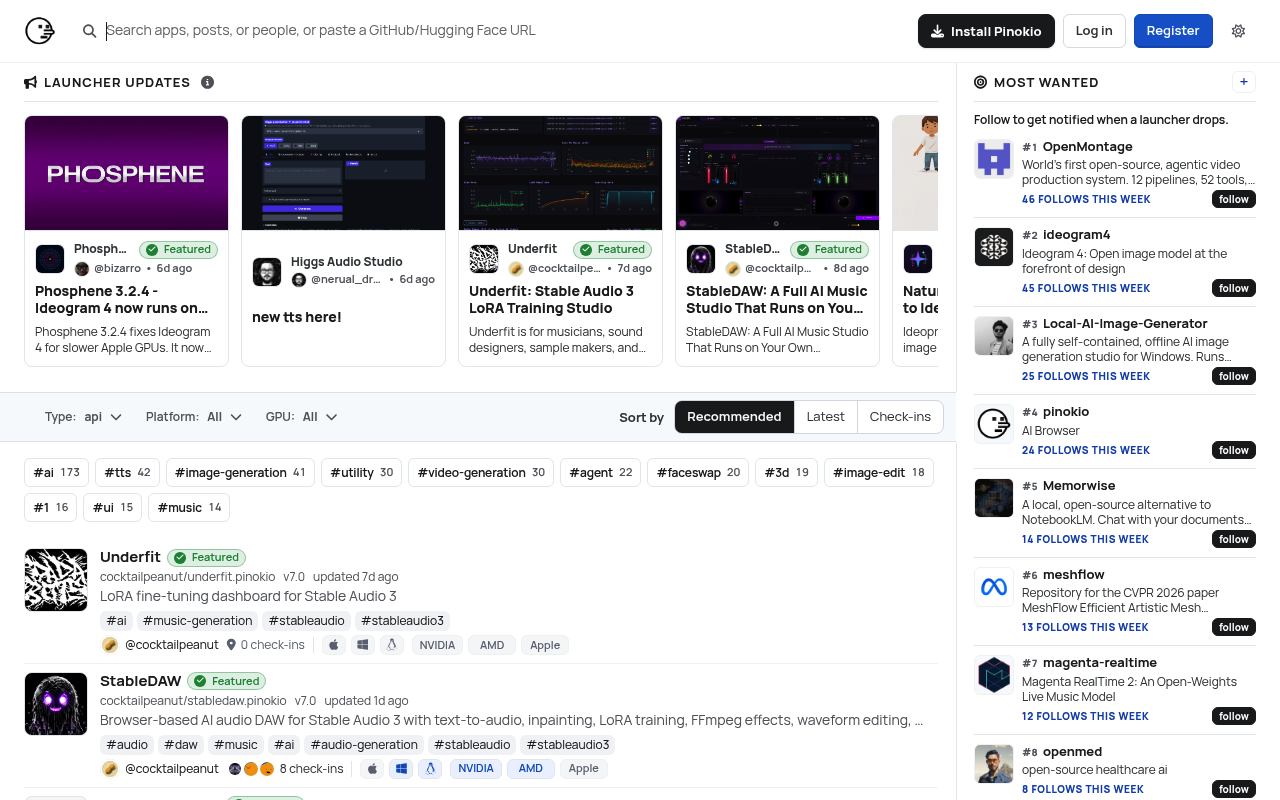
Pinokio website screenshot

Pinokio

Pinokio is an open-source desktop application — self-described as an "AI Browser" — that acts as a 1-click launcher for any open-source AI project. Built by independent developer Cocktail Peanut (cocktailpeanut), Pinokio packages a terminal, package managers (Conda, Homebrew, Pip, NPM), and a graphical UI into a single MIT-licensed desktop app for macOS, Windows, and Linux with NVIDIA, AMD, and Apple Silicon GPU support. Users install AI apps with one click from a curated "Discover" directory of 160+ vetted scripts spanning image generation, video generation, text-to-speech and voice cloning, large language models, 3D generation, music and audio generation, and face swap. Pinokio is driven by a JSON-based scripting language designed to be both human and machine readable, with primitives like shell.run, fs, input, log, jump, hf (Hugging Face), notify, browser, and json that let publishers describe install and launch flows declaratively. Each script is sandboxed under ~/pinokio with isolated paths and Python virtual environments, and featured scripts must transfer ownership to the Pinokio Factory GitHub organization for admin review. Pinokio is purely client-side open source — there is no public REST API, no hosted commercial offering, and no developer SDK beyond the local script syntax and the desktop app itself.

Pinokio is profiled on the APIs.io network. Tagged areas include AI Launcher, AI Browser, Local AI, Open-Source, and Desktop Application.

Pinokio’s developer surface includes documentation, GitHub presence, release notes, privacy policy, and 19 more developer resources.

12.9/100 emerging ▬ flat Agent 0/100 human only Full breakdown ↓
scored 2026-09-08 · rubric v0.20.0
0 APIs
AI LauncherAI BrowserLocal AIOpen-SourceDesktop ApplicationScript RunnerOne-Click InstallImage-GenerationVideo GenerationLarge Language ModelsText-to-SpeechVoice CloningHugging FaceLlamaDiscover DirectoryJSON Scripting

Kin Score

Kin Score Kin Score How this is scored →
scored 2026-09-08 · rubric v0.20.0
Create-or-Update Ergonomics could not be measured. We hold no machine-readable contract for this provider to read, so there is nothing to measure a write surface against. Excluded rather than scored zero: never-measured and measured-empty are different facts. Publishing an OpenAPI is what makes this facet — and several others — scorable at all.
Improve this rating by publishing the missing artifacts — every area above can be raised, and the full rubric is at apis.io/rating/. Every facet and dimension name above is a link: it opens that measurement's own page — what it means, the exact checks that feed it, how the whole catalog distributes on it, and the providers at the top of it. This rating is computed from github.com/api-evangelist/pinokio-computer: open an issue to ask a question, or submit a pull request to add artifacts. Submit an artifact on GitHub — free → Manage your own listing — the Influence plan, $499/mo →

Security Posture 1

Authentication, domain security, vulnerability disclosure, and trust-center signals.

Pinokio Computer Domain Security

TLSv1.3 · DMARC

SECURITY

Resources

Documentation 3

Reference material describing how the API behaves

Build 2

SDKs, sample code, and the tooling you integrate with

Access & Security 1

Authentication, authorization, and security posture

Operate 2

Status, limits, changes, and where to get help

Commercial 3

Pricing, plans, and the legal terms of use

Company 4

The organization behind the API

Other 8

Properties that don't map to a standard resource type

Scroll for all 8

Source (apis.yml)

apis.yml Raw ↑
aid: pinokio-computer
name: Pinokio
description: Pinokio is an open-source desktop application — self-described as an "AI Browser" — that acts as a 1-click launcher
  for any open-source AI project. Built by independent developer Cocktail Peanut (cocktailpeanut), Pinokio packages a terminal,
  package managers (Conda, Homebrew, Pip, NPM), and a graphical UI into a single MIT-licensed desktop app for macOS, Windows,
  and Linux with NVIDIA, AMD, and Apple Silicon GPU support. Users install AI apps with one click from a curated "Discover"
  directory of 160+ vetted scripts spanning image generation, video generation, text-to-speech and voice cloning, large language
  models, 3D generation, music and audio generation, and face swap. Pinokio is driven by a JSON-based scripting language designed
  to be both human and machine readable, with primitives like shell.run, fs, input, log, jump, hf (Hugging Face), notify,
  browser, and json that let publishers describe install and launch flows declaratively. Each script is sandboxed under ~/pinokio
  with isolated paths and Python virtual environments, and featured scripts must transfer ownership to the Pinokio Factory
  GitHub organization for admin review. Pinokio is purely client-side open source — there is no public REST API, no hosted
  commercial offering, and no developer SDK beyond the local script syntax and the desktop app itself.
type: Index
deliveryModel:
  model: unknown
  open_source: unknown
  commercial: true
  callable_host: false
  label: Delivery model not determined — needs a product licence on record
  confidence: low
  source:
  - pricing
  - repository-unlicensed
  generated: '2026-08-28'
  method: derived
accessModel:
  pricing: unknown
  onboarding: unknown
  trial: false
  try_now: false
  public: false
  label: Unknown
  confidence: low
  source: []
  generated: '2026-07-22'
  method: derived
position: Producing
access: 3rd-Party
image: https://kinlane-images.s3.amazonaws.com/shared/apis-json/icons/pinokio-computer.png
tags:
- AI Launcher
- AI Browser
- Local AI
- Open-Source
- Desktop Application
- Script Runner
- One-Click Install
- Image-Generation
- Video Generation
- Large Language Models
- Text-to-Speech
- Voice Cloning
- Hugging Face
- Llama
- Discover Directory
- JSON Scripting
tags_raw:
- AI Launcher
- AI Browser
- Local AI
- Open Source
- Desktop Application
- Script Runner
- One-Click Install
- Image Generation
- Video Generation
- Large Language Models
- Text To Speech
- Voice Cloning
- Hugging Face
- Llama
- Discover Directory
- JSON Scripting
url: https://raw.githubusercontent.com/api-evangelist/pinokio-computer/refs/heads/main/apis.yml
created: '2026-05-25'
modified: '2026-05-25'
specificationVersion: '0.23'
apis: []
common:
- type: IssueTracker
  url: https://github.com/pinokiocomputer/pinokio/issues
- type: DomainSecurity
  url: security/pinokio-computer-domain-security.yml
- type: Website
  url: https://pinokio.co
- type: LegacyWebsite
  url: https://pinokio.computer
- type: Download
  url: https://desktop.pinokio.co
- type: Documentation
  url: https://program.pinokio.computer
- type: LegacyDocumentation
  url: https://docs.pinokio.computer
- type: GitHub
  url: https://github.com/pinokiocomputer
- type: SourceCode
  url: https://github.com/pinokiocomputer/pinokio
- type: ReleaseNotes
  url: https://github.com/pinokiocomputer/pinokio/releases
- type: ScriptDirectory
  url: https://pinokio.co/discover
- type: ScriptPolicy
  url: https://github.com/pinokiocomputer/pinokio#script-policy
- type: Backend
  url: https://github.com/pinokiocomputer/pinokiod
- type: SystemProgramming
  url: https://github.com/pinokiocomputer/psp
- type: LlamaProxy
  url: https://github.com/pinokiocomputer/llamanet
- type: Gepeto
  url: https://github.com/pinokiocomputer/gepeto
- type: Factory
  url: https://github.com/pinokiocomputer/factory
- type: ProgramDocsRepo
  url: https://github.com/pinokiocomputer/program.pinokio.computer
- type: License
  url: https://github.com/pinokiocomputer/pinokio/blob/main/LICENSE
- type: Privacy
  url: https://pinokio.co/privacy
- type: TermsOfService
  url: https://pinokio.co/terms
- type: Twitter
  url: https://x.com/cocktailpeanut
- type: MaintainerTwitter
  url: https://twitter.com/cocktailpeanut
maintainers:
- FN: Kin Lane
  email: kin@apievangelist.com

Work with this as data

Every provider here is available over the APIs.io API and to AI agents over MCP.

MCP server

One button, every client — Claude, Cursor, VS Code and the rest.

https://apis.io/mcp

Tools for providers

9 MCP tools reach this
  • find_providersBrowse and filter every provider in the catalog.
  • get_provider_artifactsEvery artifact this provider publishes, grouped by type.
  • get_provider_operationsEvery operation across all of their OpenAPIs — one call instead of parsing every spec.
  • get_provider_toolsEvery MCP tool they ship, with the operation each wraps.
  • get_provider_evidenceHow each part of their score was established. Free — the basis for a claim should not sit behind it.
  • get_provider_ratingPRO — composite, band, trend and facet scores.
  • apis_io_searchSTART HERE — APIs, providers and tags for one query, each with its total.
  • resolveTurn a domain, URL or GitHub org into the provider it belongs to.
  • find_cohortsEvery scored population of providers in the catalog.
All 92 tools →

Call it yourself

curl for this page
This provider
curl "https://apis.io/api/v1/providers/pinokio-computer"
All providers
curl "https://apis.io/api/v1/providers?limit=25"
Every operation they expose
curl "https://apis.io/api/v1/providers/pinokio-computer/operations?limit=25"
How their score was established
curl "https://apis.io/api/v1/providers/pinokio-computer/evidence"

Discovery needs no key. Ratings and market analysis are Pro.

Get an API key

Free tier, no form to fill in. Signing in shares your email address with us — we store it to create your key and to recognise you if you sign in with another provider. See our Privacy Policy and Terms.

A second provider on the same verified email joins the account you already have.
