Nixpacks
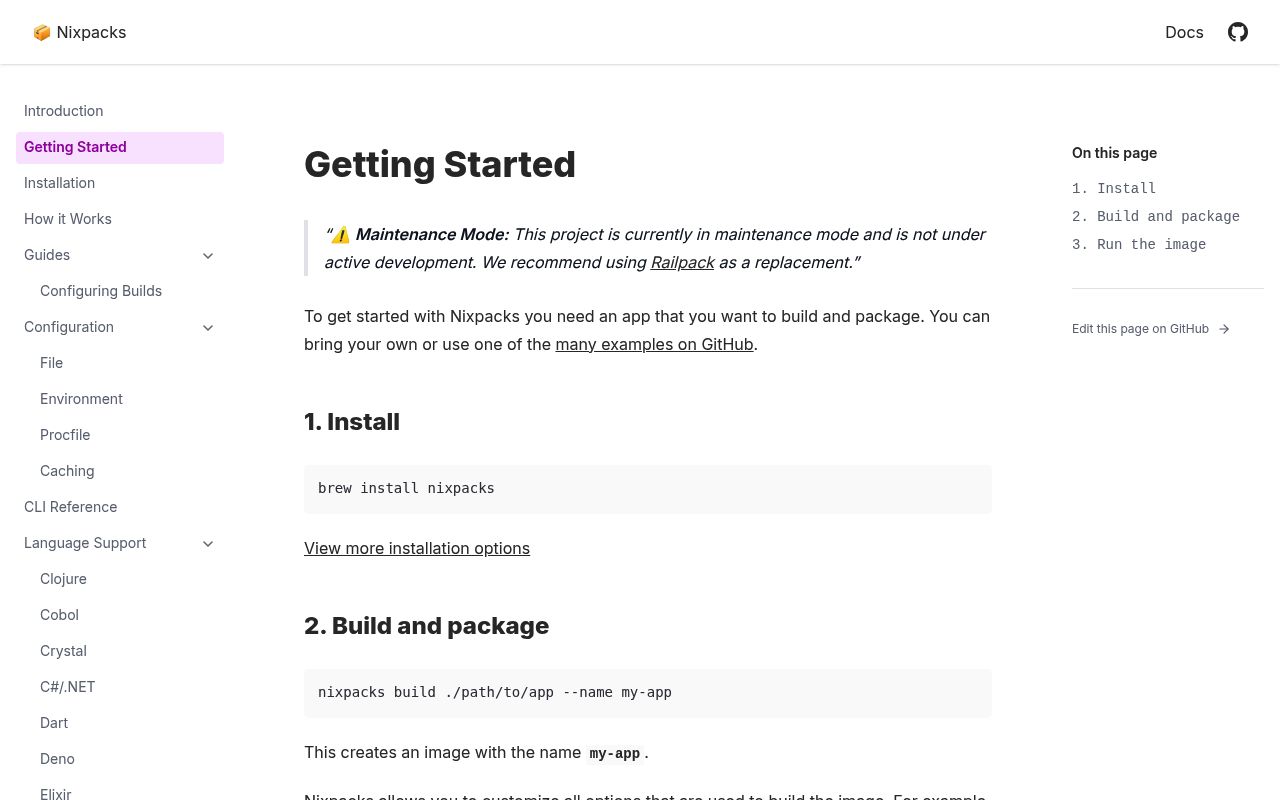
Nixpacks is an open-source build tool that converts application source code into OCI-compliant Docker images by combining language-specific providers, Nix packages, and Buildkit. Originally created by Railway as the build system powering the Railway platform, Nixpacks inspects a project's source, selects one or more providers (Node, Python, Ruby, Go, Java, Rust, PHP, Elixir, Deno, Crystal, .NET, Swift, Scala, Dart, Haskell, Gleam, Zig, Clojure, Lunatic, Cobol, Scheme, F#, Staticfile, and more), and produces a reproducible build plan composed of setup, install, build, and start phases. The plan declares Nix packages, apt packages, environment variables, commands, and cache directories, and can be customized via a `nixpacks.toml` file, CLI flags, or environment variables. Compared with Cloud Native Buildpacks, Nixpacks uses Nix as its package layer, ships as a single Rust CLI, and outputs a plain Dockerfile/OCI image without requiring a buildpack lifecycle. The project is MIT licensed and currently in maintenance mode; Railway recommends Railpack as the actively developed successor.
Nixpacks is listed with 5 APIs on the APIs.io network. Tagged areas include Build Tools, Cloud Native Buildpacks, Docker, OCI, and Nix.
Nixpacks’ developer surface includes documentation, getting-started guide, changelog, and 13 more developer resources.
5 APIs
Individual APIs this provider publishes, each with its own machine-readable definition.
Authentication, domain security, vulnerability disclosure, and trust-center signals.
aid: nixpacks
name: Nixpacks
description: Nixpacks is an open-source build tool that converts application source code into OCI-compliant Docker images
  by combining language-specific providers, Nix packages, and Buildkit. Originally created by Railway as the build system
  powering the Railway platform, Nixpacks inspects a project's source, selects one or more providers (Node, Python, Ruby,
  Go, Java, Rust, PHP, Elixir, Deno, Crystal, .NET, Swift, Scala, Dart, Haskell, Gleam, Zig, Clojure, Lunatic, Cobol, Scheme,
  F#, Staticfile, and more), and produces a reproducible build plan composed of setup, install, build, and start phases. The
  plan declares Nix packages, apt packages, environment variables, commands, and cache directories, and can be customized
  via a `nixpacks.toml` file, CLI flags, or environment variables. Compared with Cloud Native Buildpacks, Nixpacks uses Nix
  as its package layer, ships as a single Rust CLI, and outputs a plain Dockerfile/OCI image without requiring a buildpack
  lifecycle. The project is MIT licensed and currently in maintenance mode; Railway recommends Railpack as the actively developed
  successor.
url: https://raw.githubusercontent.com/api-evangelist/nixpacks/refs/heads/main/apis.yml
deliveryModel:
  model: unknown
  license: MIT License
  open_source: false
  commercial: false
  callable_host: false
  label: Delivery model not determined — needs a product licence on record
  confidence: low
  source:
  - license
  generated: '2026-08-28'
  method: derived
accessModel:
  pricing: unknown
  onboarding: unknown
  trial: false
  try_now: false
  public: false
  label: Unknown
  confidence: low
  source: []
  generated: '2026-07-22'
  method: derived
image: https://kinlane-images.s3.amazonaws.com/shared/apis-json/icons/nixpacks.png
type: Index
position: Consuming
access: 3rd-Party
tags:
- Build Tools
- Cloud Native Buildpacks
- Docker
- OCI
- Nix
- Nixpkgs
- Container Images
- Application Packaging
- Railway
- Open Source
- Rust
- DevOps
- Platform Engineering
- Platform-as-a-Service
tags_raw:
- Build Tool
- Buildpacks
- Docker
- OCI
- Nix
- Nixpkgs
- Container Image
- Application Packaging
- Railway
- Open Source
- Rust
- DevOps
- Platform Engineering
- PaaS
- Open-Source
created: '2026-05-24'
modified: '2026-05-24'
specificationVersion: '0.23'
apis:
- aid: nixpacks:cli
  name: Nixpacks CLI
  description: The Nixpacks command-line interface is the primary interface for generating build plans and producing Docker
    images from application source. Core commands include `nixpacks plan` (emit the JSON build plan that would be used), `nixpacks
    build` (produce an OCI image via Docker BuildKit), and `nixpacks detect` (identify which providers match the source directory).
    The CLI accepts inline overrides for install, build, and start commands, Nix and apt packages, environment variables,
    the base build image, and a separate runtime image, and is distributed as a single Rust binary via Homebrew, install script,
    Docker image, and GitHub releases.
  humanURL: https://nixpacks.com/docs/cli
  tags:
  - CLI
  - Builds
  - Plan
  - Detect
  tags_raw:
  - CLI
  - Build
  - Plan
  - Detect
  properties:
  - type: Documentation
    url: https://nixpacks.com/docs/cli
  - type: GettingStarted
    url: https://nixpacks.com/docs/getting-started
  - type: SourceCode
    url: https://github.com/railwayapp/nixpacks
  - type: Install
    url: https://nixpacks.com/docs/install
- aid: nixpacks:build-plan
  name: Nixpacks Build Plan
  description: The Nixpacks build plan is the JSON representation of how a source directory will be turned into a container
    image. A plan declares the list of providers used, top-level `variables`, `staticAssets`, `buildImage`, and an ordered
    set of phases (`setup`, `install`, `build`, plus any provider- or user-defined phases) along with a `start` phase. Each
    phase carries `cmds`, `nixPkgs`, `nixLibs`, `nixOverlays`, `nixpkgsArchive`, `aptPkgs`, `dependsOn`, `cacheDirectories`,
    `onlyIncludeFiles`, and `paths`. Plans can be saved and replayed via `nixpacks build --plan plan.json` to guarantee reproducible
    image builds.
  humanURL: https://nixpacks.com/docs/how-it-works
  tags:
  - Build Plan
  - JSON
  - Phases
  - Reproducible Builds
  properties:
  - type: Documentation
    url: https://nixpacks.com/docs/how-it-works
  - type: Reference
    url: https://nixpacks.com/docs/configuration/file
- aid: nixpacks:configuration-file
  name: Nixpacks Configuration File (nixpacks.toml)
  description: Projects can override or extend the auto-detected build plan by committing a `nixpacks.toml` (or `nixpacks.json`)
    file at the root of the repository. The configuration file mirrors the build-plan structure with top-level `providers`,
    `buildImage`, `variables`, and `staticAssets`, a `[phases.<name>]` table for each phase carrying `cmds`, `nixPkgs`, `nixLibs`,
    `aptPkgs`, `dependsOn`, `cacheDirectories`, `onlyIncludeFiles`, and `paths`, and a `[start]` table for `cmd`, `runImage`,
    and runtime-only file inclusion. The `"..."` token can be used inside array fields to extend rather than replace provider-supplied
    values.
  humanURL: https://nixpacks.com/docs/configuration/file
  tags:
  - Configuration
  - TOML
  - Phases
  - Customization
  properties:
  - type: Documentation
    url: https://nixpacks.com/docs/configuration/file
  - type: Reference
    url: https://nixpacks.com/docs/configuration/environment
- aid: nixpacks:providers
  name: Nixpacks Language Providers
  description: Providers are the pluggable modules that detect a language or framework in the source directory and contribute
    their portion of the build plan. Nixpacks ships with providers for Node (npm, pnpm, Yarn, Bun), Python (pip, Poetry, PDM,
    uv), Ruby, Go, Java (Gradle, Maven), Rust, PHP, Elixir, Deno, Crystal, C#/.NET, Swift, Scala, Dart, Haskell, Gleam, Zig,
    Clojure, Lunatic, Cobol, Scheme, F#, and a Staticfile provider for purely static sites. Each provider declares the Nix
    packages, install commands, build commands, and default start command appropriate to its ecosystem; multiple providers
    can compose in a single image (for example, a Node frontend with a Python backend).
  humanURL: https://nixpacks.com/docs/providers
  tags:
  - Providers
  - Detection
  - Language
  - Framework
  tags_raw:
  - Providers
  - Detection
  - Languages
  - Frameworks
  properties:
  - type: Documentation
    url: https://nixpacks.com/docs/providers
  - type: SourceCode
    url: https://github.com/railwayapp/nixpacks/tree/main/src/providers
- aid: nixpacks:github-action
  name: Nixpacks GitHub Action
  description: The official `iloveitaly/github-action-nixpacks` GitHub Action wraps the Nixpacks CLI so that CI pipelines
    can build and optionally push OCI images directly from a workflow without installing Nixpacks manually. The action accepts
    the same overrides as the CLI (image tags, platform, push target, plan path, environment variables) and is commonly paired
    with Docker login actions to publish images to GitHub Container Registry, Docker Hub, or any OCI-compliant registry.
  humanURL: https://github.com/iloveitaly/github-action-nixpacks
  tags:
  - GitHub Actions
  - CI/CD
  - Builds
  - Container Images
  tags_raw:
  - GitHub Actions
  - CI/CD
  - Build
  - Container Image
  properties:
  - type: SourceCode
    url: https://github.com/iloveitaly/github-action-nixpacks
  - type: Documentation
    url: https://nixpacks.com/docs/guides/github-actions
common:
- type: ContributionGuide
  url: https://github.com/railwayapp/nixpacks/blob/main/CONTRIBUTING.md
- type: DomainSecurity
  url: security/nixpacks-domain-security.yml
- type: Website
  name: Nixpacks Website
  description: Official Nixpacks marketing and documentation site.
  url: https://nixpacks.com
- type: Documentation
  name: Nixpacks Documentation
  description: Full Nixpacks documentation covering install, CLI, providers, configuration, and how it works.
  url: https://nixpacks.com/docs
- type: GettingStarted
  name: Nixpacks Getting Started
  description: Quickstart for installing Nixpacks and building your first image from a source directory.
  url: https://nixpacks.com/docs/getting-started
- type: Install
  name: Nixpacks Install Guide
  description: Installation instructions across Homebrew, the install script, Docker image, and GitHub release binaries.
  url: https://nixpacks.com/docs/install
- type: GitHubOrganization
  name: Railway GitHub Organization
  description: GitHub organization that owns Nixpacks and the broader Railway open-source ecosystem.
  url: https://github.com/railwayapp
- type: GitHubRepository
  name: Nixpacks GitHub Repository
  description: Primary source repository for the Nixpacks Rust CLI, language providers, and tests.
  url: https://github.com/railwayapp/nixpacks
- type: SourceCode
  name: Nixpacks Source
  description: Rust source code for the Nixpacks CLI, build planner, and language providers.
  url: https://github.com/railwayapp/nixpacks
- type: License
  name: MIT License
  description: Nixpacks is distributed under the MIT License.
  url: https://github.com/railwayapp/nixpacks/blob/main/LICENSE
- type: Issues
  name: Nixpacks Issues
  description: GitHub issue tracker for Nixpacks bug reports and feature requests.
  url: https://github.com/railwayapp/nixpacks/issues
- type: ChangeLog
  name: Nixpacks Releases
  description: Release notes and version history for the Nixpacks CLI.
  url: https://github.com/railwayapp/nixpacks/releases
- type: ContainerImage
  name: Nixpacks Docker Image
  description: Official Docker image for running Nixpacks in CI and other containerized environments.
  url: https://github.com/railwayapp/nixpacks/pkgs/container/nixpacks
- type: Provider
  name: Railway
  description: Railway, the PaaS that originated Nixpacks and uses it to build user applications.
  url: https://railway.app
- type: Successor
  name: Railpack
  description: Railpack, Railway's actively developed successor to Nixpacks.
  url: https://github.com/railwayapp/railpack
- type: Twitter
  name: Railway on Twitter/X
  description: Railway's social account, the primary public channel for Nixpacks announcements.
  url: https://twitter.com/Railway
maintainers:
- FN: Kin Lane
  email: kin@apievangelist.com
Every provider here is available over the APIs.io API and to AI agents over MCP.
 Kin Score
How this is scored →
Kin Score
How this is scored → It updates itself when the score changes. Paste this where you link to your API docs: