Formbricks
Formbricks is an open-source experience management and survey platform (a privacy-first Typeform / Qualtrics alternative). Its REST API lets you create and manage surveys, collect and query responses, manage contacts and their attributes, and wire up webhooks, with a Public Client API (no auth) for survey delivery and a Management API authenticated with an x-api-key header.
Formbricks publishes 7 API contracts indexed on the APIs.io network, including Action Classes API, Client API, Contacts API, and 4 more. Tagged areas include Surveys, Experience Management, Feedback, Forms, and Open Source.
The Formbricks catalog on APIs.io includes 1 Spectral governance ruleset.
Formbricks’ developer surface includes authentication, documentation, engineering blog, and 10 more developer resources.
What this lets a business do 2
Business capabilities this provider's published APIs can perform, derived from its own contracts. Browse all capabilities →
Kin Score
 Kin Score
How this is scored →
Kin Score
How this is scored →scored 2026-10-23 · rubric v0.25.0
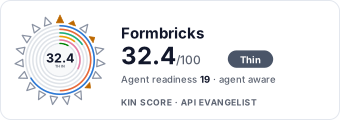 It updates itself when the score changes. Paste this where you link to your API docs:
<a href="https://apis.io/providers/formbricks/"><img src="https://apis.io/badge/formbricks/card.svg" alt="Formbricks on APIs.io — Kin Score by API Evangelist"></a>Other styles, a README pill and a shields.io endpoint are on the badge page.
Markets this provider is in provisional
The Kin Score Market layer reads a provider inside its market: its position, and how deep its integrations go. Depth is only comparable within a position. Provisional and unweighted: not part of the Kin Score or agent readiness.
| Market | Position | Depth | Registered MCP server | Declares compatibility |
|---|---|---|---|---|
| Surveys, Market Research and Experience Management | undeclared | - | - | 1 |
Registered MCP server and declares compatibility are report only — not weighted. Undeclared means we found nothing we can read, so there is no number: we never infer integrations.
APIs 7
Individual APIs this provider publishes, each with its own machine-readable definition.
Formbricks Action Classes API
Define code and no-code actions that trigger in-product surveys.
Formbricks Client API
Public unauthenticated Client API used by survey front-ends.
Formbricks Contacts API
Manage contacts and contact attribute keys.
Formbricks Me API
Account and environment information for an API key.
Formbricks Responses API
Create, query, and manage survey responses.
Formbricks Surveys API
Create and manage surveys.
Formbricks Webhooks API
Real-time HTTP notifications for response events.
Scroll for all 7
Open Collections 8
Open, tool-agnostic API collections (OpenAPI-derived and Bruno).
Formbricks Action Classes API
OPEN COLLECTIONFormbricks Action Classes Client API
OPEN COLLECTIONFormbricks Action Classes Contacts API
OPEN COLLECTIONFormbricks Action Classes Me API
OPEN COLLECTIONFormbricks Action Classes Responses API
OPEN COLLECTIONFormbricks Action Classes Surveys API
OPEN COLLECTIONFormbricks Action Classes Webhooks API
OPEN COLLECTIONFormbricks API
OPEN COLLECTIONScroll for all 8
Pricing Plans 1
Published pricing tiers and plan structures.
Rate Limits 1
Documented rate limits and quota policies.
Formbricks Rate Limits
RATE LIMITSFinOps 1
Cost, billing, and metering signals for API financial operations.
Formbricks Finops
FINOPSSpectral Rules 1
Spectral governance rulesets for linting and validating these APIs.
Formbricks — hub rules
SPECTRALSecurity Posture 2
Authentication, domain security, vulnerability disclosure, and trust-center signals.
Agentic Access 1
Recommended x-agentic-access execution contracts for AI agents.
Resources
Documentation 1
Reference material describing how the API behaves
Agent Surfaces 1
MCP servers, agent skills, and machine-readable catalogs
Design & Contract 1
Pagination, idempotency, versioning, errors, and events
Build 1
SDKs, sample code, and the tooling you integrate with
Access & Security 2
Authentication, authorization, and security posture
Operate 1
Status, limits, changes, and where to get help
Commercial 2
Pricing, plans, and the legal terms of use
Company 3
The organization behind the API
Other 1
Properties that don't map to a standard resource type
Source (apis.yml)
Work with this as data
Every provider here is available over the APIs.io API and to AI agents over MCP.