Billie is a fintech platform that provides B2B payment solutions, enabling businesses to buy now and pay later, invoice financing, and flexible checkout options. It serves over 1.3 million buyers and 9,000 merchants across Europe, processing billions in transaction volume. The service includes integration via APIs for order creation, payment processing, and refunds, with support for multiple payment methods and partner integrations.
Billieio publishes 6 API contracts indexed on the APIs.io network, including Authentication API, Back-end Order Creation API, Captures API, and 3 more. Tagged areas include Fintech, Payments, B2B, and Europe.
The Billieio catalog on APIs.io includes 1 event-driven AsyncAPI specification, 1 JSON-LD context, and 1 Spectral governance ruleset.
Billieio’s developer surface includes authentication, support, API reference, documentation, and 21 more developer resources.
Regulatory Posture applies to this provider. Its tags matched the
Payments regime, so
Regulatory Posture carries 15 points of the composite.
If this regime is wrong for your business, say so on your
provider repo — the
applicability map is public and we will correct it.
Create-or-Update Ergonomics applies to this provider. This API accepts writes, so it
carries 10 points of the composite. It is scored from the published contracts
themselves: whether a caller can create-or-update in one call, whether the write accepts a key the caller already
holds, and whether the response says which branch ran. Without that, every write needs a search-and-branch in
front of it, and the first time that check is skipped a duplicate record is created.
Scored against the observed mean rather than raw — a provider at the catalog average is unchanged by this facet,
not penalised by it.
The six quality facets above are damped to 75 points between them,
because the conditional facet above carries the other
25. That is why each facet's contribution is shown against a damped
maximum: raising a quality facet moves the composite by 75% of its nominal
weight, not 100%. The full arithmetic is at apis.io/rating/.
Show this score on your site.
It updates itself when the score changes. Paste this where you link to your API docs:
<a href="https://apis.io/providers/billieio/"><img src="https://apis.io/badge/billieio/card.svg" alt="Billieio on APIs.io — Kin Score by API Evangelist"></a>
Other styles, a README pill and a shields.io endpoint are on the badge page.
Improve this rating by publishing the missing artifacts — every area above can be raised, and the full rubric is at apis.io/rating/. Every facet and dimension name above is a link: it opens that measurement's own page — what it means, the exact checks that feed it, how the whole catalog distributes on it, and the providers at the top of it. This rating is computed from github.com/api-evangelist/billieio: open an issue to ask a question, or submit a pull request to add artifacts.
Submit an artifact on GitHub — free →Manage your own listing — the Influence plan, $499/mo →
This API uses OAuth 2.0 for secure authentication. Different keys are used for the `sandbox` and `production` environments. Both systems operate completely independent, however ...
## To integrate the Billie checkout widget, the following steps are required: 1. Add the Billie checkout widget bundle to your checkout page 2. Provide config data _(with the `s...
aid: billieio
name: Billieio
description: Billie is a fintech platform that provides B2B payment solutions, enabling businesses to buy now and pay later,
  invoice financing, and flexible checkout options. It serves over 1.3 million buyers and 9,000 merchants across Europe, processing
  billions in transaction volume. The service includes integration via APIs for order creation, payment processing, and refunds,
  with support for multiple payment methods and partner integrations.
url: https://raw.githubusercontent.com/api-evangelist/billieio/refs/heads/main/apis.yml
x-type: company
x-source: harvest:secondary-market
x-tier: profiled
x-tier-reason: enrichment pass 2026-09-28 (modular-v1; was harvest)
specificationVersion: '0.20'
created: '2026-09-28'
modified: '2026-09-28'
x-docs-platform: readme
x-docs-platform-confidence: high
x-docs-platform-checked: 2026-10-03
tags:
- Fintech
- Payments
- B2B
- Europe
tags_raw:
- Fintech
- Payments
- B2B
- API
- Europe
maintainers:
- FN: Kin Lane
  email: kin@apievangelist.com
- FN: APIs.json
  email: info@apis.io
common:
- type: AgenticAccess
  url: agentic-access/billieio-agentic-access.yml
- type: Spectral
  url: rules/billieio-rules.yml
- type: JSONLD
  url: json-ld/billieio-context.jsonld
- type: Vocabulary
  url: vocabulary/billieio-vocabulary.yml
- type: DataModel
  url: data-model/billieio-data-model.yml
- type: ErrorCatalog
  url: errors/billieio-problem-types.yml
- type: Conformance
  url: conformance/billieio-conformance.yml
- type: OAuthScopes
  url: scopes/billieio-scopes.yml
- type: SecurityTxt
  url: well-known/billieio-www-security.txt
- type: Vendors
  url: vendors/billieio-vendors.yml
- type: Webhooks
  url: asyncapi/billieio-webhooks.yml
- type: Security
  url: https://billie.io/coordinated-vulnerability-disclosure-policy
- type: Authentication
  url: authentication/billieio-authentication.yml
- type: LLMsTxt
  url: llms/billieio-llms.txt
- type: SecurityTxt
  url: well-known/billieio-status-security.txt
- type: SecurityTxt
  url: well-known/billieio-security.txt
- type: WellKnown
  url: well-known/billieio-well-known.yml
- type: Hosts
  url: hosts/billieio-hosts.yml
- type: Support
  url: https://help.billie.io/s/?language=en_US
- type: StatusPage
  url: https://status.billie.io/
- type: APIReference
  url: https://docs.billie.io/reference
- type: Documentation
  url: https://docs.billie.io/
- type: VulnerabilityDisclosure
  url: security/billieio-vulnerability-disclosure.yml
- type: DomainSecurity
  url: security/billieio-domain-security.yml
- type: Website
  url: https://www.billie.io
apis:
- name: Billie API
  description: API reference for Billie payment integration
  humanURL: https://docs.billie.io/reference
  baseURL: null
  aid: billieio:billie-api
- aid: billieio:billieio-authentication-api
  name: Billieio Authentication API
  description: "This API uses OAuth 2.0 for secure authentication. \n\nDifferent keys are used for the `sandbox` and `production`\
    \ environments. Both systems operate completely independent, however both show largely \nthe same response behaviour.\
    \ The major difference is that sandbox does not trigger any payment events (payout to merchant, repayment \nby debtors,\
    \ etc.). To obtain your credentials for both environments please contact Billie's merchant integration support \nvia telephone\
    \ ( [+49-30-120872485](tel:+4930120872485) ) or email ( pad@billie.io ).\n\nThis authentication mechanism is based on\
    \ the OAuth 2.0 protocol and requires a Client ID and a Client Secret Key (client credentials).\n\nBefore triggering any\
    \ API call, a so called JSON web token (JWT) must be requested through the `oauth/token` endpoint described below\nby\
    \ using your client credentials.\nIn all following requests / API calls, this JWT token is used for authorization and\
    \ must be passed as type \"Bearer\" token \nin the Authorization header. Example: `Authorization: Bearer eyJhbGciOiJIUzI...`\n\
    \nRenewal of the bearer token / JWT:\n\nEvery token expires automatically after 8 hours. After expiration of an existing\
    \ token a new token must be requested through the \n`POST oauth/token` endpoint. Implementation best practice is to always\
    \ try sending API calls first with the previously stored token. \nSending API calls with an expired token will be answered\
    \ with an `HTTP 401` (Unauthorized request or invalid credentials) response.\n\nAfter receiving the `401` error you will\
    \ simply need to request a new token by triggering again the `oauth/token` endpoint. \nAfter receiving the new valid token,\
    \ resend the previously failed API call. This procedure allows for optimal API interaction, \nensures reduced system load\
    \ on both ends, and is easy to implement as you don't need to keep track of token expiration times.\n\nThere is another\
    \ endpoint available for checking if a token is still valid or not: `GET oauth/token`."
  humanURL: https://docs.billie.io/reference
  tags:
  - Authentication
  properties:
  - type: OpenAPI
    url: openapi/billieio-authentication-api-openapi.yml
  - type: JSONSchema
    url: json-schema/billieio-hpp-checkout-session-ecommerce-schema.json
  - type: JSONSchema
    url: json-schema/billieio-hpp-checkout-session-telesales-schema.json
  - type: JSONSchema
    url: json-schema/billieio-hpp-checkout-session-instore-schema.json
  - type: JSONSchema
    url: json-schema/billieio-get-invoice-response-schema.json
  - type: JSONSchema
    url: json-schema/billieio-order-schema.json
  - type: JSONSchema
    url: json-schema/billieio-create-order-request-schema.json
- aid: billieio:billieio-back-end-order-creation-api
  name: Billieio Back-end Order Creation API
  description: The Back-end Order Creation API from Billieio — 2 operation(s) for back-end order creation.
  humanURL: https://docs.billie.io/reference
  tags:
  - Back-end Order Creation
  properties:
  - type: OpenAPI
    url: openapi/billieio-back-end-order-creation-api-openapi.yml
  - type: JSONSchema
    url: json-schema/billieio-hpp-checkout-session-ecommerce-schema.json
  - type: JSONSchema
    url: json-schema/billieio-hpp-checkout-session-telesales-schema.json
  - type: JSONSchema
    url: json-schema/billieio-hpp-checkout-session-instore-schema.json
  - type: JSONSchema
    url: json-schema/billieio-get-invoice-response-schema.json
  - type: JSONSchema
    url: json-schema/billieio-order-schema.json
  - type: JSONSchema
    url: json-schema/billieio-create-order-request-schema.json
- aid: billieio:billieio-captures-api
  name: Billieio Captures API
  description: The Captures API from Billieio — 5 operation(s) for captures.
  humanURL: https://docs.billie.io/reference
  tags:
  - Capture
  tags_raw:
  - Captures
  properties:
  - type: OpenAPI
    url: openapi/billieio-captures-api-openapi.yml
  - type: JSONSchema
    url: json-schema/billieio-hpp-checkout-session-ecommerce-schema.json
  - type: JSONSchema
    url: json-schema/billieio-hpp-checkout-session-telesales-schema.json
  - type: JSONSchema
    url: json-schema/billieio-hpp-checkout-session-instore-schema.json
  - type: JSONSchema
    url: json-schema/billieio-get-invoice-response-schema.json
  - type: JSONSchema
    url: json-schema/billieio-order-schema.json
  - type: JSONSchema
    url: json-schema/billieio-create-order-request-schema.json
- aid: billieio:billieio-front-end-order-creation-api
  name: Billieio Front-end Order Creation API
  description: "## To integrate the Billie checkout widget, the following steps are required:\n\n1. Add the Billie checkout\
    \ widget bundle to your checkout page\n2. Provide config data _(with the `session_id` from the server-side integration)_\n\
    3. Provide order details and call the mount method\n4. Handle the widget responses\n\n<br>\n\n<strong>This section provides\
    \ a step-by-step guide of the setup process.</strong>\n\n<br>\n\n### 1. Include Billie Checkout Widget Bundle into your\
    \ Checkout Page\n\nOn the checkout page, the following code snippet must be included:\n\n```html\n<script>\nvar bcwSrc\
    \ = 'https://static-paella-sandbox.billie.io/checkout/billie-checkout.js';\n(function(w,d,s,o,f,js,fjs){\n    w['BillieCheckoutWidget']=o;w[o]=w[o]||function(){(w[o].q=w[o].q||[]).push(arguments)};\n\
    \    w.billieSrc=f;js=d.createElement(s);fjs=d.getElementsByTagName(s)[0];js.id=o;\n    js.src=f;js.charset='utf-8';js.async=1;fjs.parentNode.insertBefore(js,fjs);bcw('init');\n\
    }(window,document,'script','bcw', bcwSrc));\n</script>\n```\n\nThe URL contained in `bcwSrc` specifies whether you are\
    \ using the Sandbox or Production environment:\n\nSandbox: <https://static-paella-sandbox.billie.io/checkout/billie-checkout.js>\n\
    \nProduction: <https://static.billie.io/checkout/billie-checkout.js>\n\nThe code snippet above injects our checkout script\
    \ into the `head` of the webshop. This will download our widget bundle code and enable function calls to interact with\
    \ the widget.\n\nIt is **strongly recommended** to add this code snippet as high as possible in the document head to ensure\
    \ that the widget download completes as soon as possible, providing a smooth user experience.\n\n<br>\n\n### 2. Provide\
    \ Config Data\n\nDuring initialization of the widget, the `session_id` is required. This can be obtained by calling [Checkout\
    \ Session Create](#operation/checkout_session_create) from your backend and exposing it to the frontend. The `session_id`\
    \ will be unique per order.\n\n```html\n<script>\nconst billie_config_data = {\n    'session_id': ':YOUR_SESSION_ID',\n\
    \    'merchant_name': ':YOUR_NAME'\n}\n</script>\n```\n\nThe `session_id` is needed to approve the order and should be\
    \ known before mounting the widget.\n\nIdeally, if you are using server-side rendering, this piece of code should be inserted\
    \ into the document head with prefilled values. Otherwise please ensure there is an [XHR request](https://developer.mozilla.org/en-US/docs/Web/API/XMLHttpRequest/Using_XMLHttpRequest)\
    \ as early as possible to your backend to retrieve the `session_id`.\n\nFor a guideline how to present Billie as payment\
    \ method please refer to the [Checkout Design Guide](https://docs.billie.io/reference/billie-payment-brand-guide).\n\n\
    <br>\n\n### 3. Provide Order Details and Call Mount Method\n\nOnce the user reviews their checkout basket and is ready\
    \ to pay, they can click on the **Pay with Billie** button. When this happens, Billie expects the `mount` method to be\
    \ called. If you want to offer payments with direct debit you can pass an **optional** `billie_widget_options` object\
    \ containing `payment_method`. The easiest integration option is to inline the function call directly on the button, for\
    \ example:\n\n```html\n<script>\nfunction payWithBillie() {\n    // prepare / get all the data and assign it to billie_order_data,\
    \ please refer to 3a section\n    BillieCheckoutWidget.mount({\n    billie_config_data: billie_config_data, \n    billie_order_data:\
    \ billie_order_data,\n\n    // not required additional options, please refer to 3c section\n    billie_widget_options:\
    \ {\n        payment_method: payment_method\n    }\n    })\n    .then(function success(ao) {\n    // code to execute when\
    \ approved order\n    // console.log('Approved order', ao);\n    })\n    .catch(function failure(err) {\n    // code to\
    \ execute when there is an error or when order is rejected\n    // console.log('Error occurred', err);\n    });\n}\n</script>\n\
    <button onclick=\"payWithBillie()\"> Pay with Billie </button>\n```\n\n`BillieCheckoutWidget` is a JavaScript promise\
    \ which can accept optional `then` and `catch` methods. They can be added if the webshop needs to perform an action based\
    \ on the outcome of the order authorization.\n\nThe `then` block will receive as a parameter the object with the authorized\
    \ order details.\n\nThe `catch` block will receive the error object with reasons why the order creation was rejected.\n\
    \n#### 3.a Mount Method Parameters\n\n`BillieCheckoutWidget.mount` expects three parameters:\n\n- `billie_config_data`\
    \ is the object received in step two which includes the `session_id` and `merchant_name`\n- `billie_order_data`  is a\
    \ collection of order data from the user\n- `billie_widget_options` **[optional]** is an object which includes `payment_method`\n\
    \n#### 3.b Order Data Object\n\nThe order data object must contain all information about an order, in the following format\
    \ (required values are marked with a \\*):\n\n- `amount` [object]\\*\n  - `gross` [float]\\* `> 0`\n  - `tax` [float]\\\
    * `>= 0`\n  - `net` [float]\\* `> 0`\n- `duration` [integer]\\* `[7...120]`\n- `delivery_address` [object]\\*\n  - `street`\
    \ [string]\\* `<= 255 characters`\n  - `house_number`  _[string]_ `<= 255 characters`\n  - `addition` _[string]_ `<= 255\
    \ characters`\n  - `city` [string]\\* `<= 255 characters`\n  - `postal_code` [string]\\* \n  - `country` [string]\\* `2\
    \ characters` `^[A-Za-z]{2}$`\n- `debtor_company` [object]\\*\n  - `name` [string]\\* `<= 255 characters`\n  - `established_customer`\
    \ _[boolean]_ \n  - `address_street` [string]\\* `<= 255 characters`\n  - `address_house_number` [string]\\* `<= 255 characters`\n\
    \  - `address_addition` _[string]_  `<= 255 characters`\n  - `address_city` [string]\\* `<= 255 characters`\n  - `address_postal_code`\
    \ [string]\\* `5 characters` `^[0-9]{5}$`\n  - `address_country` [string]\\* `2 characters` `^[A-Za-z]{2}$`\n- `debtor_person`\
    \  [object]\\*\n  - `salutation` [string] `1 character` `[\"m\" / \"f\"]`\n  - `first_name` _[string]_ `<= 255 characters`\n\
    \  - `last_name` _[string]_ `<= 255 characters`\n  - `phone_number` _[string]_ `>= 5 characters`, `<= 20 characters` `^(\\\
    +|\\d|\\()[ \\-\\/0-9()]{5,20}$`\n  - `email` [string]\\* `<= 255 characters` `valid email`\n- `line_items` [array of\
    \ objects]\\*\n  - `external_id` _[string]_ `<= 255 characters`\n  - `title` [string]\\* `<= 255 characters`\n  - `description`\
    \ _[string]_ `<= 255 characters`\n  - `quantity` [integer]\\* `>= 1`\n  - `category` _[string]_ `<= 255 characters`\n\
    \  - `brand` _[string]_ `<= 255 characters`\n  - `gtin` _[string]_ `<= 255 characters`\n  - `mpn` _[string]_ `<= 255 characters`\n\
    \  - `amount` [object]\\*\n    - `gross` [float]\\* `> 0`\n    - `tax` [float]\\* `>= 0`\n    - `net` [float]\\* `> 0`\n\
    \nBelow you can find an example of `orderData` object in javascript:\n\n```javascript\nconst billie_order_data = {\n\"\
    amount\": { \"net\": 100, \"gross\": 100, \"tax\": 0 },\n\"comment\": \"string\",\n\"duration\": 30,\n\"delivery_address\"\
    : {\n    \"house_number\": \"string\",\n    \"street\": \"string\",\n    \"city\": \"string\",\n    \"postal_code\": \"\
    10000\",\n    \"country\": \"DE\",\n    \"addition\": \"string\"\n},\n\"debtor_company\": {\n    \"name\": \"string\"\
    ,\n    \"established_customer\": false,\n    \"address_house_number\": \"string\",\n    \"address_street\": \"string\"\
    ,\n    \"address_city\": \"string\",\n    \"address_postal_code\": \"10000\",\n    \"address_country\": \"DE\",\n    \"\
    address_addition\": \"string\"\n},\n\"debtor_person\": {\n    \"salutation\": \"m\",\n    \"first_name\": \"string\",\n\
    \    \"last_name\": \"string\",\n    \"phone_number\": \"030 31199251\",\n    \"email\": \"james.smith@example.com\"\n\
    },\n\"line_items\": [\n    {\n    \"external_id\": \"string\",\n    \"title\": \"string\",\n    \"description\": \"string\"\
    ,\n    \"quantity\": 1,\n    \"category\": \"string\",\n    \"brand\": \"string\",\n    \"gtin\": \"string\",\n    \"\
    mpn\": \"string\",\n    \"amount\": { \"net\": 100, \"gross\": 100, \"tax\": 0 },\n    }\n    // , ...\n]\n};\n```\n\n\
    #### 3.c Widget Options\n\nAn **optional** collection of additional options to pass to the widget\n\n- `payment_method`\
    \ **[string]**  \n      Enum: `invoice` `direct_debit`  \n      Default: `invoice`\n\n<br>\n\n### 4. Handle Widget Responses\n\
    \nWhen submitted, the checkout widget will evaluate if an order with the given data can be accepted. \n\n- If an order\
    \ cannot be accepted, the widget will return the state `declined` with a specified `decline_reason`\n- If an order can\
    \ be accepted immediately the widget will return the state `authorized`. \n- It is also possible that some additional\
    \ checks need to be conducted by Billie in order to accept the order. In this case the widget will return the state `pre_waiting`.\
    \ \n\nIn both `authorized` and `pre_waiting` states the `checkout-session-confirm` call must be used to confirm the order\
    \ creation. \n\n#### Response\n\nAfter submitting the widget, following data will be returned to either `then` or `catch`\
    \ block:\n\n- `state` **[string]** `<= 255 characters`  \n      Enum: `authorized` `declined` `pre_waiting`\n- `decline_reason`\
    \ **[string]** `<= 255 characters`  \n      Enum: `validation_error` `risk_policy` `debtor_not_identified` `debtor_address`\
    \ `risk_scoring_failed` `debtor_limit_exceeded` `unknown_error`\n- `validation_error_source` **[string]**  `<= 255 characters`\n\
    - `debtor_company` **[object]**  \n- `name` **[string]** `<= 255 characters`\n- `address_street` **[string]** `<= 255\
    \ characters`\n- `address_house_number` **[string]** `<= 255 characters`\n- `address_city` **[string]** `<= 255 characters`\n\
    - `address_postal_code` **[string]** `5 characters` `^[0-9]{5}$`\n- `address_country` **[string]** `2 characters` `^[A-Za-z]{2}$`\n\
    \n_**Special note**_  \n\n- `decline_reason` will be set only when `state` value is `declined`\n- `validation_error_source`\
    \ will be set only when `decline_reason` value is `validation_error`. We will fill this property with information to help\
    \ you find which fields are failing validation checks."
  humanURL: https://docs.billie.io/reference
  tags:
  - Front-end Order Creation
  properties:
  - type: OpenAPI
    url: openapi/billieio-front-end-order-creation-api-openapi.yml
  - type: JSONSchema
    url: json-schema/billieio-hpp-checkout-session-ecommerce-schema.json
  - type: JSONSchema
    url: json-schema/billieio-hpp-checkout-session-telesales-schema.json
  - type: JSONSchema
    url: json-schema/billieio-hpp-checkout-session-instore-schema.json
  - type: JSONSchema
    url: json-schema/billieio-get-invoice-response-schema.json
  - type: JSONSchema
    url: json-schema/billieio-order-schema.json
  - type: JSONSchema
    url: json-schema/billieio-create-order-request-schema.json
- aid: billieio:billieio-order-management-api
  name: Billieio Order Management API
  description: The Order Management API from Billieio — 2 operation(s) for order management.
  humanURL: https://docs.billie.io/reference
  tags:
  - Order Management
  properties:
  - type: OpenAPI
    url: openapi/billieio-order-management-api-openapi.yml
  - type: JSONSchema
    url: json-schema/billieio-hpp-checkout-session-ecommerce-schema.json
  - type: JSONSchema
    url: json-schema/billieio-hpp-checkout-session-telesales-schema.json
  - type: JSONSchema
    url: json-schema/billieio-hpp-checkout-session-instore-schema.json
  - type: JSONSchema
    url: json-schema/billieio-get-invoice-response-schema.json
  - type: JSONSchema
    url: json-schema/billieio-order-schema.json
  - type: JSONSchema
    url: json-schema/billieio-create-order-request-schema.json
x-coverage:
  state: gated
  reason: partner-login
  method: derived
  generated: '2026-09-28'
  generator: derive-coverage.py (pre-flight evidence)
  detail: the company serves an API surface but requires credentials before any description of it can be read
  evidence:
  - url: https://docs.billie.io/mcp
    status: 401
  - url: https://help.billie.io/mcp/v1
    status: 401
  - url: https://equityzen.com/company/billieio
    status: 403
x-enrichment:
  date: '2026-09-28'
  status: enriched
  artifacts_added: 13
  pass: modular-v1
  engine: identity=local,contract=local,surfaces=local,docs=local,regulatory=local
x-readme-harvest:
  date: '2026-10-14'
  ops: 18
  tool: harvest-readme-openapi.py
  portal: https://docs.billie.io
Discovery needs no key. Ratings and market analysis are Pro.
Get an API key
Free tier, no form to fill in. Signing in shares your email address with us — we
store it to create your key and to recognise you if you sign in with another
provider. See our Privacy Policy and
Terms.
 Kin Score
How this is scored →
Kin Score
How this is scored →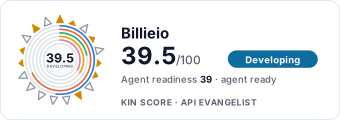 It updates itself when the score changes. Paste this where you link to your API docs: