flespi, part of Gurtam, provides a universal telematics gateway, parser and API platform for IoT and vehicle data. It offers raw data ingestion, transformation, real‑time analytics, video telematics, device management, MQTT broker, and a comprehensive REST API for developers to integrate and scale connected solutions.
flespi publishes 11 API contracts indexed on the APIs.io network, including Assets API, Calculators API, Changelog API, and 8 more. Tagged areas include Telematics, IoT, Data Ingestion, and Real-Time Analytics.
The flespi catalog on APIs.io includes 1 Spectral governance ruleset.
flespi’s developer surface includes signup flow, authentication, documentation, API reference, pricing, engineering blog, support, and 14 more developer resources.
Pull flespi's APIs, OpenAPI, scores and pricing into your own code or AI agent
with a free APIs.io key —
sign in with
GitHub,
Google or
LinkedIn.
No form to fill in; signing in shares your email address with us (Privacy).
Points earned after grading and authorship credit; n/a dimensions are left out of the score.
Regulatory Posture applies to this provider. Its tags matched the
Horizontal (data, software, accessibility, platform) regime, so
Regulatory Posture carries 15 points of the composite.
If this regime is wrong for your business, say so on your
provider repo — the
applicability map is public and we will correct it.
Create-or-Update Ergonomics could not be measured. We hold no machine-readable contract for
this provider to read, so there is nothing to measure a write surface against. Excluded rather than scored zero:
never-measured and measured-empty are different facts. Publishing an OpenAPI is what makes this facet — and
several others — scorable at all.
The six quality facets above are damped to 85 points between them,
because the conditional facet above carries the other
15. That is why each facet's contribution is shown against a damped
maximum: raising a quality facet moves the composite by 85% of its nominal
weight, not 100%. The full arithmetic is at apis.io/rating/.
Show this score on your site.
It updates itself when the score changes. Paste this where you link to your API docs:
<a href="https://apis.io/providers/flespi/"><img src="https://apis.io/badge/flespi/card.svg" alt="flespi on APIs.io — Kin Score by API Evangelist"></a>
Other styles, a README pill and a shields.io endpoint are on the badge page.
Raise your score.
Agent readiness — checks not met, largest first (exact, from this profile):
MCP Server+12 pts — deployment.mode + probe verdict on the mcp/ manifest, not the pointer; an unprobed slug falls back to authorship Ask about this →
Idempotency+9 pts — OpenAPI mutating operations declare an idempotency key — a header, a request-body property, or a named de-duplication token whose own description says so (verified); else common[].type matches /idempoten/i (documented) Ask about this →
Rate-Limit Signaling+7 pts — OpenAPI responses document X-RateLimit-* / RateLimit headers (verified), else a rate_limits artifact or RateLimits link (documented) Ask about this →
Each check links to what satisfies it. Publish the artifact, or tell us where it already lives, and the score moves on the next scoring run.
Not sure how this applies to your stack? Ask about any one item. Kin Lane reads every question, looks at your profile and your situation, and replies with what a fix would take — scoped to that one area, priced up front, yours whether you ship it or not. Ask a question →
Assets are virtual entities in flespi that represent physical objects or resources that can be monitored by different tracking devices over time. An asset maintains a historical...
API for [flespi analytics](https://flespi.com/kb/analytics-reports-and-events-engine) management. The API allows you to define the rules for how to split messages stored by devi...
Changelog posts of the flespi telematics hub system and related applications. To stay current with telematics hub updates, subscribe to 'flespi/message/gw/changelog' MQTT topic ...
[Channel](https://flespi.com/kb/channel-entry-point-to-gateway) is a protocol-specific entry point for tracking devices to the [flespi telematics hub](https://flespi.com). Confi...
[Registered device](https://flespi.com/kb/device-virtual-instance-of-real-tracker) represents an IoT or telematics tracking equipment capable of sending messages to the [channel...
Geofences allow you to enhance your telematics solution by incorporating geocoding functionality. A geofence is an independent entity characterized by **id, name, geometry (whic...
[Groups](https://flespi.com/kb/groups-organize-devices-and-simplify-mass-assignments) help to organize of [flespi devices](https://flespi.com/kb/device-virtual-instance-of-real-...
API to manage modems. [Modem](https://flespi.com/kb/modem-instance-to-send-sms) can be used to send commands as SMS messages to devices. Depending on the modem type some modems ...
[Plugins](https://flespi.com/kb/plugins-functionality-extensions-for-flespi-devices) are the key instance in flespi responsible for the transformation of the message received by...
Full [list of available channel protocols](https://flespi.com/protocols) you can find by the link. A [channel](https://flespi.com/kb/channel-entry-point-to-gateway) protocol def...
[Streams](https://flespi.com/kb/stream-forward-data-from-gateway) push messages into third-party platforms via different protocols. It is possible to subscribe a stream to incom...
aid: flespi
name: flespi
accessModel:
  pricing: freemium
  onboarding: self-serve
  trial: false
  try_now: true
  public: false
  gated: none
  gated_source:
  - onboarding
  label: Freemium · Self-serve signup
  confidence: medium
  source:
  - plans
  - authentication
  - security
  generated: '2026-11-20'
  method: derived
image: https://flespi.com/images/icons/fl.png
description: flespi, part of Gurtam, provides a universal telematics gateway, parser and API platform for IoT and vehicle
  data. It offers raw data ingestion, transformation, real‑time analytics, video telematics, device management, MQTT broker,
  and a comprehensive REST API for developers to integrate and scale connected solutions.
url: https://artifacts.apis.io/flespi/apis.yml
x-type: company
x-source: harvest:new-submission
x-tier: profiled
x-tier-reason: enrichment pass 2026-11-15 (modular-v1; was harvest)
specificationVersion: '0.20'
created: '2026-11-15'
modified: '2026-11-15'
tags:
- Telematics
- IoT
- Data Ingestion
- Real-Time Analytics
tags_raw:
- Telematics
- IoT
- API
- Data Ingestion
- Real-time Analytics
maintainers:
- FN: Kin Lane
  email: kin@apievangelist.com
- FN: APIs.json
  email: info@apis.io
common:
- type: AgenticAccess
  url: agentic-access/flespi-agentic-access.yml
- type: Plans
  url: plans/flespi-plans-pricing.yml
- type: Spectral
  url: rules/flespi-rules.yml
- type: Vocabulary
  url: vocabulary/flespi-vocabulary.yml
- type: DataModel
  url: data-model/flespi-data-model.yml
- type: ErrorCatalog
  url: errors/flespi-problem-types.yml
- type: Conformance
  url: conformance/flespi-conformance.yml
- type: Hosts
  url: hosts/flespi-hosts.yml
- type: TermsOfService
  url: https://flespi.com/terms-of-use
- type: StatusPage
  url: https://flespi.com/status
- type: SignUp
  url: https://flespi.com/blog/register-telemetry-data-from-iridium-device
- type: GitHubOrganization
  url: https://github.com/flespi-software
- type: Authentication
  url: authentication/flespi-authentication.yml
- type: DomainSecurity
  url: security/flespi-domain-security.yml
- type: Website
  url: https://flespi.com/
- type: Documentation
  url: https://flespi.com/docs
- type: APIReference
  url: https://flespi.com/rest-api
- type: Pricing
  url: https://flespi.com/pricing
- type: PrivacyPolicy
  url: https://flespi.com/privacy-policy
- type: Blog
  url: https://flespi.com/blog
- type: Support
  url: https://flespi.com/support
apis:
- aid: flespi:flespi-assets-api
  name: flespi Assets API
  description: "Assets are virtual entities in flespi that represent physical objects or resources that can be monitored by\
    \ different tracking devices over time.\nAn asset maintains a historical record of its associations with devices, enabling\
    \ seamless aggregation of telemetry data even when the monitoring device changes.\n\nKey features:\n* Can be linked with\
    \ one or multiple devices sequentially\n* Automatically tracks intervals of device associations\n* Maintains history of\
    \ which device was linked to the asset at any given time\n* Can be assigned to calculators to provide access to this history\
    \ from their expressions\n* Facilitates transition from device-centric to asset-centric data architecture\n\nThe primary\
    \ advantage of assets is their ability to maintain continuous monitoring history regardless of device changes. For example,\
    \ a trailer asset can aggregate trip data from different trucks that pulled it, driver asset can aggregate trip data from\
    \ different assigned devices or a vehicle asset can combine telemetry from both its main GPS tracker and a backup beacon\
    \ device.\n\n###### Asset intervals\n\nAsset can be assigned to the specific device on a certain temporal interval by\
    \ creating corresponding interval using **POST /gw/assets/{assets.selector}/intervals** call.\nWhen assignment to the\
    \ interval is registered, asset automatically merges this assignment into all previously registered intervals and update\
    \ or delete them accordingly.\nAt certain cases it can even split previously registered intervals onto new smaller parts.\n\
    \nAsset maintain a history of such assignments which can be retrieved with **GET /gw/assets/{assets.selector}/intervals**.\
    \ Each asset interval contains these properties:\n* **timestamp** - interval registration timestamp;\n* **begin** - interval\
    \ begin time;\n* **end** - interval ending time, may be zero to indicate this interval as unlimited;\n* **device_id**\
    \ - device ID connected to this interval, zero device ID is possible and can be interpreted in your application as unassignment;\n\
    * **meta** - any custom data connected to this interval, maximum 8 KiB of JSON size allowed;\n\nOnce new asset interval\
    \ is registered the system automatically in real-time recalculates current intervals and issue interval create, update\
    \ or delete events to maintain uninterrupted and actual timeline of interval assignments.\nSuch events are published into\
    \ asset logs and additionally you may track them via MQTT in the corresponding real-time only topics:\n  * **flespi/interval/gw/assets/{asset_id}/created**\
    \ - asset interval was created;\n  * **flespi/interval/gw/assets/{asset_id}/updated** - asset interval was updated;\n\
    \  * **flespi/interval/gw/assets/{asset_id}/deleted** - asset interval was deleted;\n\nLast interval registered into the\
    \ asset is automatically published into retain topic **flespi/state/gw/assets/{asset_id}/last**. You can subscribe to\
    \ this topic to stay current with the latest device to asset assignment.\n\nInterval that is registered into the asset\
    \ and is active according to current time is automatically published into retain topic **flespi/state/gw/assets/{asset_id}/active**.\
    \ You can subscribe to this topic to stay current with the currently active device to asset assignment. When active interval\
    \ is finished MQTT message with null payload is published in the topic.\n\nMessages posted in asset MQTT topics contain\
    \ 'trace' user property which you may use to link actual interval modification event with REST API call that was responsible\
    \ for it.\n\nThere is no possibility to delete interval assignment once it is registered but it is possible to replace\
    \ it with a new interval with zero device_id which your application can correspondingly interpret. When retrieving intervals\
    \ you may even skip such intervals by using `device_id != 0` filter.\n\n###### Asset logs\n\nTable with the list of existing\
    \ log event codes (event_code property in log record) for asset:\n\n  Event code | Description\n  -----|------\n  1|asset\
    \ was created via REST API\n  2|asset was updated via REST API\n  3|asset was deleted via REST API\n  4|asset was removed\
    \ from account(moved to account)\n  5|asset was restored from recycle bin via REST API\n  20|asset was blocked, see [customer](/docs/#/platform/customer)\
    \ for more information\n  21|asset was unblocked, see [customer](/docs/#/platform/customer) for more information\n  1600|asset\
    \ was added to calculator\n  1601|asset was removed from calculator\n  1602|asset was added to group\n  1603|asset was\
    \ removed from group\n  1604|posted asset interval registration\n  1605|asset interval was created\n  1606|asset interval\
    \ was updated\n  1607|asset interval was deleted"
  humanURL: https://flespi.io/docs/#/gw
  baseURL: https://flespi.io/gw
  tags:
  - Assets
  tags_raw:
  - assets
  properties:
  - type: OpenAPI
    url: openapi/flespi-assets-api-openapi.yml
- aid: flespi:flespi-calculators-api
  name: flespi Calculators API
  description: "API for [flespi analytics](https://flespi.com/kb/analytics-reports-and-events-engine) management.\n\nThe API\
    \ allows you to define the rules for how to split messages stored by devices into intervals and what to calculate inside\
    \ generated intervals.\nAnalytics is intended to build your own report engine on top of it or to be used as a source of\
    \ events for your software - e.g. to generate and handle notifications from flespi about certain changes associated with\
    \ the device.\n\n[Calculators](https://flespi.com/kb/analytics-reports-and-events-engine#calculators) are primary entity\
    \ in flespi analytics.\nYou define all the calculation configuration math inside calculator and than [assign devices to\
    \ calculator](https://flespi.com/kb/analytics-reports-and-events-engine#assigned-devices) to apply this math to device.\n\
    Once assigned to calculator device performs initial intervals calculation followed by automatical intervals update in\
    \ the background as soon as new device messages are received.\n\nIntervals are defined by [**intervals selectors**](https://flespi.com/kb/analytics-reports-and-events-engine#interval-selectors)\
    \ configuration.\n\nThen [**counters**](https://flespi.com/kb/analytics-reports-and-events-engine#interval-counters) can\
    \ be applied to each interval to calculate user-defined metrics (e.g. mileage, engine hours, or any other custom calculations)\
    \ over device messages.\nIn general with calculators you can detect almost everything that is hapenning with device.\n\
    Including geofence enter/exit, inactivity and GPS/connection problems, extract trips, parkings, stops, engine hours and\
    \ any other user-defined events and calculations.\n\nBe aware that whenever the [calculator configuration](https://flespi.com/kb/analytics-reports-and-events-engine#calculators)\
    \ changes - or the geofences, assets or device metadata it uses change - the system will recalculate intervals for assigned\
    \ devices within 'update_period' time and thus may modify them.\nYou control such behaviour with 'update_onchange' field\
    \ in calculator properties.\n\nEach device assigned to the calculator has a dedicated intervals storage.\nYou can [control](https://flespi.com/kb/how-to-manage-device-storage)\
    \ the size and duration of this storage with 'intervals_ttl' and 'intervals_rotate' fields in calculator properties.\n\
    \nOne of the possibilities to optimize your flespi storage utilization is to set shorter **messages_ttl** for device messages,\
    \ say 30-90 days, and set large **intervals_ttl** up to 10 years to store calculated intervals data for a much longer\
    \ period. Intervals aggregate dozens of messages and thus take up much less space.\n\n###### Calculator intervals\n\n\
    The generated interval message contains timestamp of its generation, interval begin/end times, duration, id and all calculated\
    \ counters as properties.\nInterval ID is generated automatically and you use ID if you want to attach own properties\
    \ to the interval.\nTo attach to the interval your custom properties you use **PUT /gw/calcs/{calcs.selector}/devices/{calc.devices.selector}/intervals/{calc.device.intervals.selector}**\
    \ API call with corresponding interval ID in 'calc.device.intervals.selector'.\nHowever you can not attach own properties\
    \ with same names as counters defined for calculator or reserved names such as id, timestamp, begin, end, duration.\n\n\
    Calculated intervals from the corresponding intervals storage you may retrieve via REST API with **GET /gw/calcs/{calcs.selector}/devices/{calc.devices.selector}/intervals/{calc.device.intervals.selector}**\
    \ call.\nOr via MQTT. MQTT has two sets of topics:\n  * **flespi/state/gw/calcs/{calc_id}/devices/{device_id}/+** - retained\
    \ topic from which you can\nretrieve and catch updates of last or active interval that was calculated;\n  * **flespi/interval/gw/calcs/{calc_id}/devices/{device_id}/+**\
    \ - real-time only topic to which any\nupdate with device intervals are published - create, delete, update events as well\
    \ as last interval activated and deactivated events;\nMaximum size of data inside each counter can not exceed 8 MiB. If\
    \ it will be larger during interval generation the counter will reset to null and corresponding log message will be added\
    \ to calculator logs (event_code = 614).\nMaximum total JSON size for the interval message can not exceed 16 MiB. If it\
    \ will be larger during generation - calculated device will be disabled with the reason indicated in calculator logs (event_code\
    \ = 615).\n\n###### Calculator logs\n\nAll log messages in calculators related to intervals contain specific 'reason_code'\
    \ field which clarifies why this or that interval event happened.\nSame 'reason_code' value is attached to MQTT messages\
    \ as a user property to understand the reason of this or that interval event.\nIf there are multiple reasons for the event\
    \ the system will show the reason with bigger code value. List of possible reason codes:\n\n  Reason code | Description\n\
    \  -----|------\n  2|timeout waiting for new data\n  5|referenced information has changed, e.g. intervals from referenced\
    \ calculator\n  10|interval modified via REST API\n  20|received new message from device\n  30|asset interval update\n\
    \  47|calculator assigned assets change\n  48|calculator geofences change\n  49|device metadata change\n  50|calculator\
    \ configuration change\n  90|automatic recalculation due to assigned device properties change\n  95|recalculation due\
    \ to internal reason\n  100|initial automatic calculation\n  200|manual (forced) synchronization request via REST API\n\
    \  250|calculated device is disabled"
  humanURL: https://flespi.io/docs/#/gw
  baseURL: https://flespi.io/gw
  tags:
  - Calculators
  tags_raw:
  - calculators
  properties:
  - type: OpenAPI
    url: openapi/flespi-calculators-api-openapi.yml
- aid: flespi:flespi-changelog-api
  name: flespi Changelog API
  description: 'Changelog posts of the flespi telematics hub system and related applications.


    To stay current with telematics hub updates, subscribe to ''flespi/message/gw/changelog'' MQTT topic delivering any new
    posts published in the system [changelog](https://forum.flespi.com/t/changelog) topics on the forum.


    The accumulated history of such posts is available with the ''GET /gw/changelog-posts'' request. Each post carries the
    ''title'', ''url'' and ''author'' of the original forum post, its ''text'' in markdown, the publication ''timestamp'',
    and the ''name'' of the specific changelog it belongs to:


    name | changelog | posts to expect

    -----|-----------|----------------

    telematics-hub | [flespi telematics hub](https://forum.flespi.com/d/25-changelog-flespi-telematics-hub) | Telematics hub
    features and REST API updates

    analytics | [flespi analytics](https://forum.flespi.com/d/16-changelog-flespi-analytics) | flespi analytics engine updates

    tachograph | [Tachograph functionality](https://forum.flespi.com/d/1999-changelog-tachograph-functionality) | Tachograph
    functionality updates

    toolbox | [Toolbox](https://forum.flespi.com/d/11-changelog-toolbox) | Toolbox app release notes

    trackit | [TrackIt](https://forum.flespi.com/d/239-changelog-trackit) | TrackIt app release notes

    mapview | [MapView](https://forum.flespi.com/d/10-changelog-mapview) | MapView release notes

    setbox | [SetBox](https://forum.flespi.com/d/5-changelog-setbox) | SetBox release notes

    tacho-bridge-app | [Tacho Bridge App](https://forum.flespi.com/d/1836-changelog-tacho-bridge-app) | Tacho Bridge App release
    notes'
  humanURL: https://flespi.io/docs/#/gw
  baseURL: https://flespi.io/gw
  tags:
  - Changelog
  tags_raw:
  - changelog
  properties:
  - type: OpenAPI
    url: openapi/flespi-changelog-api-openapi.yml
- aid: flespi:flespi-channels-api
  name: flespi Channels API
  description: "[Channel](https://flespi.com/kb/channel-entry-point-to-gateway) is a protocol-specific entry point for tracking\
    \ devices to the [flespi telematics hub](https://flespi.com).\n\nConfigured channel starts to listen to new TCP/UDP connections\
    \ from tracking devices on a **dedicated domain name:port**.\nIn some cases, channel provides a secondary URI to connect\
    \ auxiliary devices such as tachographs and cameras.\n\nOne channel parses messages from devices communicating over one\
    \ protocol selected during channel creation.\n\nChannel provides only data ingestion functionality.\nIn most cases you\
    \ need to register [virtual device](https://flespi.com/kb/device-virtual-instance-of-real-tracker) with device type that\
    \ corresponds to channel protocol.\nWith registered virtual device you have [remote control](https://flespi.com/kb/commands-and-settings)\
    \ capabilities, long term telematics data storage, rich [reporting engine](https://flespi.com/kb/analytics-flespi-reports-engine),\
    \ can perfom [data correction](https://flespi.com/kb/plugins-functionality-extensions-for-flespi-devices) and much more.\n\
    \nAlso the actual parameters in parsed messages can be different across [device types](https://flespi.com/devices) which\
    \ is also defined by the registered virtual device.\n\nAll channel modification operations are reported to common [logs\
    \ subsystem](https://flespi.io/docs/#/platform/logs) with the following possible event codes:\n\n  Event code | Description\n\
    \  -----|------\n  1|channel was created via REST API\n  2|channel was updated via REST API\n  3|channel was deleted via\
    \ REST API\n  20|channel was blocked, see [customer](https://flespi.io/docs/#/platform/customer) for more information\n\
    \  21|channel was unblocked, see [customer](https://flespi.io/docs/#/platform/customer) for more information\n  100|channel\
    \ accepted connection\n  101|channel connection was identified\n  102|channel connection was closed\n  103|channel data\
    \ processing error\n  104|channel data processing warning\n  114|channel configuration is invalid\n  115|the command has\
    \ been sent into the transport connection\n  116|channel protocol was modified\n\nLog records produced by the channel\
    \ protocol parser (connection, data processing and command events) contain the \"protocol_modified\" parameter - modification\
    \ timestamp of the channel protocol whose parser produced the record. Connection keeps the parser it was established with\
    \ until it is closed, even if the protocol is modified in the meantime.\n\nIf channel protocol is modified (event_code=116),\
    \ you may expect the following additional parameters in the log record:\n\n  Field name | Meaning\n  ----------------------|--------\n\
    \  protocol_name   |name of the modified channel protocol\n  protocol_modified  |new modification timestamp of the channel\
    \ protocol\n  previous_protocol_modified |previous modification timestamp of the channel protocol\n\nIf you do not see\
    \ anything in channel logs it means that device never attempted to establish connection to the channel and there is nothing\
    \ to debug on flespi, you should check device configuration first.\n\nWhenever you need to troubleshoot device operation\
    \ you can investigate raw traffic between flespi channel and hardware device.\nYou can fetch traffic packets via API or\
    \ just use flespi.io panel for this. On 'Logs & Messages' tab there is TRAFFIC button and also from each log record or\
    \ message you can navigate to associated raw traffic exchange via context menu command.\nFor traffic from unidentified\
    \ connections or connectionless protocols please check the traffic under 'unidentified' ident value.\n\n###### Channel\
    \ messages\n\nParsed data from tracking devices is stored in the message buffer associated with the given channel. Message\
    \ fields depend on the channel [protocol](https://flespi.com/protocols) and type of [registered device](https://flespi.com/kb/device-virtual-instance-of-real-tracker).\n\
    \n[Messages](https://flespi.com/kb/messages-basic-information-units) can be pulled out from the buffer via a **channels/messages**\
    \ request in a **single reader** mode, meaning that stable reading process can be performed by only one worker.\n\nIt\
    \ is also possible to receive channel messages in realtime using MQTT API by subscribing to 'flespi/message/gw/channels/#'\
    \ topic.\n\nTo stay current with channel protocol updates, subscribe to 'flespi/message/gw/channel-protocols/{protocol-id}/changelog'\
    \ MQTT topic delivering any changes published in the channel protocol [changelog](https://forum.flespi.com/t/changelog).\n\
    \nAnd [streams](https://flespi.com/kb/stream-forward-data-from-gateway) can be used to push messages to your application\
    \ in variety of protocols.\n\nEvery message in the buffer is represented by a JSON object with the following fields:\n\
    \n  Field | Description\n  --------|----------\n    timestamp | Actual message time provided by tracking device\n    ident\
    \ | Tracking device identification string** * **\n    [param name] | Any additional parameters passed by tracking device\n\
    \n** * ** *Unique tracking device identifier. It can be IMEI, international phone number or device serial number. Symbols\
    \ '#','+','/',':' are not allowed. The way flespi gateway identifies a certain device is defined by the protocol.*\n\n\
    ###### Channel connections\n\nInformation on every active TCP connection from a tracking device to the specified channel:\n\
    * connection opening time\n* listening channel ID\n* connected device IP address and identification string\n\nConnections\
    \ opening, closing, and identification operations report to the common [logs subsystem](https://flespi.io/docs/#/platform/logs)\
    \ with the following possible event codes:\n\n  Event code | Description\n  -----|------\n  100|channel has accepted connection\n\
    \  101|channel connection was identified\n  102|channel connection was closed, see below values of \"close_code\" parameter\n\
    \nIf connection is accepted or identified (event_code=100 or event_code=101), you may expect the following additional\
    \ parameters in the log record:\n\n  Field name | Meaning\n  ----------------------|--------\n  source          |connected\
    \ device's address\n  transport       |connected device's transport: tcp, udp, http etc.\n  ident           |connected\
    \ device's identification string (optional, last value only)\n  protocol_modified  |modification timestamp of the channel\
    \ protocol serving the connection\n\nIf connection is closed (event_code=102), you may expect the following additional\
    \ parameters in the log record:\n\n  Field name | Meaning\n  ----------------------|--------\n  close_code      |the reason\
    \ of connection close operation\n  error_text      |optional, additional error information\n  source          |connected\
    \ device's address\n  transport       |connected device's transport: tcp, udp, http etc.\n  ident           |connected\
    \ device's identification string (optional, last value only)\n  protocol_modified  |modification timestamp of the channel\
    \ protocol serving the connection\n  duration        |connection duration in seconds\n  msgs            |quantity of messages\
    \ received\n  recv            |quantity of bytes received\n  send            |quantity of bytes sent\n\nPossible \"close_code\"\
    \ values:\n\n  Code | Event\n  -----|------\n  2|connection closed by tracking device\n  3|connection successfully processed\
    \ and closed\n  4|received data violates channel's protocol\n  5|internal error\n  6|data parsing error (see log details)\n\
    \  7|connection closed due to server restart\n  8|protocol implementation updated\n  9|channel's parameters changed\n\
    \  10|connection closed upon user's request\n  11|outgoing connection failed\n  12|Current connection closed because of\
    \ ident collision: device has opened another connection to\nthe channel without closing the first one. It may happen because\
    \ of device firmware bug or by an unstable connectivity provider. In general, this happens to plenty of devices and usually\
    \ can be ignored.\n  13|device is blocked\n  14|authentication failed\n  15|device associated with the connection was\
    \ created, changed or deleted\n  16|channel rejected connection due to IP addresses match blacklist or mismatch whitelist\n\
    \  17|connection is closed by inactivity timeout\n  18|unsupported protocol part\n  19|protocol mismatch\n  20|processing\
    \ was cancelled\n  21|channel is blocked\n  22|device media is blocked\n  23|device is disabled\n\nHere is an example\
    \ of a log record reporting that **TCP** connection from **127.0.0.1** to **channel 1374** was successfully processed\
    \ and closed after **11 seconds** and identified by device with ident **123456789**, **32** bytes received and **64**\
    \ bytes transmitted, **10** messages total:\n\n```json\n{\n  \"close_code\": 3,\n  \"duration\": 11,\n  \"event_code\"\
    : 102,\n  \"event_origin\": \"gw/channels/1374\",\n  \"event_text\": \"connections/127.0.0.1/closed\",\n  \"ident\": \"\
    123456789\",\n  \"msgs\": 10,\n  \"recv\": 32,\n  \"send\": 64,\n  \"source\": \"127.0.0.1\",\n  \"timestamp\": 1490347944.893743,\n\
    \  \"transport\": \"tcp\"\n}\n```\n\n###### Channel blocking\n\nWhen channel usage exceeds account limits the platform\
    \ puts the [block reason](https://flespi.io/docs/#/platform/customer) code into the channel 'blocked' field.\n\nCodes\
    \ 1, 2 and 3 pause the channel: it stops accepting new connections while established ones keep operating on TCP, MQTT\
    \ and FTP transports.\nOn traffic and messages overflow the most consuming devices are blocked before the channel itself.\n\
    Other codes stop the channel and close all its connections."
  humanURL: https://flespi.io/docs/#/gw
  baseURL: https://flespi.io/gw
  tags:
  - Channels
  tags_raw:
  - channels
  properties:
  - type: OpenAPI
    url: openapi/flespi-channels-api-openapi.yml


# --- truncated at 32 KB (70 KB total) ---
# Full source: https://artifacts.apis.io/flespi/apis.yml
flespi API — frequently asked questions
Does flespi have an API?
Yes. APIs.io lists 11 APIs from flespi, including flespi Assets API, flespi Calculators API and flespi Changelog API, and 8 more.
Is there an OpenAPI specification for the flespi API?
Yes. APIs.io indexes 11 OpenAPI specifications for flespi, each linked for download from this page.
How do I authenticate with the flespi API?
flespi uses bearer-token authentication (apiKey · 1 scheme). The details are profiled on APIs.io as flespi Authentication.
How much does the flespi API cost?
flespi publishes its prices; its Free plan is €0/mo as of 2026-11-15. APIs.io lists 5 pricing plans for flespi, with each plan's price, limits and inclusions under Pricing on this page.
Is the flespi API ready for AI agents?
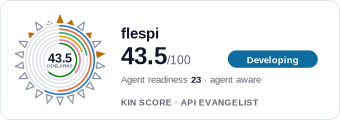
flespi has a Kin Score of 43.5 out of 100 (developing) and an Agent Readiness score of 23.0 (agent-aware), scored by API Evangelist on 2026-11-21.
Calls without X-API-Key need no key. Calls with it need a paid plan — get a key.
Get an API key
Free tier, no form to fill in. Signing in shares your email address with us — we
store it to create your key and to recognise you if you sign in with another
provider. By signing up you are subscribing to the APIs.io and API Evangelist
newsletters — you can unsubscribe from any issue. See our
Privacy Policy and Terms.
 Kin Score
How this is scored →
 It updates itself when the score changes. Paste this where you link to your API docs: