Commerce report
## Structure Assess reports follow a consistent structure. Reports contain four sections of information: ### 1. Report definition Information such as: 1. The report info (e.g. enhanced_profit_and_loss). 2. The display name of the report (e.g. Enhanced Profit and Loss). ### 2. Dimension info Information about the dimension contained in the reports such as: 1. The type of dimension (e.g. datetime, recordRef). 2. The display name of the dimension (e.g. Period, Category type, Category sub type). 3. The details about each item within the dimension (e.g. displayName:"Jan 2022", start:"...", end:"...", id:"...", name:"..."). ### 3. Measure info Information about the measures contained in the report such as: 1. The display name of the measure (e.g. value of account, percentage change). 2. The type of the measure (e.g. currency, percentage). 3. The unit of the measure (e.g. %, GBP). ### 4. The data for the report When the *includeDisplayName* parameter is set to *true*, it shows the *dimensionDisplayName* and *itemDisplayName* to make the data human-readable. The default setting for *includeDisplayName* is *false*. ## Displaying the report Reports can be rendered as follows (ordering is implicit rather than explicit): 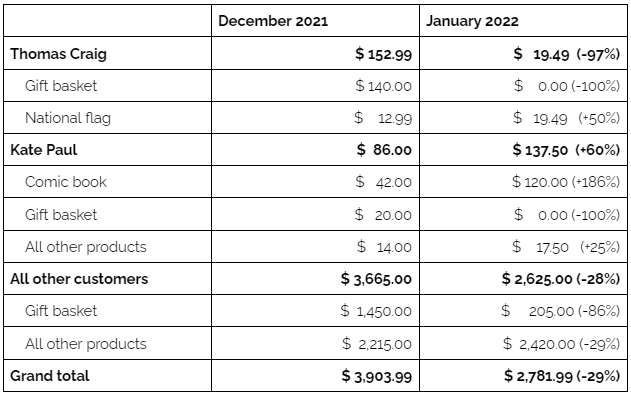 # Data model ## Dimensions
Unified APIAccountingIntegration
{
"$schema": "https://json-schema.org/draft/2020-12/schema",
"$id": "#/components/schemas/CommerceReport",
"title": "Commerce report",
"description": "## Structure\n\nAssess reports follow a consistent structure. Reports contain four sections of information:\n\n### 1. Report definition\n\nInformation such as:\n\n 1. The report info (e.g. enhanced_profit_and_loss).\n 2. The display name of the report (e.g. Enhanced Profit and Loss).\n \n### 2. Dimension info\n\nInformation about the dimension contained in the reports such as:\n\n 1. The type of dimension (e.g. datetime, recordRef).\n 2. The display name of the dimension (e.g. Period, Category type, Category sub type).\n 3. The details about each item within the dimension (e.g. displayName:\"Jan 2022\", start:\"...\", end:\"...\", id:\"...\", name:\"...\").\n\n### 3. Measure info\n\nInformation about the measures contained in the report such as:\n\n 1. The display name of the measure (e.g. value of account, percentage change).\n 2. The type of the measure (e.g. currency, percentage).\n 3. The unit of the measure (e.g. %, GBP).\n \n### 4. The data for the report\n\nWhen the *includeDisplayName* parameter is set to *true*, it shows the *dimensionDisplayName* and *itemDisplayName* to make the data human-readable. The default setting for *includeDisplayName* is *false*.\n\n\n## Displaying the report\n\nReports can be rendered as follows (ordering is implicit rather than explicit):\n\n\n\n# Data model\n\n## Dimensions",
"type": "object",
"properties": {
"reportInfo": {
"type": "object",
"additionalProperties": {
"type": "string"
}
},
"dimensions": {
"type": "array",
"items": {
"$ref": "#/components/schemas/CommerceReport/definitions/commerceReportDimension"
}
},
"measures": {
"type": "array",
"items": {
"$ref": "#/components/schemas/CommerceReport/definitions/commerceReportMeasure"
}
},
"reportData": {
"type": "array",
"items": {
"$ref": "#/components/schemas/CommerceReport/definitions/commerceReportComponent"
}
},
"errors": {
"type": "array",
"items": {
"$ref": "#/components/schemas/CommerceReport/definitions/commerceReportError"
}
}
},
"definitions": {
"commerceReportMeasure": {
"title": "Measure",
"type": "object",
"properties": {
"displayName": {
"description": "The measure's display name.",
"type": "string"
},
"units": {
"type": "string",
"description": "The measure's units e.g. percentage (%)."
},
"index": {
"type": "integer",
"description": "The measure's index."
},
"type": {
"type": "string",
"description": "The measure's type."
}
}
},
"commerceReportError": {
"title": "Error",
"type": "object",
"properties": {
"message": {
"type": "string",
"description": "Message returned by error."
},
"type": {
"type": "string",
"description": "The type of error."
},
"details": {
"description": "Additional details on the error.",
"type": "object",
"additionalProperties": {
"type": "array",
"items": {
"type": "string"
}
}
}
}
},
"commerceReportDimension": {
"title": "Dimension",
"type": "object",
"properties": {
"index": {
"type": "integer",
"description": "The dimension's index."
},
"displayName": {
"type": "string",
"description": "The dimension's display name."
},
"type": {
"type": "string",
"description": "The dimension's type."
},
"items": {
"type": "array",
"items": {
"type": "object",
"properties": {
"index": {
"type": "integer",
"description": "The dimension's items index."
}
}
}
}
}
},
"commerceReportComponent": {
"title": "Report component",
"type": "object",
"properties": {
"dimension": {
"type": "integer",
"description": "The component's dimension."
},
"dimensionDisplayName": {
"type": "string",
"description": "The component's display name."
},
"item": {
"type": "integer",
"description": "The component's item number."
},
"itemDisplayName": {
"type": "string",
"description": "The component's item display name."
},
"measures": {
"type": "array",
"items": {
"$ref": "#/components/schemas/CommerceReport/definitions/reportComponentMeasure"
}
},
"components": {
"type": "array",
"items": {
"$ref": "#/components/schemas/CommerceReport/definitions/commerceReportComponent"
}
}
}
},
"reportComponentMeasure": {
"type": "object",
"title": "Report component measure",
"properties": {
"index": {
"type": "integer",
"description": "The measure's index."
},
"measureDisplayName": {
"type": "string",
"description": "The measure's display name."
},
"value": {
"type": "number",
"format": "decimal",
"description": "The measure's value."
}
}
}
},
"x-examples": {
"Example 1": {
"reportInfo": {
"additionalProp1": "string",
"additionalProp2": "string",
"additionalProp3": "string"
},
"dimensions": [
{
"index": 0,
"displayName": "string",
"type": "string",
"items": [
{
"index": 0
}
]
}
],
"measures": [
{
"displayName": "string",
"units": "string",
"index": 0,
"type": "string"
}
],
"reportData": [
{
"dimension": 0,
"dimensionDisplayName": "string",
"item": 0,
"itemDisplayName": "string",
"measures": [
{
"index": 0,
"measureDisplayName": "string"
}
],
"components": [
"string"
]
}
],
"errors": [
{
"message": "string",
"type": "DatesOutOfRange",
"details": {
"additionalProp1": [
"string"
],
"additionalProp2": [
"string"
],
"additionalProp3": [
"string"
]
}
}
]
}
}
}
Every JSON Schema here is available over the APIs.io API and to AI agents over MCP.