openapi: 3.0.0
info:
title: Audience Segments API
description: "{% admonition type=\"danger\" name=\"This API is deprecated as of 1st August 2026\" %}\n\
The functionality has been built into the V3 Campaign Management API docs which can be found here:\
\ [https://apidocs.mediamath.com/apis/campaigns-api/openapi](https://apidocs.mediamath.com/apis/campaigns-api/openapi)\n\
{% /admonition %}\n Using the Audience Segments API, customers and data providers have control to\
\ onboard and activate the [data](http://www.mediamath.com/legal/terms/audiencedata_policy/) they\
\ need to target in MediaMath Platform. As it's a self-service solution, turnaround time for updates\
\ is reduced from business days to minutes. The API is built using industry standard, open source\
\ REST APIs and is a scaleable way to handle all requests for both global and permissioned taxonomies.\
\ The service brings transparency to data activation at MediaMath, allowing customers and data providers\
\ oversight of relevant 1st and 3rd party audience data sets as well as the permissioning of those\
\ data sets. \n\n\n# Audience Segments & Taxonomies\n\nThere are two ways to expose the data onboarded\
\ via [server-to-server](/guides/server-to-server) within MediaMath Platform:\n* **Taxonomies**\n\t\
* These can be global, meaning all MediaMath customers will have access to the segments within the\
\ taxonomy in MediaMath Platform.\n\t* These can be permissioned so that only select MediaMath customers\
\ have access to the segments within the taxonomy in MediaMath Platform.\n* **External Data Segments**\n\
\t* These represent a single segment and are always permissioned.\n\t* These are also referred to\
\ as Data Pixels.\n\nIt's possible to use both methods to achieve a mix of global and permissioned\
\ taxonomies & external data segments to suit your needs and the needs of your customers.\n\nNote:\
\ The [S2S data transfer](/guides/server-to-server) is the same for both global and permissioned taxonomies,\
\ as well as external data segments.\n\n\n## Taxonomies (Global)\n\nTaxonomies are presented in MediaMath\
\ Platform as a hierarchical tree, where the first node (root node) is the data provider's name. Within\
\ the tree, media traders can expand selections of categories of segments and view an estimated audience\
\ size (the number of unique users) and a CPM price (USD by default).\n\n\nIn this view, the Audience\
\ Targeting view has been annotated to show the elements of a taxonomy:\n\n\n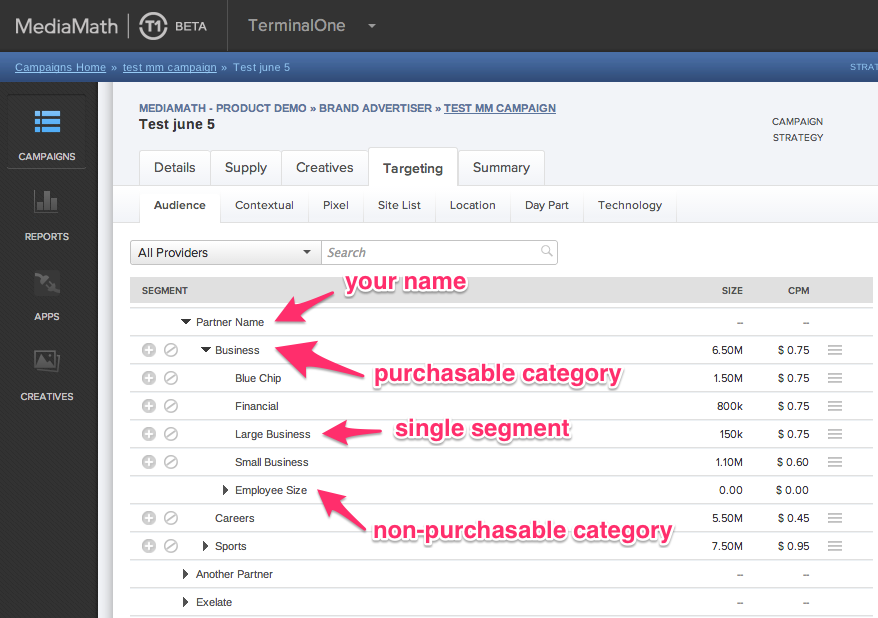\n\
\n\n## Taxonomies (Permissioned)\nSimilar to global taxonomies, permissioned taxonomies are also presented\
\ in MediaMath Platform as a hierarchical tree, where the first node (root node) is the data provider's\
\ name. Within the tree, media traders can expand selections of categories of segments and view an\
\ estimated audience size (the number of unique users) and a CPM price (USD by default).\n\nPermissioned\
\ taxonomies can include first and/or third party segments and are 'permissioned' or shared with specified\
\ entities, organizations, agencies and/or advertisers in MediaMath Platform. \n\nAs all taxonomy\
\ management utilizes the same underlying MediaMath API, the information shared in this section applies\
\ to both global and permissioned taxonomies, with the exception of the visibility of the taxonomy\
\ & permissioning. \n\n### Revenue Share at Taxonomy Level\nUtilizing the API requires the data provider\
\ be set up as a data vendor in our system and that MediaMath act as a clearinghouse for all transactions.\
\ For third-party data providers, you'll work out terms with our partnerships team; for customers\
\ sharing first-party data, the revenue share will typically be set at 0 by our partnerships team.\n\
\nEach data provider has a default revenue share, mutually agreed upon with the partnerships team;\
\ however, this default revenue share value can be overridden at a taxonomy level. For example, if\
\ a customer wants to target segments in MediaMath Platform at a rate which they have pre-negotiated\
\ with you, their data vendor, the customer's specific rate may require the use of a revenue share\
\ different from the default revenue share originally agreed upon between you & MediaMath. To facilitate\
\ this, you as the data provider, can create a permissioned taxonomy for the customer and work with\
\ the partnerships team to set a revenue share that relates to that specific taxonomy. \n\nTo override\
\ a revenue share at the taxonomy level, create the taxonomy with permissions and contact [MediaMath\
\ Support](https://mediamathsupport.force.com/s/) with the following information:\n* the Taxonomy_ID,\n\
* the desired taxonomy-level revenue share.\n\nOur team will respond once they have updated the revenue\
\ share for the specified taxonomy.\n## Taxonomy Management\n\nTaxonomies are managed using using\
\ the [API](/apis/audience-taxonomies/permission-taxonomies). \n\n\n {% admonition type=\"danger\"\
\ name=\"This API is deprecated as of 1st August 2026\" %}\nThe functionality has been built into\
\ the V3 Campaign Management API docs which can be found here: [https://apidocs.mediamath.com/apis/campaigns-api/openapi](https://apidocs.mediamath.com/apis/campaigns-api/openapi)\n\
{% /admonition %}\n ## External Data Segments\nAn external data segment (also known as a data pixel)\
\ is the output of a pixel mapping process that results in the creation of a single, permissioned\
\ audience segment. In contrast to a permissioned taxonomy, which can be managed via API and contain\
\ N segments, an external data segment represents one audience segment and is defined within the Onboard\
\ section of the Audiences module in MediaMath Platform. \n\nExternal data segments are permissioned\
\ to specific agencies (MediaMath entity structure): organization > agency > advertiser) so all advertisers\
\ within the agency will have access to the external data segment. Prior to getting started, the data\
\ provider needs to be added to the agency in MediaMath Platform. To have a data provider added, contact\
\ your MediaMath representative. \n\n\nIf the data provider already has the appropriate access, follow\
\ these steps to get your external data segments created:\n\n1. Define an audience segment by creating\
\ an External Data Segment in the Onboard tab within the MediaMath Platform Audience module.\n\n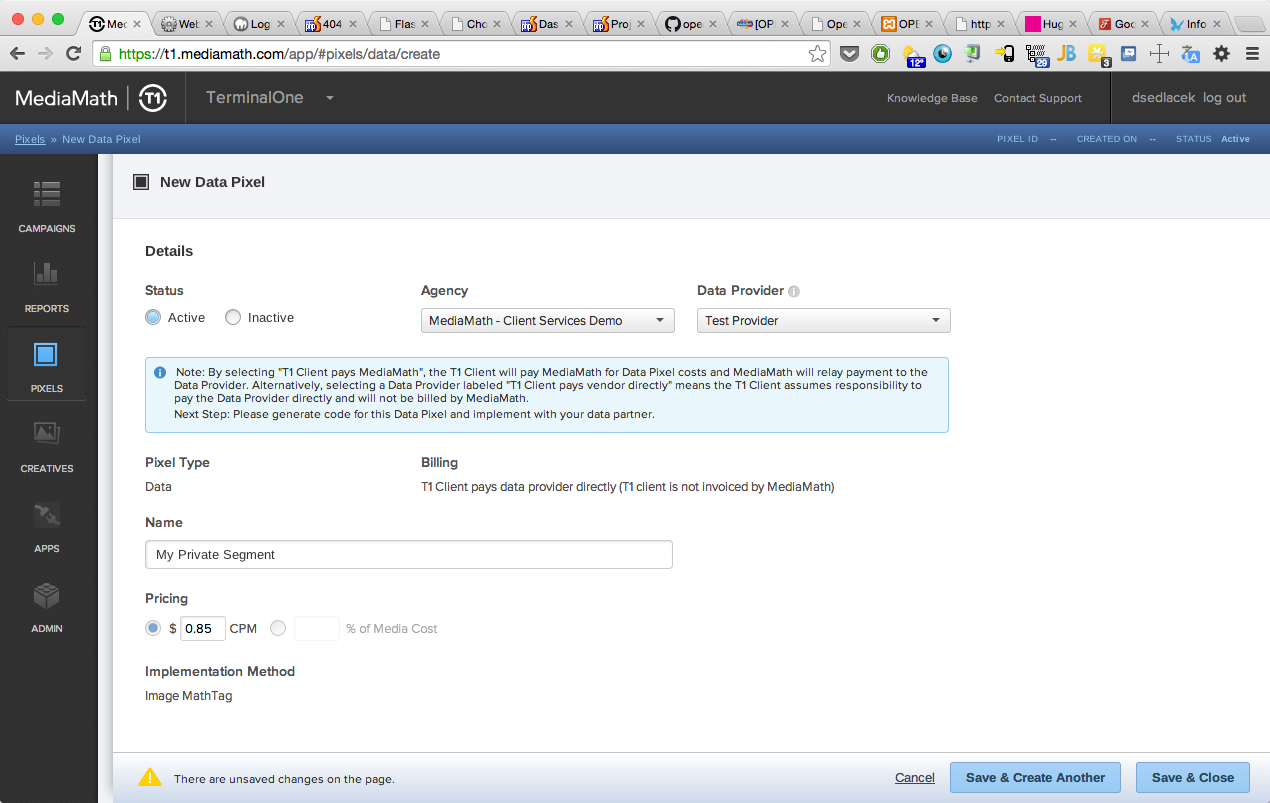\n\n2. Provide\
\ the pixel IDs created in step 1 to your data provider.\n3. Data provider will then submit a ticket\
\ directly to `pixelmapping@mediamath.com`, including the following. Include each external data segment\
\ mapping in the body of the email (or Support ticket) in the line-separated format below.\n\n**Note:**\
\ Requests to `pixelmapping@mediamath.com` are handled via an automated process, as long as the formatting\
\ below is followed in the subject and body of your email. If the format does not conform, requests\
\ will be handled within 1 business day. \n\nExternal Data Segment Example Request\n\n> Subject Line: Data\
\ Provider Pixel Mapping Request\n> \n> Description:\n> \n> Please map the following\n> \n> ns:8473,mm:679001\n\
> \n> ns:8474,mm:679002 \n> \n> ns:8675,mm:679003 \n\n\nns = the name space of the first pixel being\
\ mapped, refer below or reach out to MediaMath support if the namespace is unknown.\n\nmm = MediaMath\
\ Namespace. This will always be \"mm\" in the mapping request. \n\nXXXXXX = the partner's segment\
\ code sent to MediaMath via S2S. \n\nYYYYYY = the MathTag ID (\"MT_ID\") associated with the MediaMath\
\ external data segment pixel created in step one. \n\n"
contact:
name: developers@mediamath.com
url: https://apidocs.mediamath.com
email: developers@mediamath.com
license:
url: http://www.apache.org/licenses/LICENSE-2.0.html
name: Apache 2.0
version: '2.0'
paths:
/audience_segments:
post:
tags:
- Permission Taxonomies
summary: Create Permission Taxonomy
description: "To create a new permission taxonomy, submit a POST with the Content-Type set to \"\
application/json\".\n\n\nThe body of the API call will be raw JSON and consists of 3 sections:\n\
* **Permissions:** You may provide any number of permissions to allow entities in TerminalOne\
\ (organizations, agencies and/or advertisers) access to the taxonomy. These organization, agency,\
\ and advertiser IDs can be entered as comma separated values within the ‘permissions’ section\
\ of the body. To identify IDs for your customers, reach out to [MediaMath Support](http://support.mediamath.com)\
\ or ask your customer to locate their IDs within TerminalOne's Admin module. \n* **Vendor ID:**\
\ Every taxonomy rolls up to a MediaMath data vendor entity. The data vendor ID will need to be\
\ provided when you create new taxonomies. This ID will be provided to you by the partnerships\
\ team.\n* **Taxonomy body:** This describes the way in which the taxonomy will be shared in TerminalOne.\
\ This will be a hierarchical tree structure format (root node > leaf node > leaves).\n\n\n###\
\ Example Taxonomy (Permissioned) JSON\n\n```\n\n{\n \"permissions\": {\n \"organizations\"\
: [100048\n ],\n \"agencies\": [114842,108108\n ],\n \"advertisers\"\
: [171177,141348,137754\n ]\n },\n \"vendor_id\": 1234,\n \"taxonomy\": {\n \
\ \"name\": \"VENDOR_NAME - (Private) – Acme Co Taxonomy\",\n \"children\": [\n \
\ {\n \"code\": \"1234567\",\n\t\t\"uniques\": 100000,\n \"retail_cpm\"\
: 0,\n \"buyable\": true,\n \"name\": \"Acme Segment 1\",\n \
\ \"children\": [\n ]\n },\n {\n \"code\":\
\ \"1234568\",\n\t\t\"uniques\": 25000,\n \"retail_cpm\": 0,\n \"\
buyable\": true,\n \"name\": \"Acme Segment 2\",\n \"children\"\
: [\n ]\n }\n ]\n }\n}\n```\n\n### Segment Codes\n**NOTE**:\
\ If you are using a segment code that is not a 32-bit integer, pass an optional parameter *use_hash:true*\
\ as part of the JSON request. Additionally, ensure the [user files delivered to the MediaMath\
\ server](/guides/server-to-server) note the declaration *HashSegments: 1* to ensure proper processing\
\ and handling of the user files and taxonomy.\n\n### Segment Name\n**NOTE**: Segment name values\
\ should not exceeded 255 characters. If you are using a segment name that does not contain latin\
\ alphabetic letters then you can convert the name to an ASCII value and pass the encoded name\
\ in the POST request. It will then display in the orginal text in T1. Please make sure the ASCII\
\ value is encoded using [HTML Entities](https://www.w3schools.com/html/html_entities.asp ). \n\
\n### API Response\nUpon issuing a POST to create the taxonomy, you'll note the following within\
\ the **response**:\n* **audience_vendor_id** represents the taxonomy object in our database and\
\ rolls up to your data vendor ID. When updating the taxonomy, reference this ID.\n* **taxonomy_id**\
\ represents the individual taxonomy and must be referenced when you want to update the taxonomy.\n\
* **id** within the lower levels (branches and leaf) of the taxonomy section, *id* represents\
\ the MediaMath object you have just created. When updating a taxonomy, include id to ensure the\
\ objects - non-buyable nodes or individual segments - are processed as updates and not new additions\
\ to the taxonomy.\n* **revenue_share_pct** represents the revenue share agreed upon with MediaMath.\n\
* **wholesale_cpm** represents the amount the data vendor will accrue when the segment is inclusion\
\ or exclusion targeted within a TerminalOne strategy. \n* **visibility** will equal \"GLOBAL\"\
\ for all public taxonomies and \"RESTRICTED\" for all permissioned, or private, taxonomies. Responses\
\ for permissioned taxonmies will not include this optional parameter; API responses for global\
\ taxonomies will always include the parameter.\n\n\n### Example Taxonomy (Permissioned) Creation\
\ Response JSON\n```\n{\n \"meta\": {\n \"status\": \"success\"\n },\n \"data\"\
: {\n \"taxonomy\": {\n \"name\": \"VENDOR_NAME - (Private) - Acme Co Taxonomy\"\
,\n \"id\": 1678332,\n \"children\": [\n {\n \
\ \"uniques\": 25000,\n \"children\": [],\n \"name\"\
: \"Acme Segment 1\",\n \"retail_cpm\": 0,\n \"id\": 1678334,\n\
\ \"code\": \"1234567\",\n \"buyable\": true,\n \
\ \"wholesale_cpm\": 0.0\n },\n {\n \
\ \"uniques\": 100000,\n \"children\": [],\n \"name\"\
: \"Acme Segment 2\",\n \"retail_cpm\": 0,\n \"id\": 1678333,\n\
\ \"code\": \"1234568\",\n \"buyable\": true,\n \
\ \"wholesale_cpm\": 0.0\n }\n ]\n },\n \"\
audience_vendor_id\": 2468,\n \"revenue_share_pct\": 0.0,\n \"taxonomy_id\": 100123\n\
\ }\n}\n```"
operationId: POST_audience_segments
requestBody:
content:
application/json:
schema:
type: object
properties:
permissions:
type: object
properties:
organizations:
type: array
items:
type: integer
agencies:
type: array
items:
type: integer
advertisers:
type: array
items:
type: integer
vendor_id:
type: integer
taxonomy:
type: object
properties:
name:
type: string
description: 'Taxonomy name values should not exceeded 255 characters. '
children:
type: array
items:
type: object
properties:
name:
type: string
description: 'Segment name values should not exceeded 255 characters. '
buyable:
type: boolean
children:
type: array
items:
type: object
properties:
uniques:
type: integer
children:
type: array
items:
type: object
name:
type: string
retail_cpm:
type: number
code:
oneOf:
- type: string
- type: number
buyable:
type: boolean
required:
- name
- retail_cpm
- code
- buyable
required:
- name
- buyable
? ''
: type: string
required:
- name
- children
use_hash:
type: boolean
description: If you are using a segment code that is not a 32-bit integer, pass an optional
parameter use_hash:true as part of the JSON body.
required:
- permissions
- vendor_id
- taxonomy
x-examples:
- permissions:
organizations:
- 222224
- 555554
agencies:
- 77777
- 999997
advertisers:
- 111112
- 111114
- 111112
vendor_id: 111
taxonomy:
name: MediaMath Audiences - Test
children:
- name: US / Canada
buyable: false
children:
- uniques: 3944066
children: []
name: Entertainment
retail_cpm: 0.85
code: segment_id
buyable: true
description: _
responses:
'201':
description: ''
content:
application/json:
schema:
type: object
properties:
meta:
type: object
properties:
status:
type: string
data:
type: object
properties:
permissions:
type: object
properties:
organizations:
type: array
items:
type: integer
agencies:
type: array
items:
type: integer
advertisers:
type: array
items:
type: integer
taxonomy:
type: object
properties:
name:
type: string
id:
type: integer
children:
type: array
items:
type: object
properties:
children:
type: array
items:
type: object
name:
type: string
retail_cpm:
type: integer
id:
type: integer
code:
type: string
buyable:
type: boolean
wholesale_cpm:
type: integer
uniques:
type: integer
audience_vendor_id:
type: integer
taxonomy_id:
type: integer
revenue_share_pct:
type: integer
examples:
response:
value:
meta:
status: success
data:
permissions:
organizations:
- 100048
agencies:
- 114842
- 108108
advertisers:
- 171177
- 141348
- 137754
created_on: timestamp
updated_on: timestamp
taxonomy:
name: VENDOR_NAME - (Private) – Acme Co Taxonomy
id: 1200021
children:
- uniques: 25000
children: []
name: Acme Segment 2
retail_cpm: 0
id: 5551212
code: '1234568'
buyable: true
wholesale_cpm: 0
- uniques: 100000
children: []
name: Acme Segment 1
retail_cpm: 0
id: 5551211
code: '1234567'
buyable: true
wholesale_cpm: 0
vendor_id: 1234
taxonomy_id: 127001
security:
- OAuth2: []
get:
tags:
- Permission Taxonomies
summary: List Permission Taxonomies
description: 'Query parameters should be of the form (field)(operator)(value) where operator can
be == (equal to) or =: (like)
Example: /?q=name=:MediaMath will return segments within your taxonomies that have names like
"MediaMath."'
operationId: GET_audience_segments
parameters:
- name: q
in: query
description: 'Query String Parameter
`name==[name]`
`buyable==[boolean]`'
schema:
type: string
- name: Content-Type
in: header
description: Content-Type
required: true
schema:
type: string
- name: Cookie
in: header
description: Cookie
required: true
schema:
type: string
responses:
'200':
description: ''
content:
application/json:
schema:
type: object
properties:
data:
type: array
items:
type: object
properties:
audience_vendor_id:
type: integer
created_by:
type: integer
nullable: true
created_on:
type: string
format: date-time
revenue_share_pct:
type: integer
taxonomy:
type: object
properties:
description:
type: string
id:
type: integer
name:
type: string
uniques:
type: number
taxonomy_id:
type: integer
updated_by:
type: integer
nullable: true
updated_on:
type: string
format: date-time
visibility:
type: string
meta:
type: object
properties:
status:
type: string
total_count:
type: integer
examples:
response:
value:
data:
- audience_vendor_id: 123
created_by: null
created_on: '2018-04-02T11:49:51Z'
revenue_share_pct: 77
taxonomy:
description: Big Time Client [12345]
id: 1025958
name: Lotame Private - IBM
taxonomy_id: 100005
updated_by: 24699
updated_on: '2019-08-19T20:58:59Z'
visibility: RESTRICTED
- audience_vendor_id: 1234
created_by: 13780
created_on: '2019-08-13T20:11:57Z'
revenue_share_pct: 30
taxonomy:
id: 1520107
name: Kiosk Audiences - (Private) - Anti-Fraud
taxonomy_id: 123456
updated_by: null
updated_on: '2019-08-13T20:11:57Z'
visibility: RESTRICTED
- audience_vendor_id: 836
created_by: 22345
created_on: '2018-02-15T19:56:23Z'
revenue_share_pct: 85
taxonomy:
description: Big Time Client DEV[5432]
id: 333038
name: Big Time - (Private) - Huge Test Taxonomy
taxonomy_id: 100252
updated_by: 21212
updated_on: '2018-04-12T18:18:22Z'
visibility: RESTRICTED
meta:
status: success
total_count: 3
security:
- OAuth2: []
/audience_segments/grants/{vendor_id}:
get:
tags:
- Permission Taxonomies
summary: Get Permission List
description: 'This will retrieve [entity](https://apidocs.mediamath.com/campaigns/api-reference#entity-heirarchy)
IDs in the MediaMath Platform (organizations, agencies and/or advertisers) to which you, as a
data provider, have access. To identify entity IDs for your customers and request your grants
be updated, reach out to [MediaMath Support](http://support.mediamath.com) or ask your client
to locate their relevants IDs within the MediaMath Platform Admin section.
'
operationId: GET_audience_segments-grants-$vendor_org_id
parameters:
- name: vendor_id
in: path
description: Your vendor ID, provided by MediaMath partnerships team.
required: true
schema:
type: string
responses:
'200':
description: ''
content:
application/json:
schema:
type: object
properties:
meta:
type: object
properties:
status:
type: string
data:
type: object
properties:
organizations:
type: array
items:
type: object
properties:
name:
type: string
id:
type: integer
agencies:
type: array
items:
type: object
properties:
name:
type: string
id:
type: integer
advertisers:
type: array
items:
type: object
properties:
name:
type: string
id:
type: integer
examples:
response:
value:
meta:
status: success
data:
organizations:
- name: Org Name
id: 999999
agencies:
- name: Agency Name 1
id: 999999
- name: Agency Name 2
id: 999999
advertisers:
- name: Advertiser Name 1
id: 999999
- name: Advertiser Name 2
id: 999999
- name: Advertiser Name 3
id: 999999
security:
- OAuth2: []
/audience_segments/{taxonomy_id}:
get:
tags:
- Permission Taxonomies
summary: Get Permission Taxonomy
description: With a taxonomy ID (obtained by creating a new taxonomy), you can retrieve the taxonomy
to review permissions and audience segment details.
operationId: GET_audience_segments-taxonomy_id
parameters:
- name: taxonomy_id
in: path
description: taxonomy_id
required: true
schema:
type: string
responses:
'200':
description: ''
content:
application/json:
schema:
type: object
properties:
data:
type: object
properties:
audience_vendor_id:
type: integer
created_by:
type: integer
nullable: true
created_on:
type: string
is_clearing_house:
type: boolean
name:
type: string
permissions:
type: object
properties:
advertisers:
type: array
items:
type: integer
agencies:
type: array
items:
type: integer
organizations:
type: array
items:
type: integer
revenue_share_pct:
type: number
taxonomy:
type: object
properties:
children:
type: array
items:
type: object
properties:
buyable:
type: boolean
children:
type: array
items:
type: object
properties:
buyable:
type: boolean
# --- truncated at 32 KB (51 KB total) ---
# Full source: https://raw.githubusercontent.com/api-evangelist/mediamath/refs/heads/main/openapi/mediamath-audience-segments-api-openapi.yml