Every API here is available over the APIs.io API and to AI agents over MCP.
openapi: 3.2.0
info:
description: '### Cellenus Corporate APIs
The Cellenus Corporate APIs consists of three main datasets, "Corporate, Market & Industry", "ESG", and "Thematic Trending" which provide news, events, press releases relevant to corporate entities, typically identifying signals that affect them.'
version: '2.1'
title: Corporate Sentiment Scores API
license:
name: Copyright Bitvore Corp. 2026
servers:
- url: https://api.bitvore.com/
tags:
- name: Sentiment Scores API
description: Organization Scores
paths:
/v2/corp/sentimentscores:
get:
tags:
- Sentiment Scores API
summary: Organization Sentiment Score
description: '### Organization Sentiment Scores
Returns the daily sentiment scores of a given type for the specified companies over a period of time. The scores of up to 10 companies identified by their Bitvore ID (BvID) can be returned in a single call. The time period requested can be up to one year. The call options are:
* BvID - Up to 10 Bitvore ID''s of companies to return scores for.
* Score - Type of score to return. Options are growth, risk, and sentiment (overall sentiment for a company).
* Start - First day of the time series to return. In the format of yyyy-MM-dd, 2019-10-01 for example.
* End - Last day of the time series to return. In the format of yyyy-MM-dd, 2019-10-09 for example.
The following is an example of using the API to return the growth scores for IBM, BvID b00001ab7, between October 1st and October 7th.
```js
GET https://api.bitvore.com/v2/corp/sentimentscores?bvIds=b00001ab7&scoreType=growth&startDate=2019-10-01&endDate=2019-10-07&key=xyz123
```
The API response will list the timeline of the returned data series as a range. It will then list the scores per day in that range separately for each company requested. The list of scores for a company will be identified by the company''s BvID. An example of a response is as follows:
```js
{
"success": true,
"response": {
{
"timeline": {
"start": "2019-10-01",
"end": "2019-10-07"
},
"series": [
{
"bvId": "b00001ab7",
"scores": [
0.4936433,
0.4936433,
0.4936433,
0.15462846,
0.15462846,
0.11870702,
0.11870702
]
}
]
}
}
}
```'
operationId: handleSentimentScoreQueryUsingGET_1
parameters:
- name: bvIds
in: query
description: Bitvore Ids (up to 10) of organizations to get sentiment scores for.
required: true
allowEmptyValue: false
style: form
explode: true
schema:
type: array
items:
type: string
- name: scoreType
in: query
description: Type of scores to return.
required: true
allowEmptyValue: false
schema:
type: string
enum:
- growth
- risk
- sentiment
- name: startDate
in: query
description: Day of the first score to return. Format is 'yyyy-MM-dd' according to America/New_York timezone.
required: true
allowEmptyValue: false
x-example: '2021-04-29'
schema:
type: string
- name: endDate
in: query
description: Day of the last score to return. Format is 'yyyy-MM-dd' according to America/New_York timezone.
required: true
allowEmptyValue: false
x-example: '2021-04-29'
schema:
type: string
responses:
'200':
description: Success
content:
'*/*':
schema:
$ref: '#/components/schemas/BasicResponse'
originalRef: BasicResponse
'401':
description: Unauthorized
content:
'*/*':
schema:
$ref: '#/components/schemas/AccessDeniedResponse'
originalRef: AccessDeniedResponse
'500':
description: Internal error
content:
'*/*':
schema:
$ref: '#/components/schemas/InternalErrorResponse'
originalRef: InternalErrorResponse
security:
- API key:
- Global
- OAuth:
- Global
deprecated: false
components:
schemas:
AccessDeniedResponse:
type: object
properties:
reason:
type: string
example: access_denied
reasonSupport:
type: string
example: You are not authorized for this resource.
response:
type: string
example: UNAUTHORIZED
success:
type: boolean
example: false
title: AccessDeniedResponse
TimeSeriesTimeline:
type: object
properties:
end:
type: string
example: '2017-07-28'
description: Last day of the timeline
start:
type: string
example: '2017-06-29'
description: First day of the timeline
title: TimeSeriesTimeline
description: Lists the first and last days of the time series.
OrganizationSentimentScoreTimeSeries:
type: object
properties:
bvId:
type: string
example: b00001ab7
description: Bitvore Id of the organization with the scores.
series:
type: array
description: List of organization scores over the timeline
items:
$ref: '#/components/schemas/OrganizationSentimentScoreSeries'
originalRef: OrganizationSentimentScoreSeries
timeline:
description: Timeline of the time series
$ref: '#/components/schemas/TimeSeriesTimeline'
originalRef: TimeSeriesTimeline
title: OrganizationSentimentScoreTimeSeries
description: Time series of organization sentiment scores.
InternalErrorResponse:
type: object
properties:
reason:
type: string
example: internal_error
reasonSupport:
type: string
example: An internal error occured.
response:
type: string
example: INTERNAL_SERVER_ERROR
success:
type: boolean
example: false
title: InternalErrorResponse
OrganizationSentimentScoreSeries:
type: object
properties:
bvId:
type: string
example: b00001ab7
description: Bitvore Id of the organization with the scores.
scores:
type: array
description: List of floating point numbers representing sentiment scores ranging from -1.0 (negative) to 1.0 (positive).
items:
type: number
format: float
title: OrganizationSentimentScoreSeries
description: Series of organization sentiment scores.
BasicResponse:
type: object
properties:
response:
description: Response payload
$ref: '#/components/schemas/OrganizationSentimentScoreTimeSeries'
originalRef: OrganizationSentimentScoreTimeSeries
success:
type: boolean
example: true
description: Indicates whether the call was successful or not
title: BasicResponse
description: Default response wrapper for API requests.
securitySchemes:
API_key:
type: apiKey
name: X-BV-APIKEY
in: header
OAuth:
type: oauth2
flows:
clientCredentials:
scopes:
Global: Includes all Bitvore APIs
tokenUrl: https://api.bitvore.com/oauth/accesstoken
x-info:
description: Cellenus Corporate APIs, v2
url: https://developer.bitvore.com
x-tagDescriptions:
Datasets API: "## Datasets API \n\n The Datasets API provides two types of data that can be exported. These are Dataset and Changeset files. An API key is required to download the files.\n\n ## Dataset Files \n\n Datasets can be exported and downloaded in CSV file format. The dataset files holding data for the current year are updated once daily. \n\n Available Datasets:\n* Corporate Sentiment Scores \n * Corporate Signals \n * ESG Signals \n * Entities (Organizations) \n \n\n ### Corporate Sentiment Scores \n\n The Corporate Sentiment Scores file will contain the daily sentiment scores for an Organization. \n All scores are calculated based on input for 90 day moving windows. \n\n The scores calculated are the following:\n* sentiment - Overall corporate sentiment.\n* growth - Corporate sentiment strictly with regard to growth.\n* risk - Corporate sentiment strictly with regard to risk.\n\n\n There are two types of exports that are available; Yearly and Daily:\n\n * corp-sentiment-scores-2021.csv.gz - Yearly sentiment scores\n* corp-sentiment-scores-2021-05-04.csv.gz - Daily sentiment scores\n\n\n Example Request:\n\n ```js\nGET https://api.bitvore.com/v2/corp/datasets/corp-sentiment-scores/2021?key=xyz123\n ```\n \n\n Each file will have the following columns:\n* CompanyId - Bitvore ID that uniquely identifies the company that is the subject of the score(s).\n* CompanyName - Name of the company that is the subject of the score(s).\n* ScoreType - The type of sentiment score, \"growth\", \"risk\", \"sentiment\".\n* Score - The score value raging from -1.0 to 1.0.\n* Date - Date of the score.\n\n\n ### Corporate Signals \n\n The Corporate Signal Dataset consists of curated news, events, press releases, and filings that represent signals relevant to corporate entities. There are two types of exports that are available; Yearly and Daily: \n\n * corp-signals-2021.csv.gz - Yearly corporate signals\n* corp-signals-daily-2021-05-04.csv.gz - Daily corporate signals\n\n\n Example Request:\n\n ```js\nGET https://api.bitvore.com/v2/corp/datasets/corp-signals/2021?key=xyz123\n ```\n \n\n Each file will have the following columns:\n* Key - 56 character unique identifier of the data record, a record may be on multiple rows if more than one company is associated with it.\n* ArticleType - Type of the record, News or Press Release.\n* AvailableAt - Date/time the record was made available by the system formatted as yyyy-MM-dd hh:mm.\n* PublishedAt - Date/time the record was initially published at as yyyy-MM-dd hh:mm.\n* CompanyId - Bitvore ID that uniquely identifies the company directly referenced by the record.\n* CompanyName - Name of the company directly referenced by the record.\n* Signal - Signal identified by the record. See the list of signals [here](http://developer.bitvore.com/v2/docs/api-reference/signals).\n* Sentiment - Sentiment of the record within a range of -1.0 (negative) and 1.0 (positive).\n* SourceUrl - URL for the source of the record.\n* SourceName - Name (typically hostname) of the source of the record.\n* PreviewImageUrl - URL to an image that was used originally as a visual preview.\n* Title - Title, or brief summary, of the record.\n* Excerpt - An excerpt of the original full body content of the record.\n* SimilarityId - A record may be similar to another record, essentially reporting the same event. When records are similar they are grouped together in a similarity cluster. The SimilarityId identifies the cluster the records are grouped in.\n* SourceLocation - The location of the source of the article.\n* ArticleLocation - The location that the article is about or located.\n* LastModified - The date a record was last changed as yyy-MM-dd hh:mm. It's not often but on occasion a record can be changed to reflect either new information extracted from it or improvements to models to get more accurate information, such as a sentiment value.\n\n\n ### ESG Signals \n\n The ESG Signal Dataset consists of curated news, events, press releases, and filings that represent signals relevant to corporate entities. There are two types of exports that are available; Yearly and Daily: \n\n * esg-signals-2021.csv.gz - Yearly ESG signals\n* esg-signals-daily-2021-05-04.csv.gz - Daily ESG signals\n\n\n Example Request:\n\n ```js\nGET https://api.bitvore.com/v2/corp/datasets/esg-signals/2021?key=xyz123\n ```\n \n\n Each file will have the following columns:\n* Key - 56 character unique identifier of the data record, a record may be on multiple rows if more than one company is associated with it.\n* ArticleType - Type of the record, News or Press Release.\n* AvailableAt - Date/time the record was made available by the system formatted as yyyy-MM-dd hh:mm.\n* PublishedAt - Date/time the record was initially published at as yyyy-MM-dd hh:mm.\n* CompanyId - Bitvore ID that uniquely identifies the company directly referenced by the record.\n* CompanyName - Name of the company directly referenced by the record.\n* Signal - Signal identified by the record. See the list of signals [here](http://developer.bitvore.com/v2/docs/api-reference/signals).\n* Sentiment - Sentiment of the record within a range of -1.0 (negative) and 1.0 (positive).\n* SourceUrl - URL for the source of the record.\n* SourceName - Name (typically hostname) of the source of the record.\n* PreviewImageUrl - URL to an image that was used originally as a visual preview.\n* Title - Title, or brief summary, of the record.\n* Excerpt - An excerpt of the original full body content of the record.\n* SimilarityId - A record may be similar to another record, essentially reporting the same event. When records are similar they are grouped together in a similarity cluster. The SimilarityId identifies the cluster the records are grouped in.\n* SourceLocation - The location of the source of the article.\n* ArticleLocation - The location that the article is about or located.\n* LastModified - The date a record was last changed as yyy-MM-dd hh:mm. It's not often but on occasion a record can be changed to reflect either new information extracted from it or improvements to models to get more accurate information, such as a sentiment value.\n\n\n ### Entities (Organizations) \n\n The Corporate Entity Dataset consists of information about the companies that are covered in the Corporate datasets above. A daily, up-to-date dataset is available: \n\n * entities-daily-2021-05-04.csv.gz - Daily up-to-date entities dataset\n\n\n Example Request:\n\n ```js\nGET https://api.bitvore.com/v2/corp/datasets/entities/2021/05/04?key=xyz123\n ```\n \n\n Each file will have the following columns:\n* Id - Bitvore ID that uniquely identifies the company.\n* Name - Name of the company.\n* Ticker - Ticker the company is traded under (if public).\n* MIC - MIC code of the exchange the ticker is traded on.\n* DomainName - Website domain name of the company.\n* City - City the company's headquarters is located in.\n* State - State code of the state the company's headquarters is located in.\n* Country - Country the company's headquarters is located in.\n* Employees - Number of employees for the company within a range. The ranges are 1-10, 10-50, 50-100, 100-250, 250-500, 500-1000, 1000-5000, 5000-10000, > 10000\n* NAICSIndustry - NAICS industry code for the industry the company primarily operates in.\n* SICIndustry - SIC industry code for the industry the company primarily operates in.\n* YearFounded - Year the company was founded.\n* FacebookUrl - URL of the company's Facebook page.\n* LinkedInUrl - URL of the company's LinkedIn page.\n* TwitterUrl - URL of the company's Twitter page.\n* ParentId - Bitvore ID that uniquely identifies the company's immediate parent (if any).\n* UltimateParentId - Bitvore ID that uniquely identifies the company's ultimate (root) parent (if any).\n* LastModified - The date a record was last changed as yyy-MM-dd hh:mm.\n\n ### Changesets \n\n Get a list of changes by date range, with optional changesets. \n Requests are limited to 31 days and up to 1000 results per page.\n \n\n Example Request:\n\n ```js\nGET https://api.bitvore.com/v2/corp/changesets?changesets=entities-added&endDate=2021-05-12T23%3A59%3A59.999Z&pageNo=1&pageSize=1000&startDate=2021-05-10T00%3A00%3A00.000Z&key=xyz123\n GET https://api.bitvore.com/v2/corp/changesets?changesets=fields-modified,records-modified&endDate=2021-05-12T23%3A59%3A59.999Z&pageNo=1&pageSize=1000&startDate=2021-05-10T00%3A00%3A00.000Z&key=xyz123\n ```\n \n\n ### Changeset CSV File \n\n Files are produce on a daily basis and rolled into yearly file. Daily files are available for the last 7 days. \n\n Example Request:\n\n ```js\nGET https://api.bitvore.com/v2/corp/changeset/records-added/2020?key=xyz123\n GET https://api.bitvore.com/v2/corp/changeset/fields-removed/2020/05/04?key=xyz123\n ```\n \n\n "
Filings API: "## Filings API \n\n The financial filings submitted by companies or organizations in the Bitvore Knowledge Graph can be obtained through the Financial Filing API. \n\nFilings can be searched for based on filing type (8-K, 10-Q, etc.), company Bitvore ID, and time frame. The API provides the option of returning summary information about each filing such as the filing company information and filing type or returning the entire filing submission. Filing submissions consist of multiple files and will be returned in compressed file downloads. \n\nFilings queries are time based. The filings can be queried either within a specified time window or by a number of days back in history from the current day. The dates used when specifying a time window can be based on the submission date of a filing or the date which the filing was made available by the system. When using a polling strategy to query the latest filings using the API, the available date is recommended as submission dates can be less predictable. Due to the large number (and size) of filings that may be returned because of a broad criteria or a large window a limit on the number of filings to return by the system can be specified. \n\nResponses to summary queries are capped at 1000 filings while responses to submission queries are capped at 200. It is possible however that there are more than the capped amount of filings that match a given query. To accommodate queries that match more than the maximum size the concept of paging is supported. A page is a set of filings returned by a single query. It may be less than the total result set. The client can indicate which page they want returned on each call. This allows the client to loop through the result set one page at a time until the entire result set is returned. \n\nBoth the page to return and the size of the page are specified by the client with the pageNo and pageSize parameters respectively. The API will list these parameter options as either query parameters or properties of the input message body. A query parameter example is as follows: \n\n```js\n GET ...&pageNo=1&pageSize=100 HTTP 1.1\n ```\n \n\nThis instructs the API to return the first page with a maximum of 100 filings in it. Each response will identify the number of filings returned for the current page and the total number of filings in the result set so the client can loop if needed. For example: \n\n```js\n {\n \t\"success\": true,\n \t\"returned\": 100,\n \t\"total\": 1000, \n \t... \n ``` \n\nThe above response indicates the requested page of 100 filings are in the response but there were a total of 1000 filings that matched the query. To then ask for the second page of the result set the pageNo parameter would be incremented as follows: \n\n```js\n GET ...&pageNo=2&pageSize=100 HTTP 1.1\n ```\n \n\nIn this example the next response will return the 101st to 200th filings in the result set. \n\nThe Financial Filings API is part of the corporate data set and requires a corporate data set API key for access. To register for an API Key please contact the [Products Team](mailto:products@bitvore.com). The API key can be used directly or to obtain an OAuth access token as described on the [Security APIs](http://developer.bitvore.com/v2/docs/security) page.\n\n"
News API: "## News API \n\n The News APIs provide access to curated news annotated with metadata tags. There are two APIs that access their own datasets; Corporate and Economic. Each API has a specific way of querying the data sets and specific data they return, which is described in the [Corporate and Economic News API](http://developer.bitvore.com/v2/docs/api-reference/corp?tagname=News%20API). \n\n A news article is tagged with metadata that describes the content of the article. Each dataset has its own set of unique tags but there is a common set depicted below \n\n 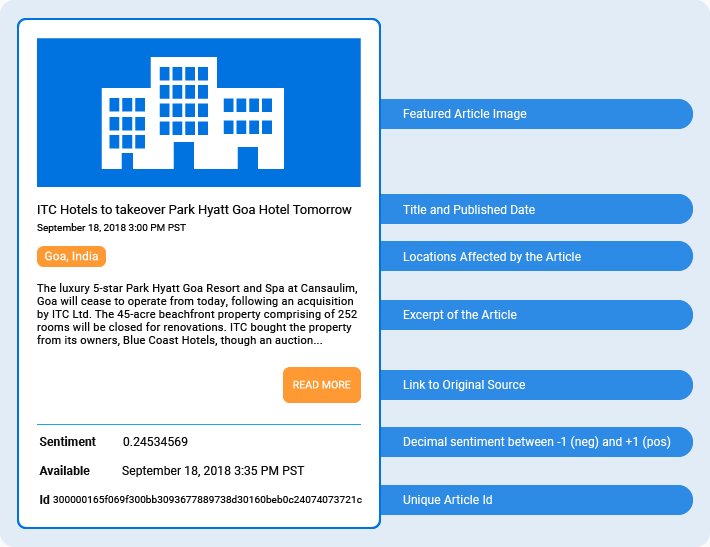 \n\n News queries are time based. The news can be queried within a specified time window. The dates used can be based on the published date of an article or the date which the article was made available by the system. When using a polling strategy to query the latest news using the API, use the available date instead of published date. \n\n Results are limited to 1000 articles. To accommodate queries that match more than the maximum size, paging is supported. \n\n Both the page to return and the size of the page are specified by the client with the pageNo and pageSize parameters respectively. Each API will list these parameter options as either query parameters or properties of the input message body. A query parameter example is as follows: \n\n ```js\n GET ...&pageNo=1&pageSize=100 HTTP 1.1\n ```\n \n\n This instructs the API to return the first page with a maximum of 100 articles in it. Each news response will identify the number of articles returned for the current page and the total number of articles in the result set so the client can loop if needed. For example: \n\n ```js\n {\n \t\"success\": true,\n \t\"returned\": 100,\n \t\"total\": 1000, \n \t... \n ``` \n The above response indicates the requested page of 100 articles are in the response but there were a total of 1000 articles that matched the query. To then ask for the second page of the result set the pageNo parameter would be incremented as follows: \n\n ```js\n GET ...&pageNo=2&pageSize=100 HTTP 1.1\n ```\n \n\n In this example the next response will return the 101st to 200th article in the result set. \n\n The corporate and municipal datasets require their own API key. The economic data set is shared between the corporate and municipal data sets and does not require its own key. To register for an API Key please contact the [Products Team](mailto:products@bitvore.com). The API key can be used directly or to obtain an OAuth access token as described on the [Security APIs](http://developer.bitvore.com/v2/docs/security) page. \n\n"
Organizations API: "## Organizations API \n\n Organizations is a general term that represent corporate entities, companies or organizations. These organizations are identified in articles the Corporate News API. The Organizations API provides access to the information about those entities. \n\n 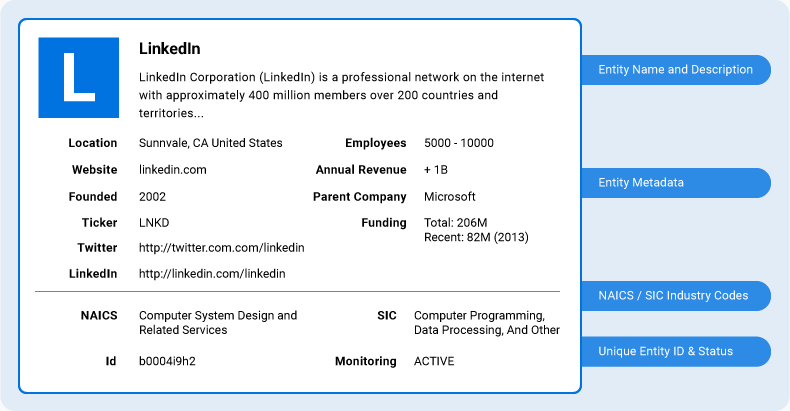 \n\n Organizations can be searched for based on some criteria or directly using a Bitvore ID which uniquely identifies an organization in the Bitvore system. When using the Bitvore ID the entire organization profile will be returned for that single organization. If one is unsure what the Bitvore ID of a organization is a search can be performed using different profile properties such as name, ticker, industry, etc. The API will return all companies that match the search criteria. Only summary information is returned but it should be enough information to identify the exact organization being searched for. Once the Bitvore ID is found news can be retrieved for the organization using the Corporate News API. \n\n 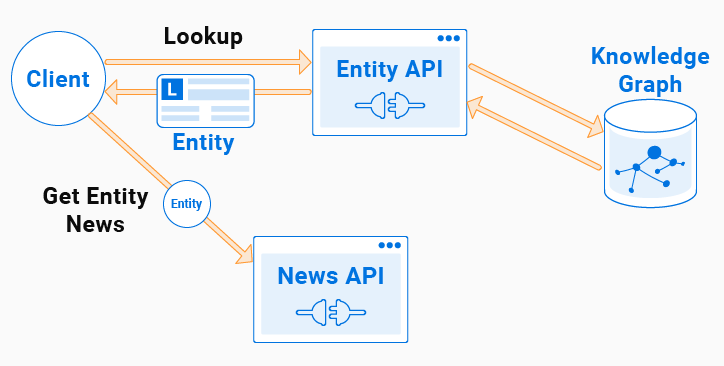 \n\n The Bitvore ID for an organization does not change, however, organizations can be merged into other organizations either due to an actual 'merger' event or in the case there are actual duplicate organization. When this happens, the organization will be marked as inactive and the active organization's ID will need to be used. \n\n The Organizations API is part of the corporate dataset and requires a corporate dataset API key for access. To register for an API Key please contact the [Products Team](mailto:products@bitvore.com). The API key can be used directly or to obtain an OAuth access token as described on the [Security APIs](http://developer.bitvore.com/v2/docs/security) page.\n\n"
Portfolios API: "## Portfolios API \n\n Bitvore RESTful APIs useful for integrating with a portfolio so that querying news articles can be focused on business relevant entities and performed in a simplified manner. \n\n A Corporate News API key can be used to access any of the Portfolio APIs. To register for an API Key please contact [customer support](mailto:support@bitvore.com). The API key can be used directly or to obtain an OAuth access token as described on the [Security APIs](http://developer.bitvore.com/v2/docs/security) page. \n\n ### Portfolio Management API \n\n The Portfolio Management API provides the ability to create, or replicate a portfolio in the Bitvore system. The entities to be tracked in the portfolio are identified by Bitvore IDs (for organizations). The benefit of creating a portfolio in Bitvore is the news APIs both take a portfolio ID as a parameter making it easy to retrieve news for a portfolio. \n\n If creating a portfolio of organizations in Bitvore the Bitvore ID of each company will be needed. This ID can be obtained from a organization's profile using the Entity API. \n\n 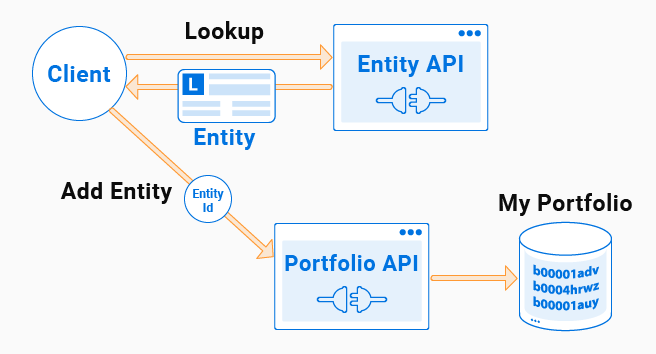 \n\n The returned Bitvore ID can then be added to the portfolio. When querying for news about the portfolio the news for that organization will be returned. \n\n A set of sample CSV files listing organizations found [here](http://developer.bitvore.com/v2/docs/api-reference/portfolios) can be used to quickly create portfolios of your own. Simply download the CSV file you want to create your portfolio with, create a new organization (BVID) portfolio, and then use the [Upload Portfolio Items](http://developer.bitvore.com/v2/docs/api-reference/corp?tagname=Portfolios%20API) API call to fill the new portfolio from the CSV file. Note the portfolio ID generated and then use that ID when querying for portfolio news using the [Corporate News API](http://developer.bitvore.com/v2/docs/api-reference/corp?tagname=News%20API). \n\n ## Custom Ids (Id Mapping) \n\n Portfolio items support the mapping of custom ids. These custom Ids are not required, but when used along with the other APIs, it helps facilitate the mapping, discovery and identification of these ids to existing Bitvore Ids. \n\n To include a mapping, construct an PortfolioItem and ItemCustomId as followed \n\n ```js\n { \n \t \"id\": \"b0004hrm6\", \n \t \"customIds\": \n \t\t[{ \n \t\t\"id\": \"0x000201\", \n \t\t\"type\": \"FOREIGN_ID\" \n \t}, \n \t{ \n \t\t\"id\": \"0x000202\", \n \t\t\"type\": \"FOREIGN_ID\" \n \t}] \n } \n ```\n \n\n Please note when using the Portfolio API, you should not mix the use of update items by 'Ids' and 'Items' as they can overwrite existing data. \n \n\n "
Sentiment Scores API: "## Sentiment Scores API \n\n The Score APIs provide access to the different scores Bitvore generates, such as company sentiment scores. Scores are calculated by gathering data over a period of time and aggregated in some manner to produce a numerical score that can be used to compare, trend, and correlate with other information. The scores are calculated periodically and are made available in a time series format by the APIs. \n\n The [Sentiment Scores API](http://developer.bitvore.com/v2/docs/api-reference/corp?tagname=Sentiment%20Scores%20API) provides scores measuring the sentiment about a company in regards to a given topic, such as a growth, risk, or an overall sentiment. The company sentiment score is calculated daily. Scores for each day are returned for each company requested over a given time period. \n\n To register for an API Key please contact the [Products Team](mailto:products@bitvore.com). The API key can be used directly or to obtain an OAuth access token as described on the [Security APIs](http://developer.bitvore.com/v2/docs/security) page.\n\n "