openapi: 3.0.3
info:
title: Quality-On-Demand
description: |
The Quality-On-Demand (QoD) API provides programmable interface for developers and other users (capabilities consumers) to request stable latency or throughput managed by Telco networks without the necessity to have an in-depth knowledge of the 4G/5G system or the overall complexity of the Telecom Systems.
# Introduction
Industrial (IoT), VR/Gaming, live video streaming, autonomous driving and many other scenarios demand network communication quality and are sensitive to any change in transmission conditions. Being able to request a stable latency (reduced jitter) or prioritized throughput from the network can improve user experience substantially.
The QoD API offers the application developers the capability to request for stable latency (reduced jitter) or throughput for some specified application data flows between application clients (within a user device) and Application Servers (backend services). The developer has a pre-defined set of Quality of Service (QoS) profiles which they could choose from depending on their latency or throughput requirements.

The usage of the API is based on QoS session resources, which can be created (based on available QoS profiles), queried and deleted. The deletion of a requested session can be triggered by the API consumer or can be triggered automatically once the QoS session has reached its limit.
# Relevant terms and definitions
* **QOD service endpoint**:
The URL pointing to the RESTful resource of the QoD API.
* **Authentication**:
Security access keys such as OAuth 2.0 client credentials used by client applications to invoke the QoD API.
* **QoS profiles and QoS profile labels**:
Latency, throughput or priority requirements of the application mapped to relevant QoS profile values. The set of QoS Profiles that a network operator is offering may be retrieved via the `qos-profiles` API (cf. https://github.com/camaraproject/QualityOnDemand/) or will be agreed during the onboarding with the API service provider.
* **Identifier for the device**:
At least one identifier for the device (user equipment) out of four options: IPv4 address, IPv6 address, Phone number, or Network Access Identifier assigned by the mobile network operator for the device. Note: Network Access Identifier is defined for future use and will not be supported with v0.11.0 of the API.
* **Identifier for the application server**:
IPv4 and/or IPv6 address of the application server (application backend)
* **App-Flow (between the application client and application server)**:
The precise application data flow the developer wants to prioritize and have stable latency or throughput for. This flow is in the current API version determined by the identifiers used for the device and the application server. And it can be further elaborated with details such as ports or port-ranges. Future version of the API might allow more detailed flow identification features.
* **Duration**:
Duration (in seconds) for which the QoS session (between application client and application server) should be created. Limits for session duration can be set by the implementation for the QoS profile. The user may request a termination before its expiration.
* **Notification URL and token**:
Developers may provide a callback URL (`sink`) on which notifications about all status change events (eg. provisioning termination) can be received from the service provider. This is an optional parameter. The notification will be sent as a CloudEvent compliant message.
If `sink` is included, it is RECOMMENDED for the client to provide as well the `sinkCredential` property to protect the notification endpoint. In the current version,`sinkCredential.credentialType` MUST be set to `ACCESSTOKEN` if provided.
# API functionality
The usage of the QoD API is based on QoS profile classes and parameters which define App-Flows.
Based on the API, QoS session resources can be created, queried, and deleted. Once an offered QoS profile class is requested, application users get a prioritized service with stable latency or throughput even in the case of congestion. The QoD API has the following characteristics:
* A specified App-Flow is prioritized to ensure stable latency or throughput for that flow.
* The prioritized App-Flow is described by providing information such as device IP address (or other device identifier) & application server IP addresses and port/port-ranges.
* The developer specifies the duration for which they need the prioritized App-flow.
* Stable latency or throughput is requested by selecting from the list of QoS profiles made available by the service provider (e.g. QOS_E) to map latency and throughput requirements.
* The developer can optionally also specify callback URL (`sink` param) on which notifications for the session can be sent. <br>
Following diagram shows the interaction between different components
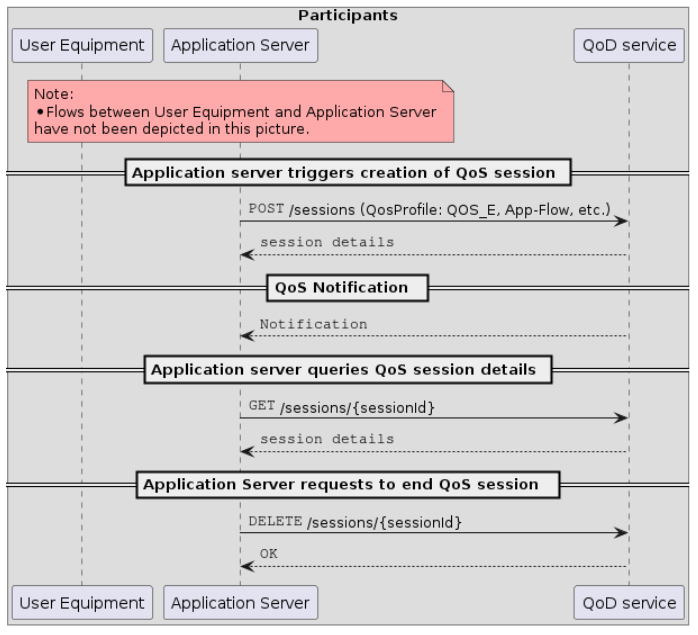
# Authorization and authentication
The "Camara Security and Interoperability Profile" provides details on how a client requests an access token. Please refer to Identify and Consent Management (https://github.com/camaraproject/IdentityAndConsentManagement/) for the released version of the Profile.
Which specific authorization flows are to be used will be determined during onboarding process, happening between the API Client and the Telco Operator exposing the API, taking into account the declared purpose for accessing the API, while also being subject to the prevailing legal framework dictated by local legislation.
It is important to remark that in cases where personal user data is processed by the API, and users can exercise their rights through mechanisms such as opt-in and/or opt-out, the use of 3-legged access tokens becomes mandatory. This measure ensures that the API remains in strict compliance with user privacy preferences and regulatory obligations, upholding the principles of transparency and user-centric data control.
# Identifying a device from the access token
This specification defines the `device` object field as optional in API requests, specifically in cases where the API is accessed using a 3-legged access token, and the device can be uniquely identified by the token. This approach simplifies API usage for API consumers by relying on the device information associated with the access token used to invoke the API.
## Handling of device information:
### Optional device object for 3-legged tokens:
- When using a 3-legged access token, the device associated with the access token must be considered as the device for the API request. This means that the device object is not required in the request, and if included it must identify the same device, therefore **it is recommended NOT to include it in these scenarios** to simplify the API usage and avoid additional validations.
### Validation mechanism:
- The server will extract the device identification from the access token, if available.
- If the API request additionally includes a `device` object when using a 3-legged access token, the API will validate that the device identifier provided matches the one associated with the access token.
- If there is a mismatch, the API will respond with a 403 - INVALID_TOKEN_CONTEXT error, indicating that the device information in the request does not match the token.
### Error handling for unidentifiable devices:
- If the `device` object is not included in the request and the device information cannot be derived from the 3-legged access token, the server will return a 422 `UNIDENTIFIABLE_DEVICE` error.
### Restrictions for tokens without an associated authenticated identifier:
- For scenarios which do not have a single device identifier associated to the token during the authentication flow, e.g. 2-legged access tokens, the `device` object MUST be provided in the API request. This ensures that the device identification is explicit and valid for each API call made with these tokens.
# Multi-SIM scenario handling
In multi-SIM scenarios where more than one mobile device is associated with a phone number (e.g. a smartphone with an associated smartwatch), it might not be possible to uniquely identify the device to which the enhanced QoS profile should apply from that phone number. If the phone number is used as the device identifier when creating a QoS session in a multi-SIM scenario, the API may respond with an error, apply the enhanced QoS profile to all devices in the multi-SIM group, or apply the enhanced QoS profile to a single device in the multi-SIM group which may not be the intended device.
Possible solutions in such a scenario include:
- Using the authorisation code flow to obtain an access token, which will automatically identify the intended device
- Identifying the intended device from a unique identifier for that device, such as its source IP address and port
- Check with the SIM provider whether a unique "secondary" phone number is already associated with each device, and use the secondary phone number to identify the intended device if available
# Further info and support
(FAQs will be added in a later version of the documentation)
license:
name: Apache 2.0
url: https://www.apache.org/licenses/LICENSE-2.0.html
version: 0.11.1
x-camara-commonalities: 0.4.0
externalDocs:
description: Project documentation at Camara
url: https://github.com/camaraproject/QualityOnDemand
servers:
- url: "{apiRoot}/quality-on-demand/v0.11"
variables:
apiRoot:
default: http://localhost:9091
description: API root, defined by the service provider, e.g. `api.example.com` or `api.example.com/somepath`
tags:
- name: QoS Sessions
description: Manage QoS sessions
paths:
/sessions:
post:
tags:
- QoS Sessions
summary: Creates a new session
description: |
Create QoS Session to manage latency/throughput priorities
If the qosStatus in the API response is "AVAILABLE" and a notification callback is provided the client will receive in addition to the response a
`QOS_STATUS_CHANGED` event notification with `qosStatus` as `AVAILABLE`.
If the `qosStatus` in the API response is `REQUESTED`, the client will receive either
- a `QOS_STATUS_CHANGED` event notification with `qosStatus` as `AVAILABLE` after the network notifies that it has created the requested session, or
- a `QOS_STATUS_CHANGED` event notification with `qosStatus` as `UNAVAILABLE` and `statusInfo` as `NETWORK_TERMINATED` after the network notifies that it has failed to provide the requested session.
A `QOS_STATUS_CHANGED` event notification with `qosStatus` as `UNAVAILABLE` will also be send if the network terminates the session before the requested duration expired
**NOTES:**
- In case of a `QOS_STATUS_CHANGED` event with `qosStatus` as `UNAVAILABLE` and `statusInfo` as `NETWORK_TERMINATED` the resources of the QoS session are not directly released, but will get deleted automatically at earliest 360 seconds after the event.
This behavior allows clients which are not receiving notification events but are polling to get the session information with the `qosStatus` `UNAVAILABLE` and `statusInfo` `NETWORK_TERMINATED`. Before a client can attempt to create a new QoD session for the same device and flow period they must release the session resources with an explicit `delete` operation if not yet automatically deleted.
- The access token may be either 2-legged or 3-legged.
- If a 3-legged access token which is associated with a device is used, it is recommended NOT to include the `device` parameter in the request (see "Handling of device information" within the API description for details).
- If a 2-legged access token is used, the device parameter must be provided and identify a device.
operationId: createSession
security:
- openId:
- quality-on-demand:sessions:create
parameters:
- $ref: "#/components/parameters/x-correlator"
requestBody:
description: Parameters to create a new session
content:
application/json:
schema:
$ref: "#/components/schemas/CreateSession"
required: true
callbacks:
notifications:
"{$request.body#/sink}":
post:
tags:
- Session notifications callback
summary: "Session notifications callback"
description: |
Important: this endpoint is to be implemented by the API consumer.
The QoD server will call this endpoint whenever any QoS session change (e.g. network termination) related event occurs.
Currently only QOS_STATUS_CHANGED event is defined.
operationId: postNotification
parameters:
- $ref: "#/components/parameters/x-correlator"
requestBody:
required: true
content:
application/cloudevents+json:
schema:
$ref: "#/components/schemas/CloudEvent"
examples:
QOS_STATUS_CHANGED_EXAMPLE:
$ref: "#/components/examples/QOS_STATUS_CHANGED_EXAMPLE"
responses:
"204":
description: Successful notification
headers:
x-correlator:
$ref: '#/components/headers/x-correlator'
"400":
$ref: "#/components/responses/Generic400"
"401":
$ref: "#/components/responses/Generic401"
"403":
$ref: "#/components/responses/Generic403"
"410":
$ref: "#/components/responses/Generic410"
"500":
$ref: "#/components/responses/Generic500"
"503":
$ref: "#/components/responses/Generic503"
security:
- {}
- notificationsBearerAuth: []
responses:
"201":
description: Session created
headers:
x-correlator:
$ref: '#/components/headers/x-correlator'
content:
application/json:
schema:
$ref: "#/components/schemas/SessionInfo"
"400":
$ref: "#/components/responses/CreateSessionBadRequest400"
"401":
$ref: "#/components/responses/Generic401"
"403":
$ref: "#/components/responses/Generic403"
"404":
$ref: "#/components/responses/GenericDevice404"
"409":
$ref: "#/components/responses/SessionInConflict409"
"422":
$ref: "#/components/responses/Generic422"
"429":
$ref: "#/components/responses/Generic429"
"500":
$ref: "#/components/responses/Generic500"
"503":
$ref: "#/components/responses/Generic503"
/sessions/{sessionId}:
get:
tags:
- QoS Sessions
summary: Get QoS session information
description: |
Querying for QoS session resource information details
**NOTES:**
- The access token may be either 2-legged or 3-legged.
- If a 3-legged access token is used, the end user (and device) associated with the session must also be associated with the access token.
- The session must have been created by the same API client given in the access token
operationId: getSession
security:
- openId:
- quality-on-demand:sessions:read
parameters:
- name: sessionId
in: path
description: Session ID that was obtained from the createSession operation
required: true
schema:
$ref: "#/components/schemas/SessionId"
- $ref: "#/components/parameters/x-correlator"
responses:
"200":
description: Contains information about active session
headers:
x-correlator:
$ref: '#/components/headers/x-correlator'
content:
application/json:
schema:
$ref: "#/components/schemas/SessionInfo"
examples:
SESSION_AVAILABLE:
$ref: '#/components/examples/SESSION_AVAILABLE_EXAMPLE'
SESSION_UNAVAILABLE:
$ref: '#/components/examples/SESSION_UNAVAILABLE_EXAMPLE'
"400":
$ref: "#/components/responses/Generic400"
"401":
$ref: "#/components/responses/Generic401"
"403":
$ref: "#/components/responses/Generic403"
"404":
$ref: "#/components/responses/Generic404"
"429":
$ref: "#/components/responses/Generic429"
"500":
$ref: "#/components/responses/Generic500"
"503":
$ref: "#/components/responses/Generic503"
delete:
tags:
- QoS Sessions
summary: Delete a QoS session
description: |
Release resources related to QoS session
If the notification callback is provided and the `qosStatus` of the session was `AVAILABLE` the client will receive in addition to the response a `QOS_STATUS_CHANGED` event with
- `qosStatus` as `UNAVAILABLE` and
- `statusInfo` as `DELETE_REQUESTED`
There will be no notification event if the `qosStatus` was already `UNAVAILABLE`.
**NOTES:**
- The access token may be either 2-legged or 3-legged.
- If a 3-legged access token is used, the end user (and device) associated with the session must also be associated with the access token.
- The session must must have been created by the same API client given in the access token
operationId: deleteSession
security:
- openId:
- quality-on-demand:sessions:delete
parameters:
- name: sessionId
in: path
description: Session ID that was obtained from the createSession operation
required: true
schema:
$ref: "#/components/schemas/SessionId"
- $ref: "#/components/parameters/x-correlator"
responses:
"204":
description: Session deleted
headers:
x-correlator:
$ref: '#/components/headers/x-correlator'
"400":
$ref: "#/components/responses/Generic400"
"401":
$ref: "#/components/responses/Generic401"
"403":
$ref: "#/components/responses/Generic403"
"404":
$ref: "#/components/responses/Generic404"
"429":
$ref: "#/components/responses/Generic429"
"500":
$ref: "#/components/responses/Generic500"
"503":
$ref: "#/components/responses/Generic503"
/sessions/{sessionId}/extend:
post:
tags:
- QoS Sessions
summary: "Extend the duration of an active session"
description: |
Extend the overall session duration of an active QoS session (with qosStatus = AVAILABLE).
The overall duration of the QoS session, including the additional extended duration, shall not exceed the maximum duration limit fixed for the QoS Profile. If the current duration plus the value of `requestedAdditionalDuration` exceeds the maximum limit, the new overall duration shall be capped to the maximum value allowed.
An example: For a QoS profile limited to a `maxDuration` of 50,000 seconds, a QoD session was originally created with duration 30,000 seconds. Before the session expires, the developer requests to extend the session by another 30,000 seconds:
- Previous duration: 30,000 seconds
- Requested additional duration: 30,000 seconds
- New overall session duration: 50,000 seconds (the maximum allowed)
**NOTES:**
- The access token may be either 2-legged or 3-legged.
- If a 3-legged access token is used, the end user (and device) associated with the session must also be associated with the access token.
- The session must must have been created by the same API client given in the access token
operationId: extendQosSessionDuration
security:
- openId:
- quality-on-demand:sessions:update
parameters:
- name: sessionId
in: path
description: Session ID that was obtained from the createSession operation
required: true
schema:
$ref: "#/components/schemas/SessionId"
- $ref: "#/components/parameters/x-correlator"
requestBody:
description: Parameters to extend the duration of an active session
content:
application/json:
schema:
$ref: "#/components/schemas/ExtendSessionDuration"
required: true
responses:
"200":
description: Contains information about active session
headers:
x-correlator:
$ref: '#/components/headers/x-correlator'
content:
application/json:
schema:
$ref: "#/components/schemas/SessionInfo"
"400":
$ref: "#/components/responses/GenericExtendSessionDuration400"
"401":
$ref: "#/components/responses/Generic401"
"403":
$ref: "#/components/responses/Generic403"
"404":
$ref: "#/components/responses/Generic404"
"409":
$ref: "#/components/responses/SessionStatusConflict409"
"429":
$ref: "#/components/responses/Generic429"
"500":
$ref: "#/components/responses/Generic500"
"503":
$ref: "#/components/responses/Generic503"
/retrieve-sessions:
post:
tags:
- QoS Sessions
summary: Get QoS session information for a device
description: |
Querying for QoS session resource information details for a device
**NOTES:**
- The access token may be either 2-legged or 3-legged.
- If a 3-legged access token is used, the end user (and device) associated with the session must also be associated with the access token. In this case it is recommended NOT to include the `device` parameter in the request (see "Handling of device information" within the API description for details).
- If a 2-legged access token is used, the device parameter must be provided and identify a device.
- The session must have been created by the same API client given in the access token
- If no QoS session is found for the requested device, an empty array is returned.
- This call uses the POST method instead of GET to comply with the CAMARA Commonalities guidelines for sending sensitive or complex data in API calls. Since the device field may contain personally identifiable information, it should not be sent via GET.
[CAMARA API Design Guidelines](https://github.com/camaraproject/Commonalities/blob/r0.4.0/documentation/API-design-guidelines.md#post-or-get-for-transferring-sensitive-or-complex-data)
operationId: retrieveSessionsByDevice
parameters:
- $ref: "#/components/parameters/x-correlator"
requestBody:
description: Parameters to get QoS session information by device
content:
application/json:
schema:
$ref: "#/components/schemas/RetrieveSessionsInput"
required: true
responses:
"200":
description: Returns the QoS sessions information for a given device. A device may have multiple sessions, thus the response is an array. An empty array is returned if no sessions are found.
headers:
x-correlator:
$ref: "#/components/headers/x-correlator"
content:
application/json:
schema:
$ref: "#/components/schemas/RetrieveSessionsOutput"
examples:
RETRIEVE_SESSIONS_ONE_ITEM:
$ref: "#/components/examples/RETRIEVE_SESSIONS_EXAMPLE"
RETRIEVE_SESSIONS_NO_ITEMS:
$ref: "#/components/examples/RETRIEVE_SESSIONS_EMPTY_EXAMPLE"
"400":
$ref: "#/components/responses/Generic400"
"401":
$ref: "#/components/responses/Generic401"
"403":
$ref: "#/components/responses/Generic403"
"404":
$ref: "#/components/responses/GenericDevice404"
"422":
$ref: "#/components/responses/Generic422"
"429":
$ref: "#/components/responses/Generic429"
"500":
$ref: "#/components/responses/Generic500"
"503":
$ref: "#/components/responses/Generic503"
security:
- openId:
- "quality-on-demand:sessions:retrieve-by-device"
components:
securitySchemes:
openId:
type: openIdConnect
openIdConnectUrl: https://example.com/.well-known/openid-configuration
notificationsBearerAuth:
description: Bearer authentication for notifications
type: http
scheme: bearer
bearerFormat: "{$request.body#sinkCredential.credentialType}"
parameters:
x-correlator:
name: x-correlator
in: header
description: Correlation id for the different services
schema:
type: string
headers:
x-correlator:
description: Correlation id for the different services
schema:
type: string
schemas:
SessionId:
description: Session ID in UUID format
type: string
format: uuid
BaseSessionInfo:
description: Common attributes of a QoD session
type: object
properties:
device:
$ref: "#/components/schemas/Device"
applicationServer:
$ref: "#/components/schemas/ApplicationServer"
devicePorts:
description: The ports used locally by the device for flows to which the requested QoS profile should apply. If omitted, then the qosProfile will apply to all flows between the device and the specified application server address and ports
allOf:
- $ref: "#/components/schemas/PortsSpec"
applicationServerPorts:
description: A list of single ports or port ranges on the application server
allOf:
- $ref: "#/components/schemas/PortsSpec"
qosProfile:
$ref: "#/components/schemas/QosProfileName"
sink:
type: string
format: url
description: The address to which events about all status changes of the session (e.g. session termination) shall be delivered, using the HTTP protocol.
example: "https://endpoint.example.com/sink"
sinkCredential:
description: A sink credential provides authentication or authorization information necessary to enable delivery of events to a target.
allOf:
- $ref: "#/components/schemas/SinkCredential"
required:
- applicationServer
- qosProfile
SessionInfo:
description: |
Session related information returned in responses.
Note that the device object is defined as optional and will only to be returned if provided in createSession. If more than one type of device identifier was provided, only one identifier will be returned (at implementation choice and with the original value provided in createSession).
Please note that IP addresses of devices can change and get reused, so the original values may no longer identify the same device. They identified the device at the time of session creation.
allOf:
- $ref: "#/components/schemas/BaseSessionInfo"
- type: object
properties:
sessionId:
$ref: "#/components/schemas/SessionId"
duration:
description: |
Session duration in seconds. Implementations can grant the requested session duration or set a different duration, based on network policies or conditions.
- When `qosStatus` is "REQUESTED", the value is the duration to be scheduled, granted by the implementation.
- When `qosStatus` is AVAILABLE", the value is the overall duration since `startedAt. When the session is extended, the value is the new overall duration of the session.
- When `qosStatus` is "UNAVAILABLE", the value is the overall effective duration since `startedAt` until the session was terminated.
type: integer
format: int32
minimum: 1
example: 3600
startedAt:
description: Date and time when the QoS status became "AVAILABLE". Not to be returned when `qosStatus` is "REQUESTED". Format must follow RFC 3339 and must indicate time zone (UTC or local).
type: string
format: date-time
example: "2024-06-01T12:00:00Z"
expiresAt:
description: |
Date and time of the QoS session expiration. Format must follow RFC 3339 and must indicate time zone (UTC or local).
- When `qosStatus` is "AVAILABLE", it is the limit time when the session is scheduled to finnish, if not terminated by other means.
- When `qosStatus` is "UNAVAILABLE", it is the time when the session was terminated.
- Not to be returned when `qosStatus` is "REQUESTED".
When the session is extended, the value is the new expiration time of the session.
type: string
format: date-time
example: "2024-06-01T13:00:00Z"
qosStatus:
$ref: "#/components/schemas/QosStatus"
statusInfo:
$ref: "#/components/schemas/StatusInfo"
required:
- sessionId
- duration
- qosStatus
CreateSession:
description: Attributes required to create a session
allOf:
- $ref: "#/components/schemas/BaseSessionInfo"
- type: object
properties:
duration:
description: |
Requested session duration in seconds. Value may be explicitly limited for the QoS profile, as specified in the [Qos Profile API](TBC). Implementations can grant the requested session duration or set a different duration, based on network policies or conditions.
type: integer
format: int32
minimum: 1
example: 3600
required:
- duration
Port:
description: TCP or UDP port number
type: integer
minimum: 0
maximum: 65535
PortsSpec:
description: Specification of several TCP or UDP ports
type: object
minProperties: 1
properties:
ranges:
description: Range of TCP or UDP ports
type: array
minItems: 1
items:
type: object
required:
- from
- to
properties:
from:
$ref: "#/components/schemas/Port"
to:
$ref: "#/components/schemas/Port"
ports:
description: Array of TCP or UDP ports
type: array
minItems: 1
items:
$ref: "#/components/schemas/Port"
example:
ranges:
- from: 5010
to: 5020
ports:
- 5060
- 5070
SinkCredential:
type: object
properties:
credentialType:
type: string
enum:
- PLAIN
- ACCESSTOKEN
- REFRESHTOKEN
description: "The type of the credential. With the current API version the type MUST be set to `ACCESSTOKEN`"
discriminator:
propertyName: credentialType
mapping:
PLAIN: "#/components/schemas/PlainCredential"
ACCESSTOKEN: "#/components/schemas/AccessTokenCredential"
REFRESHTOKEN: "#/components/schemas/RefreshTok
# --- truncated at 32 KB (60 KB total) ---
# Full source: https://raw.githubusercontent.com/api-evangelist/gsma/refs/heads/main/openapi/gsma-open-gateway-quality-on-demand-openapi.yml