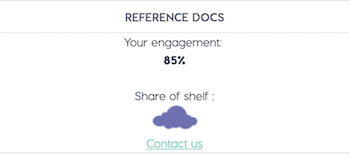
85%
Share of shelf :

Contact us
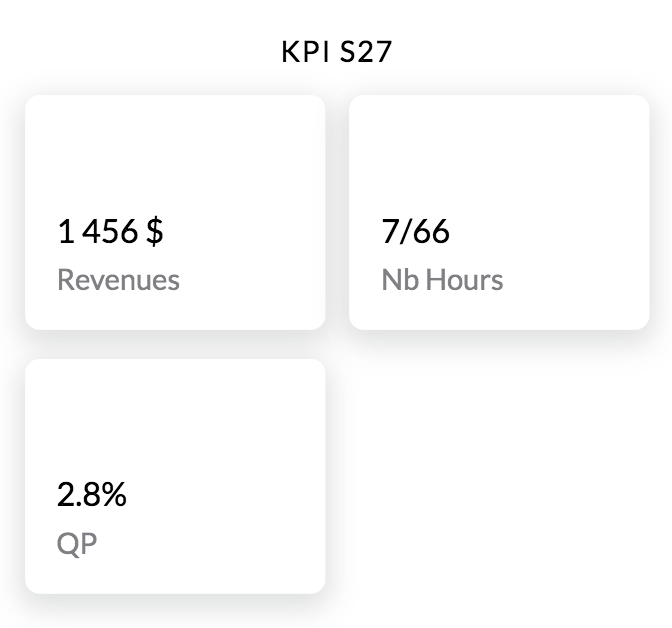
 When you use your GPS to get your position on your smartphone, how are you located? Every point on the Earth's surface can be defined with a pair of coordinates: latitude and longitude. When you are creating new stores, geo location data is required (`latitude` and `longitude`). In these fields you have to enter the coordinates pair of the store you are trying to locate. In the case you don't provide them, the coordinates will be infered automatically from the `address` but it may result in a less accurate location than the exact geolocation of the store. ### Fields | Field | Type | Required | Readonly | OrderBy | Description | |--------------------------|:-------:|:--------:|:--------:|:-------:|-----------------| |`store_id` | string | | x | | Unique store id | |`title` | string | x | | | Name of the store| |`address` | string | x | | | The full address allows us to locate the store on the map. This is used to display the missions available near the user's position| |`tags` | array | | | | Tags allow to specify additional information about the store| |`latitude` | float | x | | | Latitude of the store| |`longitude` | float | x | | | Longitude of the store| |`client_id` | string | x | | x | The external unique id of the store as it may exists in your Information System| |`store_type_name` | string | x | | | The name of the store type| |`store_type_id` | string | x | | | The id of the store type| |`info` | string | | | | Additional information regarding the store. Supports HTML layout | |`country` | string | | x | | Country location of the store | |`notification_emails` | array | | | | List of email(s) that will be notified when a mission is finished and/or a request is created/finished | |`contact_email` | string | | | | Contact's email of the store i.e. store manager's email | |`contact_phone` | string | | | | Contact's phone of the store i.e. store manager's phone | |`contact_name` | string | | | | Contact's name of the store i.e. store manager's name | |`properties` | json | | | | Extra information that enables you to customize the display of the data shown on the Store Activity page. This can be split into 4 components: `columns`, `rows`, `grid`, `html` | |`photo` | string | | | | A photo of the store | |`vip` | boolean | | | | Indicates if the store is a VIP store (a flagship store) | |`timezone` | string | | x | | The Time Zone allows to display the hourly sales data in the store insights in the local time of the store. | |`capacity` | number | | | | Maximum number of customers which can be served at the same time | |`created_date` | date | | x | | Created Date| |`updated_date` | date | | x | x | Updated Date| |`custom_fields` | object | | | | Dynamic properties (optional)| One of either fields is required: - address - geoloc (latitude + longitude) In case one of the fields' missing the other one will be inferred automatically by using Google Map API. Please note that the results may be incorrect and it's always recommended to supply both fields. `country` field will be resolved using either the geoloc or address. Order of precedence is to resolve by the geoloc and if not present, by address. One of either fields is required: - store_type_name - store_type_id The `properties` field is a json array and can be used to display the following columns, rows, grid, and html. In its most generic format it looks like : ```json [ { "title": "string", "type": "string", "headers": [ "string" ], "values": [ "object" ] } ] ``` #### columns ``` { "title" : "KPI S27", "type" : "columns", "values" : [ { "title" : "Revenues", "value" : "1 456 $", "isPercent" : false, "colorHex" : "#00FF00" }, { "title" : "Nb Hours", "value" : "7/66", "colorHex" : "#B404FF" }, { "title" : "QP", "value" : 2.8, "isPercent" : true, "colorHex" : "#B40404" } ] } ```
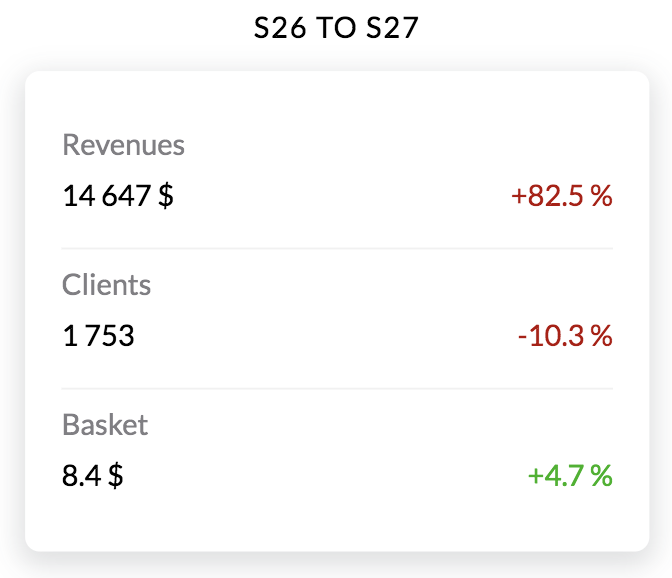
  #### rows ``` { "title" : "S26 to S27", "type" : "rows", "values" : [ { "title" : "Revenues", "value" : "14 647 $", "delta" : "+82.5 %", "colorHex" : "#B40404" }, { "title" : "Clients", "value" : "1 753", "delta" : "-10.3 %", "colorHex" : "#B40404" }, { "title" : "Basket", "value" : "8.4 $", "delta" : "+4.7 %", "colorHex" : "#04B404" } ] } ```
  #### grid ``` { "title" : "Hours", "type" : "grid", "headers" : [ "Day", "Morning", "Afternoon", "Nb Hours" ], "values" : [ { "values" : [ "Monday", "9:00", "20:00", "5/11" ], "colorHex" : "#000000" }, { "values" : [ "Tuesday", "9:00", "20:00", "2/11" ], "colorHex" : "#000000" }, { "values" : [ "Wednesday", "9:00", "20:00", "0/11" ], "colorHex" : "#000000" }, { "values" : [ "Thursday", "9:00", "20:00", "0/11" ], "colorHex" : "#000000" }, { "values" : [ "Friday", "9:00", "20:00", "0/11" ], "colorHex" : "#000000" }, { "values" : [ "Saturday", "9:00", "20:00", "0/11" ], "colorHex" : "#A0A0A0" }, { "values" : [ "Sunday", " ", " ", "0/0" ], "colorHex" : "#A0A0A0" } ] } ``` #### html ``` { "title" : "Reference docs", "type" : "html", "value" : "
 **Important:** `custom_fields` contains new attributes that can be used to describe more precisely a store. Custom fields provide a new way to customize your store data by allowing you to filter and select the relevant data in the application. You can create your own custom fields in the YOOBIC Web Application in order to enrich your store data. For the full list of supported field types see [campaigns](#group-campaigns-question-types)
## Machine-readable artifacts (11)
- **OpenAPI** — https://raw.githubusercontent.com/api-evangelist/yoobic/refs/heads/main/openapi/yoobic-stores-api-openapi.yml
- **Documentation** — https://docs.yoobic.com/api.html
- **APIReference** — https://docs.yoobic.com/api.html
- **Postman** — https://assets.yoobic.com/raw/upload/v1767016464/3c85c240-dd03-4981-9814-bc6e5e861fa0.zip
- **ErrorCatalog** — https://raw.githubusercontent.com/api-evangelist/yoobic/refs/heads/main/errors/yoobic-problem-types.yml
- **Conventions** — https://raw.githubusercontent.com/api-evangelist/yoobic/refs/heads/main/conventions/yoobic-conventions.yml
- **ChangeLog** — https://raw.githubusercontent.com/api-evangelist/yoobic/refs/heads/main/changelog/yoobic-changelog.yml
- **Lifecycle** — https://raw.githubusercontent.com/api-evangelist/yoobic/refs/heads/main/lifecycle/yoobic-lifecycle.yml
- **Conformance** — https://raw.githubusercontent.com/api-evangelist/yoobic/refs/heads/main/conformance/yoobic-conformance.yml
- **Sandbox** — https://raw.githubusercontent.com/api-evangelist/yoobic/refs/heads/main/sandbox/yoobic-sandbox.yml
- **Webhooks** — https://raw.githubusercontent.com/api-evangelist/yoobic/refs/heads/main/asyncapi/yoobic-webhooks.yml
## Other Yoobic APIs (12)
- [Yoobic Answers API](https://apis.io/apis/yoobic/yoobic-answers-api/)
- [Yoobic Badges API](https://apis.io/apis/yoobic/yoobic-badges-api/)
- [Yoobic Bot Messages API](https://apis.io/apis/yoobic/yoobic-bot-messages-api/)
- [Yoobic Bots API](https://apis.io/apis/yoobic/yoobic-bots-api/)
- [Yoobic Business KPIs data - salesdata API](https://apis.io/apis/yoobic/yoobic-business-kpis-data-salesdata-api/)
- [Yoobic Campaigns API](https://apis.io/apis/yoobic/yoobic-campaigns-api/)
- [Yoobic Catalogs API](https://apis.io/apis/yoobic/yoobic-catalogs-api/)
- [Yoobic Chats API](https://apis.io/apis/yoobic/yoobic-chats-api/)
- [Yoobic Comments API](https://apis.io/apis/yoobic/yoobic-comments-api/)
- [Yoobic Communities API](https://apis.io/apis/yoobic/yoobic-communities-api/)
- [Yoobic Community Posts API](https://apis.io/apis/yoobic/yoobic-community-posts-api/)
- [Yoobic Competencies API](https://apis.io/apis/yoobic/yoobic-competencies-api/)
## Tags
Stores
---
Profiled by [API Evangelist](https://apievangelist.com) and published on [APIs.io](https://apis.io/apis/yoobic/yoobic-stores-api/). The API's provider profile, Kin Score and agent-readiness rating are at https://apis.io/providers/yoobic/.
**Important:** `custom_fields` contains new attributes that can be used to describe more precisely a store. Custom fields provide a new way to customize your store data by allowing you to filter and select the relevant data in the application. You can create your own custom fields in the YOOBIC Web Application in order to enrich your store data. For the full list of supported field types see [campaigns](#group-campaigns-question-types)
## Machine-readable artifacts (11)
- **OpenAPI** — https://raw.githubusercontent.com/api-evangelist/yoobic/refs/heads/main/openapi/yoobic-stores-api-openapi.yml
- **Documentation** — https://docs.yoobic.com/api.html
- **APIReference** — https://docs.yoobic.com/api.html
- **Postman** — https://assets.yoobic.com/raw/upload/v1767016464/3c85c240-dd03-4981-9814-bc6e5e861fa0.zip
- **ErrorCatalog** — https://raw.githubusercontent.com/api-evangelist/yoobic/refs/heads/main/errors/yoobic-problem-types.yml
- **Conventions** — https://raw.githubusercontent.com/api-evangelist/yoobic/refs/heads/main/conventions/yoobic-conventions.yml
- **ChangeLog** — https://raw.githubusercontent.com/api-evangelist/yoobic/refs/heads/main/changelog/yoobic-changelog.yml
- **Lifecycle** — https://raw.githubusercontent.com/api-evangelist/yoobic/refs/heads/main/lifecycle/yoobic-lifecycle.yml
- **Conformance** — https://raw.githubusercontent.com/api-evangelist/yoobic/refs/heads/main/conformance/yoobic-conformance.yml
- **Sandbox** — https://raw.githubusercontent.com/api-evangelist/yoobic/refs/heads/main/sandbox/yoobic-sandbox.yml
- **Webhooks** — https://raw.githubusercontent.com/api-evangelist/yoobic/refs/heads/main/asyncapi/yoobic-webhooks.yml
## Other Yoobic APIs (12)
- [Yoobic Answers API](https://apis.io/apis/yoobic/yoobic-answers-api/)
- [Yoobic Badges API](https://apis.io/apis/yoobic/yoobic-badges-api/)
- [Yoobic Bot Messages API](https://apis.io/apis/yoobic/yoobic-bot-messages-api/)
- [Yoobic Bots API](https://apis.io/apis/yoobic/yoobic-bots-api/)
- [Yoobic Business KPIs data - salesdata API](https://apis.io/apis/yoobic/yoobic-business-kpis-data-salesdata-api/)
- [Yoobic Campaigns API](https://apis.io/apis/yoobic/yoobic-campaigns-api/)
- [Yoobic Catalogs API](https://apis.io/apis/yoobic/yoobic-catalogs-api/)
- [Yoobic Chats API](https://apis.io/apis/yoobic/yoobic-chats-api/)
- [Yoobic Comments API](https://apis.io/apis/yoobic/yoobic-comments-api/)
- [Yoobic Communities API](https://apis.io/apis/yoobic/yoobic-communities-api/)
- [Yoobic Community Posts API](https://apis.io/apis/yoobic/yoobic-community-posts-api/)
- [Yoobic Competencies API](https://apis.io/apis/yoobic/yoobic-competencies-api/)
## Tags
Stores
---
Profiled by [API Evangelist](https://apievangelist.com) and published on [APIs.io](https://apis.io/apis/yoobic/yoobic-stores-api/). The API's provider profile, Kin Score and agent-readiness rating are at https://apis.io/providers/yoobic/.